
 Need help?
Do you have a question about the Quectel L80-R and is the answer not in the manual?
Details the revision history and version changes of the user guide.
Describes the physical layout and components of the EVB's top and bottom sides.
Lists and illustrates the accessories included with the EVB, such as USB cables.
Explains the use of the Micro-USB interface for power supply and data communication.
Details the UART port pinout and its function for serial communication.
Identifies and describes the function of switches and buttons on the EVB for control.
Lists and explains the purpose of various test points on the EVB for diagnostics.
Introduces the PowerGPS tool and its main interface elements for GPS receiver status.
Explains how to send PMTK commands using the PowerGPS tool for module configuration.
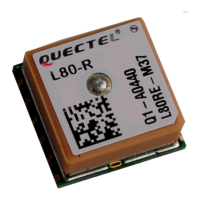
The Quectel L80-R EVB (Evaluation Board) is a development kit designed for GPS module series, specifically the L80-R module. This document serves as a user guide, providing comprehensive information on the EVB's usage and its interaction with the PowerGPS demo tool. The primary function of the L80-R EVB is to facilitate the evaluation and development of applications utilizing the L80-R GPS module, enabling users to conveniently monitor the GPS receiver's status and interact with the module.
The L80-R EVB acts as an intermediary platform, allowing users to connect and communicate with the L80-R GPS module. Its core function revolves around providing a stable and accessible environment for data communication and power supply to the GPS module. The board supports two primary communication interfaces: Micro-USB and UART. This dual interface capability offers flexibility in how the user interacts with the GPS module, catering to different development setups and preferences. The Micro-USB interface is crucial for both supplying power to the EVB and enabling data communication. When using the Micro-USB, the EVB can simultaneously power the L80-R module and transmit NMEA (National Marine Electronics Association) data, which is a standard format for GPS information.
For more specialized or traditional serial communication, the UART interface is available. This interface typically requires an RS232 cable for connection and is also capable of outputting NMEA data. A key feature of the EVB is the serial port alternation switch (S401), which allows users to seamlessly switch between the Micro-USB and UART interfaces for data output. This ensures that developers can choose the most suitable communication method for their specific testing or integration needs.
The L80-R EVB is designed to work in conjunction with the PowerGPS tool, a dedicated software application that visualizes the GPS receiver's status. This tool is integral to the EVB's function, as it translates the raw data from the L80-R module into an understandable format, displaying critical information such as Carrier-to-Noise Ratio (CNR), time, position, speed, and precision. This visualization capability is essential for debugging, performance analysis, and validating the GPS module's operation.
The board also incorporates several test points, which are strategically placed to allow for direct measurement and monitoring of various signals, including TXD1 (Transmit Data), RXD1 (Receive Data), RESET, GND (Ground), and 1PPS (1 Pulse Per Second). These test points are invaluable for advanced debugging and hardware-level analysis, providing direct access to the module's electrical signals. The 1PPS signal, in particular, is critical for applications requiring precise time synchronization.
The L80-R EVB is designed for ease of use, making it accessible for both novice and experienced developers. The setup process involves assembling the EVB accessories, which typically include a USB cable. Once assembled, the module can be powered on, and the PowerGPS tool can be launched.
Connecting the EVB to a computer is straightforward, primarily through the Micro-USB interface. Before data communication can commence, users must install the appropriate device driver for the Micro-USB. Quectel provides these drivers on their FTP server, and they are also generally available online. This driver installation is a one-time process that enables the computer to recognize the EVB and establish a virtual COM port for communication.
Once the driver is installed and the EVB is connected, the PowerGPS tool becomes the central interface for interacting with the L80-R module. Users can select the correct COM port and baud rate within the PowerGPS application. The L80-R module defaults to a baud rate of 9600bps, which is a common setting for serial communication. After configuring these settings, clicking "Create Connection" initiates communication between the PowerGPS tool and the L80-R module via the EVB.
The PowerGPS tool offers a rich set of features for monitoring and controlling the GPS module. It displays a "Sky View" which graphically represents the satellites in view, indicating their PRN (Pseudorandom Noise) numbers and elevation angles. This visual aid helps users understand the satellite constellation being tracked. The tool also provides detailed NMEA text output, allowing developers to see the raw GPS data stream, including UTC time, latitude, longitude, position fix status, number of satellites used, HDOP (Horizontal Dilution of Precision), altitude, and UTC date.
Beyond monitoring, the PowerGPS tool enables users to send PMTK (Proprietary MTK) commands to the L80-R module. These commands are crucial for configuring various aspects of the GPS module's operation, such as setting update rates, enabling or disabling specific NMEA sentences, or configuring power modes. The tool provides a dedicated interface for entering these commands, ensuring precise control over the module's behavior. The format for PMTK commands is clearly defined, requiring characters between '$' and '*', for example, PMTK869,0.
The EVB includes several physical controls to enhance usability. The POWER switch (S2) controls the power supply to the module via the Micro-USB, offering a convenient way to cycle power without disconnecting the cable. The RESET button (K2) allows users to perform a hardware reset of the L80-R module, which can be useful for recovering from unexpected states or applying new configurations. The serial port alternation switch (S1) is a critical feature for managing the data output, allowing users to choose between the Micro-USB and UART interfaces as the primary data channel.
While the L80-R EVB itself requires minimal maintenance, understanding its components and how to troubleshoot common issues is important for continuous development. The document provides a detailed "EVB Top and Bottom View" with labeled components, which is essential for identifying specific parts of the board, such as the L80-R module, PATCH antenna, UART port, Micro-USB port, and various switches and buttons. This visual guide aids in understanding the board's layout and facilitates troubleshooting.
The "Table Index" and "Figure Index" within the document serve as quick reference points, allowing users to easily navigate and locate information about specific features, accessories, or diagrams. This structured documentation is a key maintenance feature, as it empowers users to find solutions to their queries independently.
For software-related maintenance, keeping the PowerGPS tool updated to the latest version (V2.3.2 or newer, as specified) ensures access to the most recent features and bug fixes. Similarly, ensuring that the Micro-USB device drivers are correctly installed and up-to-date is crucial for stable communication between the EVB and the host computer. The document explicitly provides the FTP server paths for these drivers, simplifying the process of obtaining the correct software.
In case of persistent issues, the document directs users to Quectel's support channels, including their company headquarters, local offices, and dedicated email addresses for technical support. This ensures that users have access to expert assistance when self-troubleshooting is insufficient. The "GENERAL NOTES" section also highlights that Quectel makes every effort to ensure the quality of information provided and that all information is subject to change without prior notice, implying that users should refer to the latest documentation for the most accurate details.
The "Appendix A Reference" section lists relevant documents such as the "Quectel_L80-R_Hardware_Design," "Quectel_L80-R_Protocol_Specification," and "Quectel_L80-R_Reference Design." These documents are vital for in-depth understanding of the L80-R module's hardware and communication protocols, which can be crucial for advanced development and troubleshooting. The "Abbreviations" table clarifies common terms used in GPS technology and in the documentation, ensuring clear communication and understanding.
Overall, the L80-R EVB is a well-documented and user-friendly evaluation kit that provides a robust platform for developing and testing applications with the L80-R GPS module, supported by comprehensive documentation and accessible support channels.
 General
| Update Rate | 1Hz (Default), Up to 10Hz |
|---|---|
| Tracking Sensitivity | -165 dBm |
| Reacquisition Sensitivity | -160 dBm |
| Hot Start Time | 1s |
| Operating Voltage | 2.8V to 4.3V |
| Interface | UART |
| Data Protocol | NMEA |
| Operating Temperature | -40°C to +85°C |
| Dimensions | 16.0mm × 12.2mm × 2.4mm |
| Type | GPS module |
| Frequency | 1575.42 MHz |
| Accuracy | 2.5m |
| Operating Current | 20mA |
| Baud Rate | 9600 bps (Default) |
| Storage Temperature | -40°C to +85°C |
| Antenna Type | Passive or Active |
| Channels | 66 acquisition channels, 22 tracking channels |

 To Next Page