Need help?
Do you have a question about the QUICKO T12 and is the answer not in the manual?
Calibrates temperature by comparing actual to set temperature using a formula.
Adjusts display brightness from 2 (darkest) to 100 (brightest).
Sets auto-heating stop after idle time (e.g., 5s, 120s) or disables sleep.
Configures screen to stay on or turn off after a period of inactivity.
Indicates power supply stability; adjust value if unstable.
Selects display language, supporting Chinese and English.
Returns to the main temperature display interface.
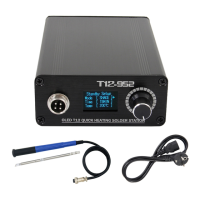
The OLED T12 Soldering Iron is a portable and versatile tool designed for various soldering tasks, offering a blend of power, precision, and user-friendly features. Its primary function is to provide controlled heat for melting solder, allowing for the creation of strong electrical connections in electronic components and circuits. The device is engineered to be compatible with T12 iron tips, which are known for their efficient heat transfer and durability, making it suitable for both hobbyists and professionals.
One of the key usage features of this soldering iron is its digital OLED screen. This display provides real-time information, including the current power voltage, the actual temperature of the iron tip, and the user-defined setting temperature. This immediate feedback is crucial for maintaining optimal soldering conditions and ensuring consistent results. The temperature is continuously adjustable within a wide range, typically from 180°C to 450°C, allowing users to select the precise temperature required for different types of solder and components. This adjustability is managed through a simple knob interface, which also serves to navigate the device's menu system.
The control handle of the soldering iron is designed for comfortable and precise operation. The knob on the handle is multi-functional, enabling users to adjust various settings beyond just temperature. For instance, it can be used to modify the screen's brightness, set the sleep time, change the display language, and configure the screen display duration. This level of customization enhances the user experience, allowing the tool to be adapted to individual preferences and working environments.
A notable feature related to its power management is the rapid heating capability. When powered by a higher voltage, such as 24V, the soldering iron can reach its operating temperature very quickly, often within 5 seconds for tinning. This quick heat-up time significantly improves efficiency, especially in tasks requiring frequent use or when time is critical. Conversely, when operating at lower voltages, the heating speed is slightly slower, but still effective for general soldering applications. The device utilizes a standard DC5.5x2.5 plug for its power supply, ensuring broad compatibility with various power sources.
The OLED T12 Soldering Iron also incorporates several maintenance and operational features designed to extend its lifespan and improve usability. One such feature is the "Sleep" mode, referred to as "DMH" in the menu. When activated, if the soldering iron is not used for a specified period (e.g., 5 seconds), it will automatically stop heating. This not only conserves energy but also prevents unnecessary wear on the iron tip. The heating resumes automatically once the iron is picked up, ensuring it's ready for use without manual intervention. There's also an option to turn off the sleep mode ("Sleep Off"), which keeps the iron in a constant heating state, suitable for continuous work.
Another maintenance-related feature is the "Always on display" setting, or "LED" in the menu. This allows users to configure the screen to turn off after a period of inactivity (e.g., 5 seconds) to save power and potentially extend the screen's life. Alternatively, the display can be set to remain continuously on. The "Off Screen On" setting provides a balance, turning off the screen after a set time but lighting it up again with any button operation.
The device includes a "Calibration" function, labeled "ATC," which is essential for maintaining temperature accuracy over time. This feature allows users to adjust the iron's temperature reading to match an external temperature measuring instrument. The calibration process involves measuring the actual temperature of the soldering iron tip and then inputting a calibration value to correct any discrepancies. This ensures that the displayed temperature accurately reflects the tip's actual heat, which is vital for delicate components and consistent solder joints. It's recommended to set the calibration value to 0 before performing a new calibration.
Furthermore, the "LVF" or "Power" option in the menu provides an indication of the power supply's stability. If the power supply is unstable, the device allows for adjustments to compensate, and in cases of persistent insufficient power, it recommends replacing the power supply. This diagnostic feature helps users identify and address potential power-related issues that could affect performance.
The user interface is designed with ease of navigation in mind. The knob acts as a multi-directional control: pushing it to the right increases values or moves right in menus, pushing it to the left decreases values or moves left, and pressing it down confirms selections or enters the main menu. This intuitive control scheme makes it easy to access and modify the various settings.
Finally, the "LAN" or "Language" option allows users to select their preferred language for the display, with Chinese and English being available options. The "RTN" or "Return" function provides a quick way to exit the menu and return to the main temperature display interface. These features collectively contribute to a user-friendly and adaptable soldering experience, making the OLED T12 Soldering Iron a practical choice for a wide range of soldering applications.
 General
| Type | Soldering Station |
|---|---|
| Tip to Ground Voltage | <2mV |
| Tip to Ground Resistance | <2Ω |
| Voltage | 24V DC |
| Weight | 1.2kg |
| Temperature Range | 200°C - 480°C |

 To Next Page