14
PAIR MODE
Pair Mode is a feature that was designed to
prevent users from having to get into the attic
to access the physical Hub in order to pair
additional devices.
NOTE: In order to use this feature, you must
have one device that is already paired to the
Fan Hub. If you do not have any devices that
are currently paired to the Fan Hub, you will
have to press the physical Pair button.
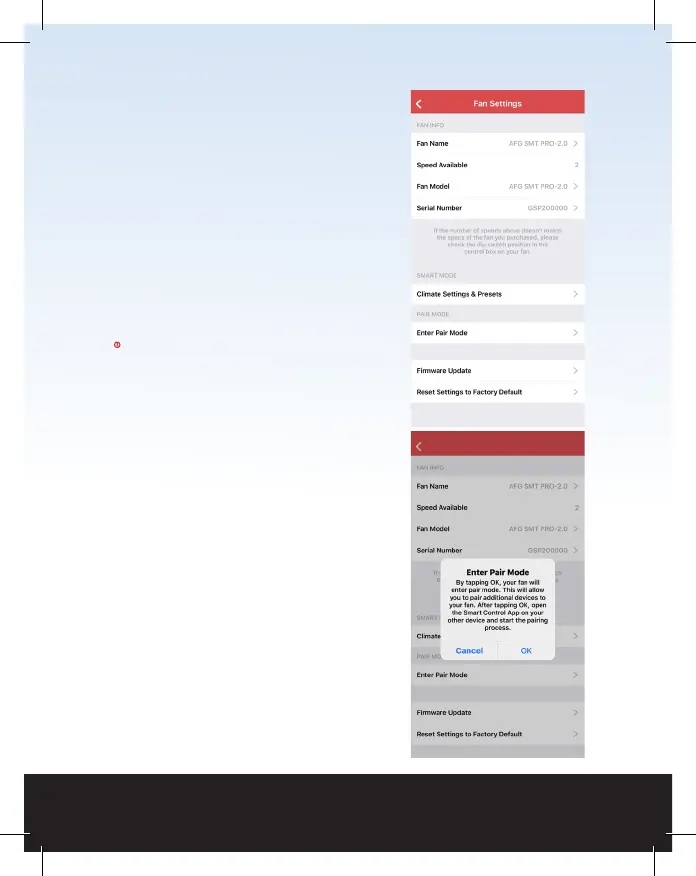
In the Fan Settings page, tap Enter Pair Mode.
An alert box will come up on your screen
indicating you are about to enter Pair Mode.
Tap OK.
Now, on the device you are trying to pair, open
up the Smart Control app and tap the fan. You
will now be taken to the Fan Setup page and
you are now paired.



 To Next Page
 Loading...