15
FIRMWARE UPDATE
Your attic fan includes a Firmware Update feature
in order for us to update your Fan Hub to include
bugxesandadditionalfeaturesinthefuture.
Werecommendcheckingforanewrmware
update a few times per year.
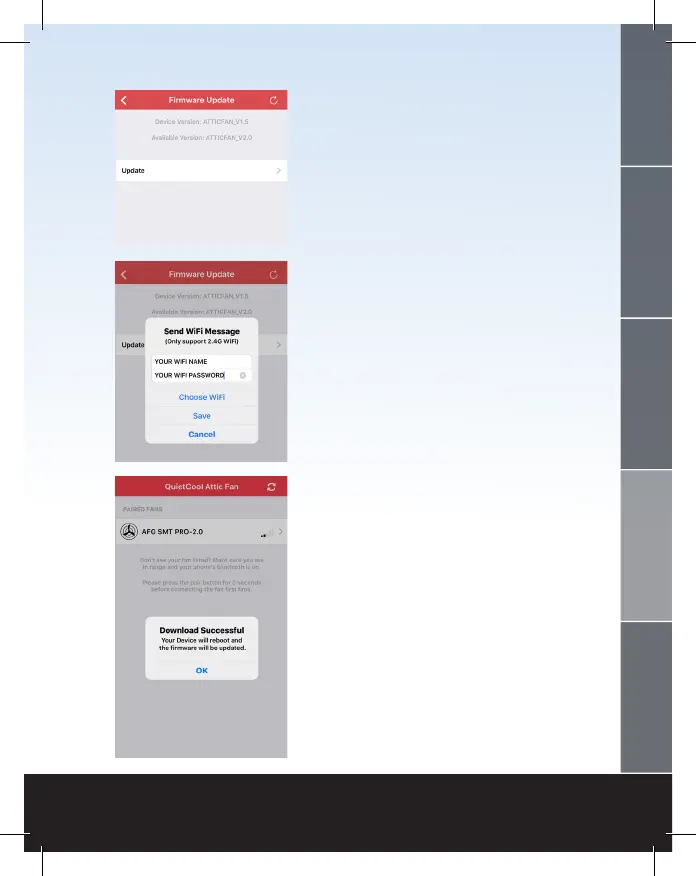
Tocheckforanavailablermwareupdate,gointo
the Fan Settings page and tap Firmware Update.
If there is no update available, an alert will popup
indicatingthereisnoavailablermwareupdate.
At the top of the page you will see your current
device version as well as what the available
version is.
If there is an update available, you will be able
to tap the Update button. Once you tap Update,
an alert will popup asking you to type in your
Wi-Fi details.
Youcannotinitiatearmwareupdatewhileyour
phone is on cellular so if you are not currently
connected to a Wi-Fi network on your phone, tap
Choose Wi-Fi. This will take you to your phone
settings. Connect to your home Wi-Fi network
and go back to the Smart Control app.
Once back in the app, your Wi-Fi network name
willbepre-lled.TypeinyourWi-Fipasswordand
tapSave.Thermwareupdatewill
now begin.
Once completed, an alert will popup indicating
that the download was successful and your Hub
will reboot. Your Hub is now updated.
WELCOME
INSTALLATION
WIRING OPERATION
WARRANTY



 To Next Page
 Loading...