This document describes the AIR by Quirky speaker system, a versatile audio solution designed for wireless music enjoyment both indoors and outdoors. The system consists of an AirBase Bluetooth® Speaker and four AirConnect Bluetooth® Speakers, which can operate together or independently.
Function Description:
The AIR by Quirky system allows users to play music wirelessly from a smart device to up to five speakers simultaneously, with a range of up to 75 feet from the AirBase. The speakers are designed to work through most walls in a home, offering flexible placement. Each AirConnect speaker can also be used as a standalone Bluetooth® speaker, providing individual audio output. The system is fully rechargeable, and when connected, all speakers can be charged from a single USB cable. Additionally, the AirBase has an audio output ("OUT" jack) that allows it to connect to an alternate audio system, such as a home theater system or TV, using an auxiliary cable.
Important Technical Specifications:
- Bluetooth Version: V 5.0
- Power:
- AirBase: 2x4 W
- AirConnect: 1x4 W
- Battery:
- AirBase: 2200 mAh/3.7V
- AirConnect: 1400 mAh/3.7V
- Frequency:
- AirBase: 88Hz-17KHz
- AirConnect: 100Hz-17KHz
- Separated Speakers Connectivity Range: Up to 75ft via 5.8GHz
- Bluetooth® Range: ≤32.8ft (for individual AirConnect speakers when paired directly to a smart device)
- Speaker Signal to Noise Ratio (dB): ≥60DB
- Peak Noise at Max Volume (dB, distance 1M):
- AirBase: 80DB
- AirConnect: 78DB
- USB Cable Input Volt: 5V 2A
- Charging Time:
- AirBase: Up to 4H
- AirConnect: Up to 4.5H
- Play Time:
- AirBase: Up to 7.5H
- AirConnect: Up to 6H
- Audio Input: AUX
- Buttons: Mechanical buttons for Play/Pause, Volume Up/Down, Mode/Power
- Material: ABS + Rubberized Grill
- Water Resistance Grade: IPX4 (splash resistant)
- Dimensions: 11.53″ x 4.02" x 3.68"
- Weight:
- AirBase: 0.753 lbs/0.341 kg
- AirConnect (1 piece): 0.518 lbs/0.235 kg
- Dolby Support: No
- Microphone Support: Yes
- Bluetooth® Names:
- AirBase: "Air"
- AirConnect: "Air Left" / "Air Right"
- BT ID: D044966
Usage Features:
- Initial Setup and Pairing:
- Charging: Before first use, charge all speakers for four hours. When speakers are connected, any micro USB port can be used for charging.
- Power On: Turn on the speakers. If connected, pressing any power button will turn all on. If separated, each speaker must be turned on individually. A green light on the back indicates connection.
- AirBase Pairing: Connect the AirBase to a Bluetooth®-enabled device. The AirBase will announce "pairing mode." Select "Air" from the device list. A voice will confirm pairing.
- Speaker Separation: Once paired, speakers can be separated and placed within 75 feet of the AirBase.
- Individual AirConnect Speaker Pairing:
- Preparation: While the AirConnect speaker is off, press and hold the power button until a chime and then a beep are heard.
- Bluetooth® Mode: Press the power button again to switch to Bluetooth® mode; the indicator light will turn blue.
- Device Pairing: On a smart device, choose "Air Left" or "Air Right" from the list of nearby devices. Another beep will confirm pairing.
- Note: Both right and left speakers share the same pairing names. Some devices may not allow pairing if another speaker with the same name is already paired. Deleting the existing pairing name might be necessary.
- Adding Extra AirConnect Speakers: To expand the sound, simply click an extra AirConnect speaker to the AirBase. The system supports up to 75 additional AirConnect speakers.
- Disconnecting AirConnect Speakers from AirBase:
- Power Off: Turn off the AirConnect speaker.
- Hold Power Button: Press and hold the power button for 10-15 seconds. The speaker will power on and then off. Continue holding until it powers itself off completely.
- Disconnected: The AirConnect speaker is now disconnected from that AirBase and can be paired to another AirBase.
- Water Resistance: IPX4 rating means the speakers are resistant to splashes, making them suitable for outdoor use where light water exposure might occur.
- Portability: The design emphasizes portability, allowing music to go wherever the user does.
Maintenance Features:
- Troubleshooting Connection Loss:
- If pairing fails, turn off speakers and repeat the pairing steps.
- Ensure speakers are within range of the smart device.
- A long beep or voice indicating low battery means the speakers need recharging, as connection may be lost due to low battery.
- Charging: Only use the enclosed USB cable for charging.
- Safety Instructions:
- Keep the unit away from heat sources, direct sunlight, humidity, water, and other liquids.
- Do not operate if exposed to water or moisture to prevent electric shock or damage.
- Do not use if dropped or damaged. Repairs should only be performed by a qualified electrician.
- Do not puncture or harm the exterior surface.
- Keep free from dust, lint, etc.
- Use only for its intended purpose.
- Not a toy; keep out of reach of children.
- Avoid excessive volume levels to prevent hearing damage.
- Do not expose batteries to excessive heat or open flame.
- Warranty: The product comes with a One-Year Limited Warranty against defects in materials and workmanship from the date of original retail purchase. This warranty is in addition to consumer law rights. For support, contact help@airaudio.co.
- FCC Compliance: The device complies with FCC rules, ensuring it does not cause harmful interference and accepts received interference. Users are advised that changes or modifications not expressly approved by the responsible party could void their authority to operate the equipment. In case of interference, users can try reorienting the receiving antenna, increasing separation between equipment and receiver, connecting to a different circuit, or consulting a dealer/radio/TV technician.

 Need help?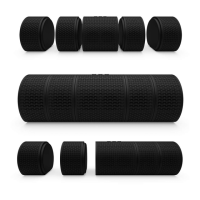

 To Next Page
 General