4
8. Balance Functions (Tables) .................................................................. 25
8.1 Open and Close a Balance ................................................................................................. 25
8.2 Print the Invoice .................................................................................................................. 26
8.3 Transfer Balance ................................................................................................................. 26
8.4 Splitting a Balance .............................................................................................................. 27
8.5 Balance Clerk Transfer ....................................................................................................... 27
8.6 Modifiers and Condiments ................................................................................................. 28
9. Reports ................................................................................................... 28
9.1 System Reports ................................................................................................................... 29
9.2 User Reports........................................................................................................................ 30
9.3 Electronic Journal ............................................................................................................... 31
9.3.1 Text Format ..................................................................................................................... 31
9.3.2 Binary Format ................................................................................................................. 32
10. Programming ....................................................................................... 32
10.1 Programming of Date and Time ....................................................................................... 32
10.2 Easy PLU Programming .................................................................................................... 33
10.3 File Programming .............................................................................................................. 34
10.4 Program Version and Test Routines ................................................................................ 35
11. Training Mode ...................................................................................... 36
12. Instructions for Use ............................................................................. 36
12.1 Use of the Touch Screen .................................................................................................. 36
12.2 Calibration of the Touch Screen ...................................................................................... 36
12.3 Power Supply and Interfaces ........................................................................................... 36
12.4 Cleaning ............................................................................................................................. 36
12.5 Service and Maintenance .................................................................................................. 37
12.6 Assembling of the Stand of POS QTouch2 ..................................................................... 37
13. Information on the Electromagnetic Compatibility and Safety ......... 38
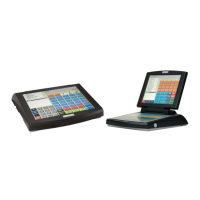
IMPORTANT!
Finger Touch Screen!
Use only your finger to operate this Touch Screen nothing else!


 To Next Page