17
CUSTOMER LOGO
5 Department 1 17,50
3 PLU 25 3,00
3 4912345678901 3,00
0.2 PLU 2 1,20
---------------------------
11.2 Total 24,70
Cash 24,70
4.6 Multiplication/Division
Instead of pressing the same item repeatedly, you may
use the “Multiplication” key. First, enter the quantity to be
rung up, followed by the “Multiplication” key and then the
item.
Depending on the programming, the “Multiplication” key
can also be used for division. First enter the numerator and
press the “Multiplication” key. Now enter the divider and
press “Multiplication” again. Finally, select the
corresponding PLU or department.
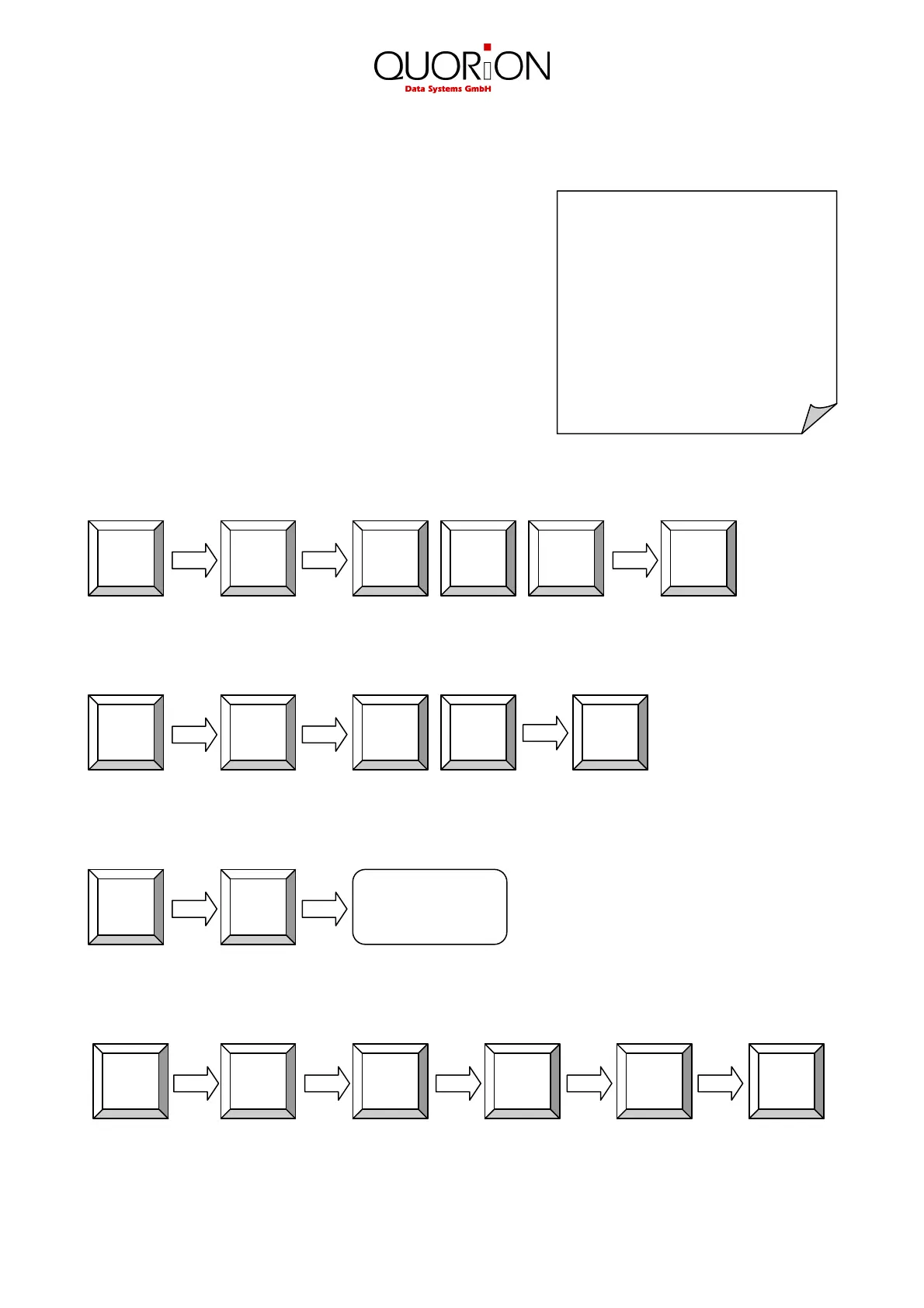
Example: Register 5 x 3.50 EUR in department 1:
Example: Register 3 x PLU 25:
Example: Register 3 x the scan code 4912345678901:
Example: Register 1/5 of PLU 2:
X
1
PLU
2
X
5
Scan
4912345678901
X
3
PLU
5
2
X
3
1
0
5
3
X
5


 To Next Page