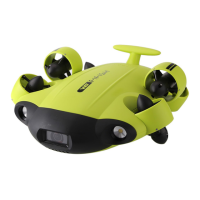
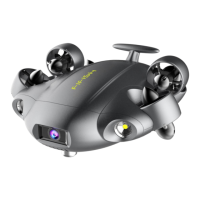
This document is a user manual for the QYSEA Laser Scaler, an accessory designed for underwater measurement in conjunction with FIFISH Remotely Operated Vehicles (ROVs).
Function Description
The Laser Scaler is an accessory that provides a visual reference for underwater measurements. It projects two parallel laser points, 10 cm apart, onto an object, allowing users to estimate or measure the size of objects captured by the ROV's camera. This feature is particularly useful for scientific research, inspection, and other underwater tasks where accurate sizing is required. The device integrates with the FIFISH APP interface, where users can select the Laser Scaler widget to activate and utilize its functionality. When the ROV is switched to 'S' (Sport) mode, the Laser Scaler can be used to measure objects from multiple angles, enhancing its versatility.
Important Technical Specifications
- Laser Tube Type: Spot Laser
- Wavelength: 650nm (Red)
- Scale Length: 10cm (distance between the two laser points)
- Wave Beam: 100 meters
- Work Temperature: -5°C to 45°C
The packing list for the Laser Scaler includes:
- Laser Scaler Bracket (Quantity: 1 PCS)
- M3*8 Hex Socket Head Cap Screws (Quantity: 8 PCS)
- User manual (Quantity: 1 PCS)
Usage Features
Precautions Before Usage:
- Ensure the FIFISH APP is ready.
- Check all accessory interfaces, plug-ins, and O-rings for damage or missing parts, and ensure they are dry and clean.
- Power off the underwater vehicle before connecting the Laser Scaler.
- Verify the underwater vehicle's battery level for sufficient and stable power.
- Before entering the water, confirm that the probes and connectors of the accessories are tightly sealed.
- Align connectors with the positioning pin on the underwater vehicle to avoid damage during insertion.
- Check that the underwater robot and remote control are working normally when connected.
- Check the batteries of mobile phones, tablet PCs, and laptops.
- For after-sales support, contact support@qysea.com.
Installation:
- Remove the protective cover from the accessory port at the bottom of the ROV's body.
- Install the Laser Scaler bracket into the accessory port and secure it with four M3 screws.
- Install the Laser Scaler onto the bracket, ensuring the slot of the Laser Scaler faces downward to be inserted into the latch of the bracket.
- Fix the Laser Scaler to the bracket with two M3 screws.
- Remove the cover of the accessory port under the FIFISH V6 EXPERT, connect the cable of the Laser Scaler, and tighten its cap.
Operation:
- After integration with the ROV, open the toolbox icon in the FIFISH APP interface and select the Laser Scaler widget.
- The Laser Scaler projects two laser points with a fixed distance of 10 cm between them, serving as a reference for measurements.
- Ensure the laser points are perpendicular to the object being measured for accurate results.
- When the ROV is switched to 'S' (Sport) mode, the Laser Scaler can be used to measure objects from various angles.
Maintenance Features
General Maintenance:
- Keep all connectors (ports and plugs) clean, dry, and covered with protective caps when not in use.
- Regularly check sealing parts and rubber sealing washers; replace them if worn or damaged.
- Store the product in a dry and cool place after use.
- Always replace the protective cover on the submersible after usage.
- Avoid using the device in strong acid/alkali environments, as this may reduce the service life of the underwater vehicle and its accessories.
After-Sales Support:
For any assistance, users can contact QY after-sales personnel through:
- Online Customer Service: Available via the FIFISH APP, WeChat official account (FIFISH Underwater Robot), and the official website.
- Contact Number: +86-755-2266-2313 (Monday to Friday, 9:00-22:30 GMT+8).
- Email: support@qysea.com.
- Malfunction Reporting: If a machine malfunction occurs, users should record a video of the malfunction, provide the machine's SN number, and the purchase invoice for faster resolution.
- Authorized Service Center: More information can be found at https://www.qysea.com/support/repair-center/.
- User Guide/Manual Updates: The latest version of the user guide/manual and other instructions are available at https://www.qysea.com/support/user-manual/.
- Technical Support: Contact via email at support@qysea.com.
Disclaimer:
QYSEA provides after-sales services, but certain situations are excluded from warranty coverage. These include:
- Collision damages due to non-manufacturing factors or user faults.
- Damages from unauthorized modification, disassembly, or opening of the enclosure not in accordance with official instructions.
- Damages from improper installation, use, or operation not in accordance with official instructions.
- Damages caused by unauthorized service providers.
- Damages from unauthorized modification of circuits, or misuse of battery/charger.
- Damages from underwater operations not following instructions.
- Damages from working in harsh water conditions (e.g., strong acid/alkali, strong current, huge waves).
- Damages from operation in environments with electromagnetic interference (e.g., mining areas, radio towers, caves, muddy areas, radiation, tunnels).
- Damages from operation in environments interfered by other wireless devices (e.g., transmitters, video downlinks, Wi-Fi signals).
- Damages from forced diving with aging or damaged components.
- Damages from using unauthorized third-party parts.
- Damages from operating equipment with insufficient power or defective batteries.
- Continuous or error-free product operation.
- Loss or damage of user data.
- Any software provided with or subsequently installed.
- Failures or damages caused by third-party products (including those QYSEA may provide or integrate at user request).
- Damage caused by non-QYSEA technology or support (e.g., "operation method" problems, incorrect product settings, installation, firmware upgrades).
- Damages from operating ROV in sensitive areas (e.g., military areas, natural resource reserves).
- Damages caused by unpredictable factors (e.g., water flow, cave collapse, animal swallowing).
- Products or parts with changed or missing identification labels.
Users are advised not to place heavy objects on the product and to handle it with care. Water droplets or stains on the ROV may be present due to manufacturing plant testing and do not affect performance. For more information, users can refer to explanation videos or the FAQs section in "FIFISH Application/Help/FAQs" on the website. The content of the manual is subject to change without notice.

 Need help?
 General

 To Next Page