36
support.R82.org
a
b
c
d
ee
f
g
h
i
j
k
Power Unit system
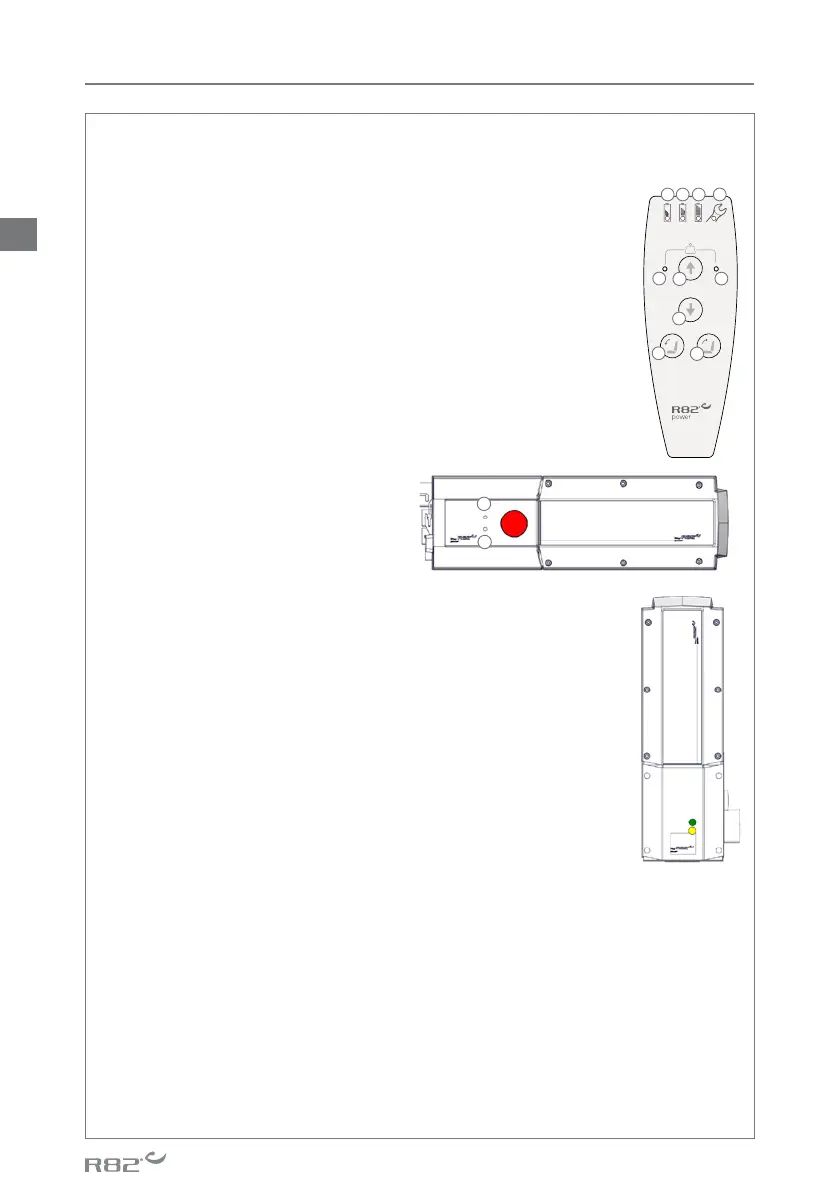
Handset functionality
a. Battery is OK, no need for charging. Green LED lights when activating functions
b. Battery is soon empty, the battery needs recharging. Orange LED
Lights when activating functions
c. The battery needs recharging, red LED ashes when activating
functions. It is still possible to lower the seat height and to tilt the
seat forwards
d. Service required, LED Lights. Check that all connectors are rmly
xed in the connections. If the LED continues to light up see Service
interval page 34 and go through the Service check list on page 35.
e. Overload, orange LED ashes when trying to heighten the seat level.
Lower the seat until stop to reset the system
f. Increase the seat height
g. Lower the seat height
h. Tilt the seat forward
i. Tilt the seat backward
Troubleshooting:
Make sure that the emergency stop is not activated. In case of the handset
malfunctioning the seat height can
be adjusted by using the control box.
Using a pen or a 3mm Allen Key,
activate the up and down points in the
control box.
j. Increase the seat height
k. Lower the seat height
Recharging the battery:
• Connect the charger to mains. The charger indicates whether the
charger is connected to the mains (green LED)
• Place the battery in the charger, battery is being charged (yellow
LED)
• Charging time: approximately 4-5 hours
Warning
Caregiver
• Do not operate the Power unit system unless you have received
training in using it
• Do not leave children and youngsters alone with the handset
• Do not let children and youngsters play with the handset
• Do not leave the handset within reach of children and youngsters.
• It is important to remove the transport plastic bag before using the handset. Cables need to be
placed in such a way that users or carers cannot trip and injure themselves.
Product
• The control box has an emergency stop
• The system must not be sprayed directly with a highpressure cleaner
• Cleaning with a steam cleaner is not permitted
• Do only use the power unit within specied working limits
• It is recommended to check the handset and cable for damage and holes caused by violent
handling at least once a year
• Do not submerge the handset in water
EN



 To Next Page
 Loading...