29
WEEKLY PROGRAM
The Programmed mode allows to set, for every hour of day and for every day of the week independently, the
desired temperature choosing between the Comfort, Eco (equal to that of Comfort decreased by 3.5 ° C) or Antifreeze.
A short press of the button allows to activate/deactivate the programmed functioning. A long press (> 3") allows to
enter the view/change menu. If the product is brand new the default program is the following:
Always Frost-free mode except Comfort mode in the following hours:
- from 06:00 to 08:00 on Monday-Friday;
- from 08:00 to 10:00 on Saturday-Sunday.
Press the dedicated button to quickly activate the program mode!
To view/change the program proceed as follows:
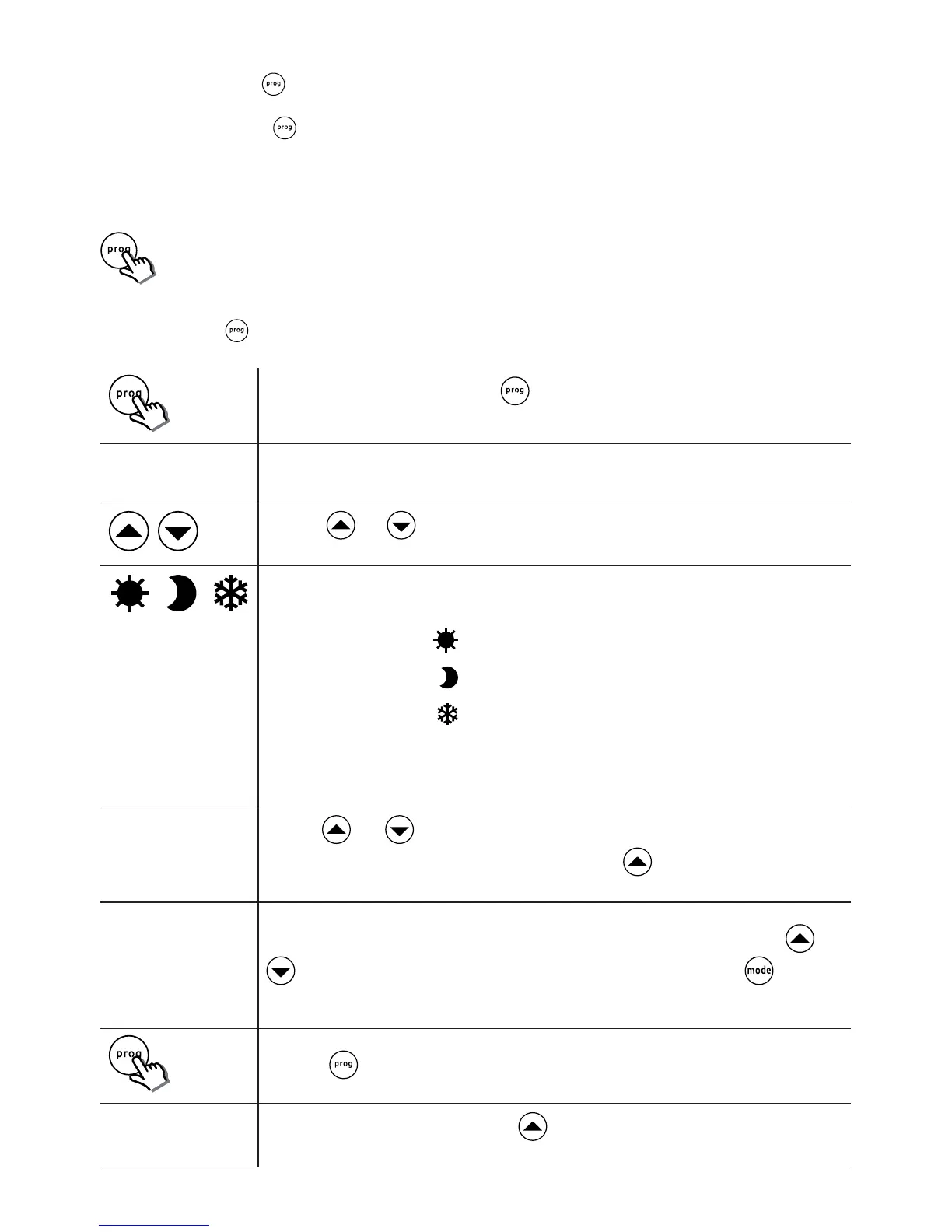
Press and hold the button for 3 seconds to enter the menu:
3"
Activate display / edit by holding the key down for at least 3 seconds.
d: 1
The display shows the day, 1 (Monday)
Push the and keys to display the various hours of the day starting from “00” (hour
included between 00:00 and 00:59)
The reference temperature set for the time slot selected, is indicated by the relevant icon
switching on:
Comfort set by the user
Eco = Comfort – 3,5°C
Anti-freeze (temperature of 7°C)
The reference temperature required can be edited by pushing the key. The icons indicated
above switch on in sequence and indicate the reference temperature. A letter to the right of
the time, also indicates the reference temperature: C = Comfort, E = Eco, I = Anti-freeze.
23: I
Use the and keys to display / edit the temperature set for each of the hours of
day 1. Once hour 23 is reached, the next time the key is pushed moves the system
on to programming day 2:
d: 2
At this stage it is possible to choose whether to display / edit the temperature for the indivi-
dual hours of day 2, or to set day 2 identical to day 1. In the former case, use the and
keys as already illustrated for day 1, in the latter case, simply push the key again.
By doing this, day 2 is automatically made the same as day 1 and the system moves on to
the beginning of day 3. This procedure can be repeated until day 7 has been programmed:
On completion of programming of day 7, or in any intermediate phase of programming,
when the key is pushed the program conrm and save phase begins.
End
The display reads "End" and when the key is pushed again the program just dened
is saved.


 To Next Page