30
donE
When the display reads "donE" for a few seconds, this is conrmation that the procedure
has been completed correctly. The product goes back to the operating state programmed
for the current time and day.
Note:
-At any time you can abandon the procedure for viewing / editing the program deleting unsaved changes by
pressing the Stand-by button;
-During the programming the heating elements are disconnected and the product doesn't heat.
TURBO MODE
• The heater works for the preset period switching on both the front surface heating and the fan heater integrated
at the bottom of the unit. The functioning period can be set choosing between 10, 20,30 and 60 minutes just
pushing repeatedly the Turbo key.
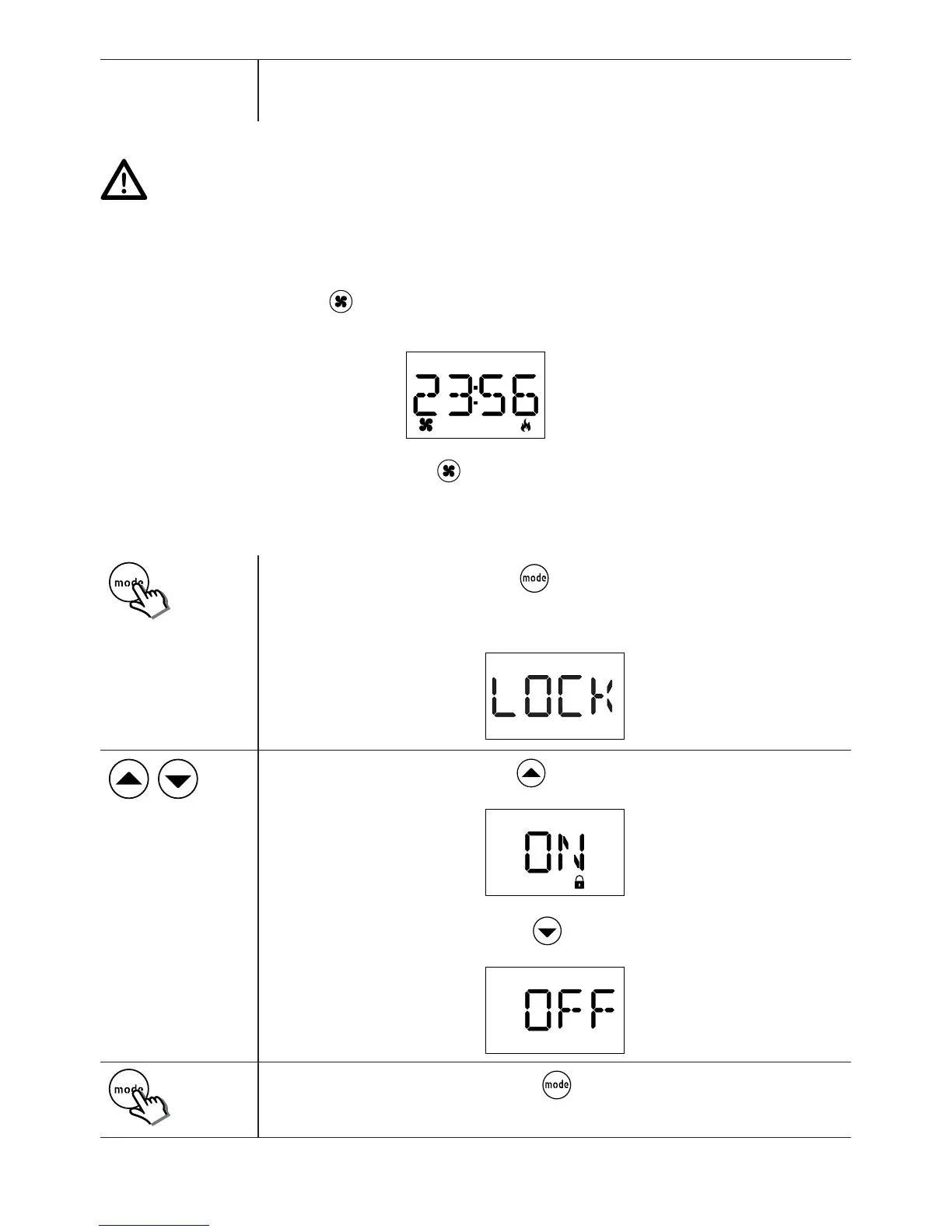
• The display reads the Turbo function icon, the pilot ame representing that heating is activated and the remaining
functioning time:
• To deactivate the Turbo function just press the ket at any time.
9.
15"
Access the lock function by holding the key down for at least 10 seconds.
It is normal for the time to begin ashing after 3 seconds. Do not remove your nger from
the button until the display reads "LOCK".
To activate the Lock function, push the key.
The display reads ON and the lock symbol is shown at the bottom of the display:
To deactivate the Lock function, push the key.
The display reads OFF
Conrm the setting chosen by pushing the key . The system goes back to the opera-
ting mode in progress previously.


 To Next Page