20
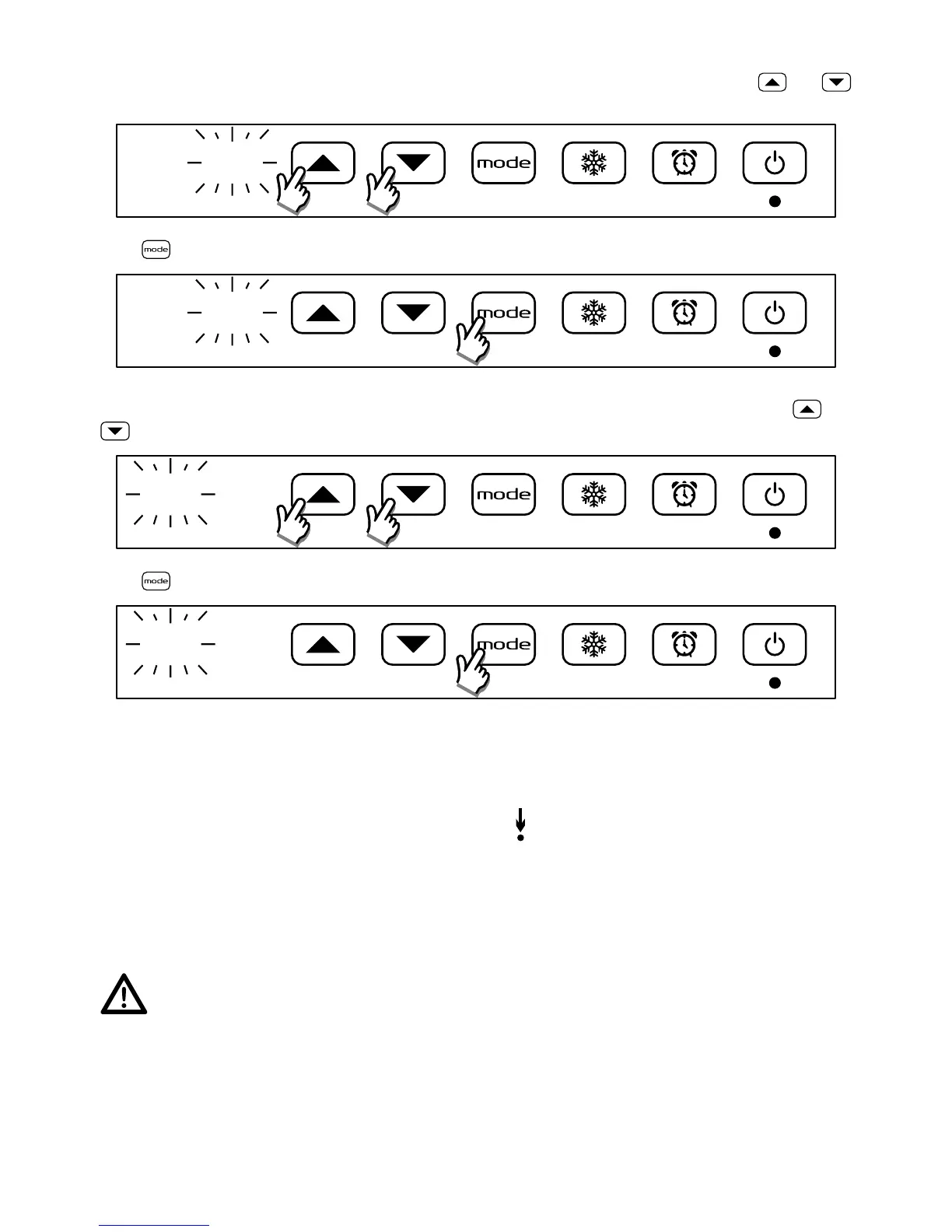
Set the day of the week (1 = Monday)
After conrming the time, the day of the week starts blinking: set the current day of the week using and
buttons
d
:
1
Press to conrm
d
:
2
Set the Comfort temperature (Eco = Comfort - 3,5°C)
After conrming the day, the comfort temperature value starts blinking: set the desired temperature using and
buttons
23 C
Press to conrm
25 C
OPEN WINDOW DETECTION
This function makes it possible to detect an open window and automatically activate the Anti-freeze operating mode.
When the function is enabled and ready to set the Frost-free mode if an open windows is detected, a red dot lights up
on the upper right area of the display between the 3
rd
and the 4
th
digit.
If a temperature drop is observed in the room during the normal functioning, the Frost-free mode is automatically
activated to save enery consumption. The red light under the Frost-free button ashes to show that the open window
function operates.
The reset of the normal functioning is not automatic but is achieved by pressing one of the ve buttons of the product.
Correct operation of this function may depend on where the radiator is positioned in the room, the presence
of draughts, the outside temperature, and how long the window stays open.


 To Next Page