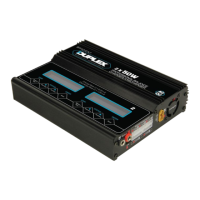
The Duplex charger is set to the default user settings when it is connected to a power
source for the first time. The screen displays the following information in sequence and
the user can change the parameters on each screen.
If you need to alter the values in any program, press the ‘ENTER/Start’ key to make the
value blink, then change the value with the ‘Increase’ or ‘Decrease’ key. The value can
be stored by pressing the ‘ENTER/Start’ key once.
STOP
Battery Type
STOP
Battery Type
STOP
Battery Type
STOP
Battery Type
STOP
Battery Type
ENTER
Start
ENTER
Start
ENTER
Start
ENTER
Start
ENTER
Start
Decrease
Increase
Decrease
Increase
Decrease
Increase
Decrease
Increase
Decrease
Increase
Decrease
Increase
Decrease
Increase
Decrease
Increase
Decrease
Increase
Decrease
Increase
Decrease
Increase
Decrease
Increase
Decrease
Increase
Decrease
Increase
Decrease
Increase
Decrease
Increase
Decrease
PROGRAM FLOW CHART
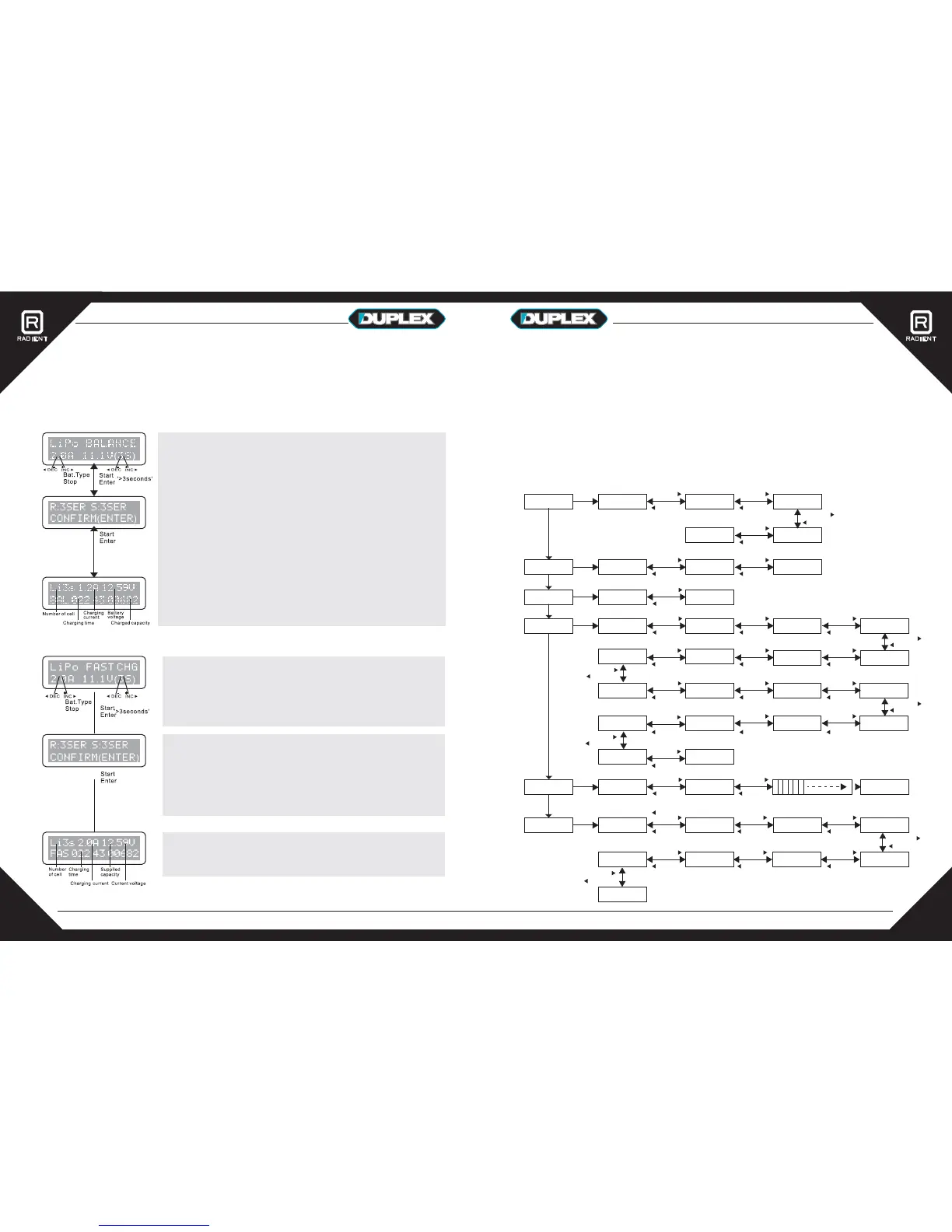
This function is for balancing the voltage of Lithium-polymer battery cells while
charging. In balance mode, the battery must use a balance lead to connect to the
individual port in the corresponding side of the charger. When charging in this mode,
the built-in processor monitors the voltage of each cell and controls the current fed
into individual cells to normalize the voltages.
Fast charging Lithium batteries
Balancing Lithium batteries
The left side of the first line shows the type of battery you
have chosen. Under it is the user-set current value. After
setting the current and voltage, press the ‘Start/Enter’ key
for more than 3 seconds to start the process.
This displays the number of cells you have selected (S)
and the charger’s processsor has detected (R). If both
numbers are identical you can start charging by pressing
the ‘Start/Enter’ button. If not, press the ‘Battery
Type/Stop’ button to go back to previous screen to
carefully check the number of cells is correct.
This screen shows the real-time status during the charge
process. Press the ‘Battery Select/Stop’ key once to stop
the charge process.
The value on the left of the second line shows the charge
current. The value on the right of the second line is the
battery pack's voltage. After setting the current and
voltage, press ‘Start/Enter’ for more than 3 seconds to
start the process.
This displays the number of cells you have selected (S)
and the charger’s processsor has detected (R). If both
numbers are identical you can start charging by pressing
the ‘Start/Enter’ button. If not, press the ‘Battery/stop’
button to go back to previous screen to carefully check
the number of cells is correct.
This screen shows the real-time status during the charge
process. Press the ‘Battery Type/Stop’ key once to stop
the charging process.
PROGRAM SELECT
Lithium Battery
PROGRAM SELECT
NiMH/NiCd
PROGRAM SELECT
PB(Lead Acid)
PROGRAM SELECT
User Settings
LITHIUM BATTERY
Chk Time 5min
Waste Time
CHG>DCHG 5min
Pb CHARGE
2.0A 12.0V( 6P)
Pb DISCHARGE
1.0A 12.0V( 6P)
NiMH CHARGE AUTO
CURRENT 2.0A
NiMH DISCHARGE
1.0A 10.0V
NiMH CYCLE
C->D Cnt: 3
Decrease
Increase
Decrease
Increase
Temp.Cut-Off
ON 80C
Decrease
Increase
Safety Timer
ON 240min
Capacity Cut-Off
ON 5000mAh
Input Power Low
Cut-Off 11.0V
Increase
Increase
LiPo Termination
Voltage 4.20V/S
Watt Limit (W)
CHG: 50
Increase
Completion Ring
Beep 5
Increase
Decrease
Increase
LiIon Termination
Voltage 4.10V/S
LiFe Termination
Voltage 3.60V/S
LiHv Termination
Voltage 4.35V/S
Increase
Decrease
Increase
Decrease
DecreaseDecreaseDecrease
DecreaseDecreaseDecrease
Decrease
Increase
NiMH Sensitivity
D.Peak Default
LiPo DISCHARGE
1.0A 22.2V(6S)
LiPo BALANCE CHG
2.0A AUTO
LiPo CHARGE
2.0A 22.2V(6S)
LiPo FAST CHARGE
2.0A 22.2V(6S)
Decrease
Increase
Decrease
Increase
NiCd Sensitivity
D.Peak Default
ENTER
Start
Decrease
Increase
PROGRAM SELECT
Load Memory
PROGRAM SELECT
Extra Function
1> MEASURE IR
----->
2> Check Lixx
Battery ----->
3> Lixx Balance
----->
4> Digital Power
----->
5> Brushed Motor
Drive ----->
6> Hot Wire Foam
Cutter DRV ----->
7> Thrust Calc
----->
8> Measure Ext.
Tempra: 0C
A> Measure VOL
I:17.3V 0: 0.00V
LS> LiPo BALANCE
5.0A 11.1V(3S)
01> LiPo CHARGE
2.0A 22.2V(6S)
20> LiPo BALANCE
2.0A 22.2V(6S)
Decrease
Increase
Decrease
Increase
Key Beep ON
Buzzer ON
Increase
Increase
Pb Termination
Voltage 2.40V/P
Select Language
English
Lithium Battery
CHK Time 5min
LiPo STORAGE
1.0A 22.2V(6S)
1316


 To Next Page
 Loading...