DUPLEX v1.0
BY RADIENT RC
Increase
STOP/Battery Type
Increase
STOP/Battery Type
Increase
STOP/Battery Type
Increase
STOP/Battery Type
Increase
STOP/Battery Type
Increase
STOP/Battery Type
Increase
STOP/Battery Type
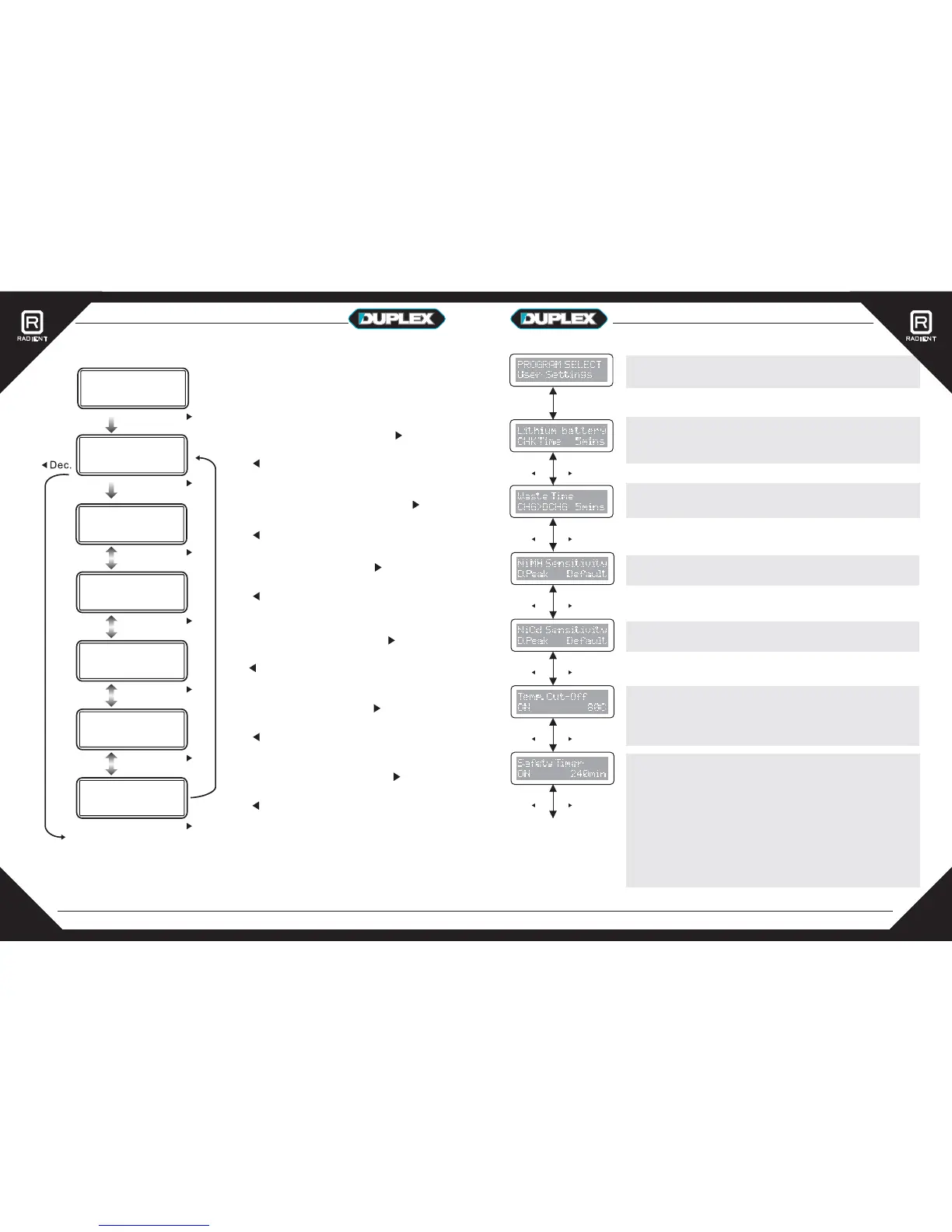
The opening display shows the charger name
for two seconds and any software revision.
The Duplex will then go straight to the main
menu.
User settings program: Press ‘______ ’
button to move down the menus and the
‘______’ key to move up the menus.
Press the ‘_____’ button to enter the submenu.
ENTER
Start
Decrease
NiMH/NiCd battery program: Press ‘______ ’
button to move to the next menu and the
‘_______’ key to go back. Press the ‘_____’
button to enter the submenu.
ENTER
Start
Decrease
Pb battery program: Press ‘______ ’
button to move to the next menu and the
‘_______’ key to go back. Press the ‘_____’
button to enter the submenu.
ENTER
Start
Decrease
Load data program: Press ‘______ ’
button to move to the next menu and the
‘_______’ key to go back. Press the ‘_____’
button to enter the submenu.
ENTER
Start
Decrease
Extra Function program: Press ‘______ ’
button to move to the next menu and the
‘_______’ key to go back. Press the ‘_____’
button to enter the submenu.
ENTER
Start
Decrease
Lithium battery program: Press ‘_I ____ ’
button to move to the next menu and the
‘_______’ key to go back. Press the ‘_____’
button to enter the submenu.
ENTER
Start
Decrease
Increase
Increase
Increase
Increase
Increase
Increase
OPERATING INSTRUCTIONS
ENTER
Start
DEC INC
DEC INC
There are a number of User Settings that can be adjusted
to alter the default charger set-up.
This program allows the Delta peak voltage to be adjusted
from the NiMH default of 11mV/cell.
This program allows the Delta peak voltage to be adjusted
from the NiCd default of 9mV/cell.
The check time is how long it takes to identify a LiXX
battery. Increase this value if the number of cells cannot be
accurately determined.
The waste time is the period between a Charge>Discharge
cycle to allow the battery to cool between operations.
This function monitors the temperature of the battery being
charged when using an optional temperature sensor (not
included) connected to the charger’s termperature sensor
port.
When the charge process starts, the integral safety timer
also begins. If an error is detected or the termination circuit
cannot detect whether the battery is fully charged or not, the
Duplex is programmed to prevent overcharging by
terminating the charge using the safety timer.
When charging NiCd or NiMH batteries, divide the
capacity by current, then divide the result by 11.9. Set
this number of minutes as the value for the safety timer
setting. At this point, around 140% of the capacity will
have been fed into the battery.
PROGRAM SELECT
Lithium Battery
PROGRAM SELECT
NiMH/NiCd
PROGRAM SELECT
PB(Lead Acid)
PROGRAM SELECT
User Settings
PROGRAM SELECT
Load Memory
PROGRAM SELECT
Extra Function
DEC INC
DEC INC
DEC INC
DEC INC
1712


 To Next Page
 Loading...