EasyManua.ls Logo

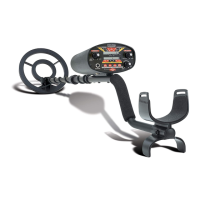
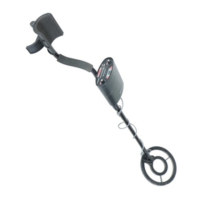
Radio Shack Metal Detector with Depth Read-Out - User Manual

Radio Shack Metal Detector with Depth Read-Out
6 pages
Print Icon
To Next Page IconTo Next Page
Loading...
©
2000 RadioShack Corporation.
All Rights Reserved.
RadioShack and RadioShack.com are trademarks used by RadioShack Corporation.
OWNER’S MANUAL — Please read before using this equipment.
Metal Detector with Depth Read-Out
With your RadioShack Metal Detector, you can hunt for coins, relics,
jewelry, gold, and silver just about anywhere. This electronically ad-
vanced metal detector is versatile, easy to use, and offers superior
performance when hunting for smaller objects (such as gold nuggets
or small pieces of jewelry). The metal detector’s other features include:
Dual Liquid Crystal Display
— displays the probable type of metal
being detected and the probable depth of the target item.
Slow Sweep Discrimination
— distinguishes between different met-
als efficiently, even when the detector is swung at slow speeds.
Three-Tone Audio Discrimination
— sounds distinctive tones for dif-
ferent categories of metal objects to make target identification easier.
Eight Inch Waterproof Search Coil
— lets you use your metal detec-
tor in almost any weather conditions.
TREASURE HUNTERS CODE OF ETHICS
All treasure hunters might be judged by the example you set. Here are
a few basic rules you should follow while using your metal detector:
Always get permission before searching any site.
Respect the rights and property of others.
Observe all national, state, and local laws while treasure hunting.
Never destroy historical or archaeological treasures. If you are not
sure about an object you have found, contact a museum or histor-
ical society in your area.
Leave the land and vegetation as it was. Fill in any holes you dig.
Use your detector only in safe areas.
Dispose of any junk you find only in approved areas. Do not leave
it for the next treasure hunter to find.
CHOOSING A SEARCH COIL
The best search coil to use depends on
where
you use the detector
and the
desired target
. Your local RadioShack store carries a variety of
search coils.
If you are looking for deeply-buried objects, a medium-sized
search coil (such as the supplied standard 8 inch search coil) is
more efficient.
If you are looking for tiny, coin-sized objects not buried too deeply,
or if you are gold prospecting, a 4 inch search coil might work bet-
ter.
PREPARATION
Assembling the Metal Detector
Assembling your metal detector is easy and requires no special tools.
1. Using the supplied bolt and knurled knob, attach the search coil to
the lower stem. Do not fasten the bolt all the way.
2. Press the button on the upper end of the lower stem, then slide
the lower stem into the upper stem, allowing the button to stop at
the desired length.
Adjust the stem to a length that lets you maintain a comfortable
upright posture, with your arm relaxed at your side and the search
coil parallel to the ground.
3. Wind the search coil’s cable around the stem. Leave enough
slack in the cable to let you adjust the search coil when you are
hunting on uneven ground.
4. Tighten the knob at the end of the search coil.
5. Insert the search coil’s plug into the matching connector on the
control housing. Be sure the holes and pins line up correctly.
Do not force it! The plug fits only one way.
Knob
Bolt
Search Coil
Control
Panel
Button
Lower Stem
Upper Stem
Cable

Plug Connector

Questions and Answers

  • K
    Kelly MaxwellJul 31, 2025
    Why does my Radio Shack with Depth Read-Out Metal Detector emit a constant loud tone?
    • S
      Samuel MendezJul 31, 2025
      If your Radio Shack Metal Detector emits a constant loud tone or repeating tones, the batteries may be weak. Replace them with new ones to resolve the issue.
  • A
    Angela GonzalezAug 6, 2025
    How to stop false signals on Radio Shack with Depth Read-Out Metal Detector?
    • C
      Corey AdkinsAug 6, 2025
      Your Radio Shack Metal Detector might be emitting false signals due to several reasons. The SENSITIVITY may be set too high, so adjust it back slightly until the false signaling disappears. Also, you might be moving the search coil too quickly; try swinging it more slowly. Some false signals occur on highly rusted metals; if the signal doesn't repeat over the same area when passing the search coil over it, the target usually isn't worthwhile.
  • E
    Eugene HuntAug 12, 2025
    What to do if Radio Shack with Depth Read-Out display is not locking?
    • M
      Michelle JordanAug 12, 2025
      If the display on your Radio Shack Metal Detector isn't locking in or identifying targets and it emits multiple tones, it usually means there's more than one object in the area you're sweeping, or the detector can't recognize the metal. In this case, search another location. Also, the SENSITIVITY may be set too high, so adjust it back slightly until the false signaling disappears. Sometimes, oxidation can cause the display ID arrows and tones to jump around.
  • K
    Kathryn CollinsAug 18, 2025
    Why is my Radio Shack Metal Detector tone distorted?
    • M
      Matthew SmithAug 18, 2025
      If your Radio Shack Metal Detector is unstable and has a pulsing, distorted tone, the area you're searching might be trashy, so search another location. Also, adjust the GROUND BALANCE.
  • S
    Sandy WilliamsAug 25, 2025
    Why Radio Shack with Depth Read-Out does not function?
    • A
      Alexander BennettAug 25, 2025
      If your Radio Shack Metal Detector isn't functioning or is operating erratically, another metal detector may be too close. Move to another area, and do not operate two or more metal detectors within 15 feet of each other.

Summary

Operation and Safety

Understanding the Display

Describes the various indicators and their meanings on the detector's display for target identification and status.

Testing and Usage Techniques

Testing and Using the Metal Detector

Guides users on how to test and operate the metal detector effectively for different materials.

Operating Modes and Discrimination

Discrimination Modes Explained

Covers DISC, NOTCH, and AUTO NOTCH modes for target rejection and identification.

Understanding Three-Tone Audio Target Identification (ATI)

Explains the audio system for identifying detected targets into three categories based on tone.

Controls and Balancing

Adjusting Ground Balance

Explains the process of ground balancing for mineral and saltwater compensation in ALL METAL mode.

Troubleshooting and Care

Troubleshooting Common Problems

Lists common issues like false signals, display problems, and unstable tones with suggested solutions.

Radio Shack Metal Detector with Depth Read-Out Specifications

General IconGeneral
Operating Frequency6.6 kHz
Depth IndicatorYes
Sensitivity AdjustmentYes
Discrimination ModeYes
Search ModesAll Metal, Discrimination
Headphone JackYes
Search CoilWaterproof
Search Coil Size8 inches

Related product manuals