EasyManua.ls Logo

Radio Shack 63-3011 - User Manual

Radio Shack 63-3011
16 pages
Print Icon
To Next Page IconTo Next Page
Loading...
Cat. No. 63-3011
OWNER’S MANUAL
Please read before using this equipment.
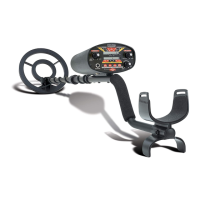
Three-Mode Discriminator
Metal Detector
with Analog
Signal-Strength Meter

Questions and Answers

  • G
    garzarachelJul 31, 2025
    Why does my Radio Shack 63-3011 Metal Detector sound a constant loud tone?
    • W
      Willie DavisJul 31, 2025
      Your Radio Shack Metal Detector might sound a constant loud tone or constant repeating tones because the batteries may be weak, so replace them. Alternatively, operating the detector near another detector or near power lines can cause this issue, as power lines can interfere with the detector's operating frequency.
  • A
    Alexis ConleyAug 6, 2025
    What to do if my Radio Shack 63-3011 Metal Detector displays or sounds false signals?
    • R
      Robert PriceAug 6, 2025
      If your Radio Shack Metal Detector displays or sounds false signals, it could be due to several reasons. The sensitivity might be set too high, so adjust the SENSITIVITY counterclockwise. You might be sweeping the detector’s search-coil too fast or at the wrong angle, so sweep the searchcoil more slowly and hold the detector correctly. The detector might also be detecting heavily oxidized metals; try pinpointing the target from different angles. If the signal isn't consistent, it's likely oxidized metal.
  • D
    Dawn BarnesAug 12, 2025
    Why does my Radio Shack 63-3011 Metal Detector display or sound false signals?
    • H
      heather85Aug 12, 2025
      Your Radio Shack Metal Detector might be displaying or sounding false signals because the sensitivity is set too high. Try adjusting the SENSITIVITY counterclockwise. Another reason could be that you are sweeping the detector’s searchcoil too fast or at the wrong angle. Try sweeping the searchcoil more slowly and hold the detector correctly. Also, the detector might sound a false signal if it detects some types of heavily oxidized metals. Try pinpointing the target from several different angles. If the detector does not display and sound the same signal each time, the target is probably heavily oxidized metal.
  • N
    Natasha JacobsAug 17, 2025
    What to do if my Radio Shack 63-3011 Metal Detector sounds a constant loud tone or constant repeating tones?
    • C
      Caroline GutierrezAug 17, 2025
      If your Radio Shack Metal Detector sounds a constant loud tone or constant repeating tones, the batteries might be weak, so you should replace them. It could also be caused by operating the detector near another detector or near power lines. Power lines can interfere with the frequency that the detector operates on.
  • R
    Robert NelsonAug 25, 2025
    How to fix Radio Shack 63-3011 when it sounds only one kind of tone, and discrimination does not work?
    • D
      Debra WilkersonAug 25, 2025
      If your Radio Shack Metal Detector sounds only one kind of tone, and discrimination does not work, it might be because DISC/ALL METAL/TONE is set to ALL METAL or DISC. This is not a malfunction. Alternatively, set DISC/ALL METAL/TONE to TONE.

Summary

FEATURES

Easy-to-Read Viewmeter

Provides a visual indication of signal strength when metal is detected.

Target Mode Control

Allows easy selection of the detector's different operation modes.

Waterproof 7-Inch Searchcoil

Enables use of the searchcoil underwater and in various weather conditions.

Built-In Speaker

Allows operation of the detector without the need for headphones.

Headphone Jack

Enables connection of headphones with a 1/4 inch plug.

Discrimination and Tone Control

Adjusts the detector's discrimination and tone for better metal identification.

Two-Tone Audio Discrimination

Uses distinct tones for different metals to aid in target identification.

Low Battery Indicator

Alerts the user when it is time to replace the batteries.

S-Rod Handle with Arm Cup

Designed for comfortable handling and use over extended periods.

Automatic Tuning and Ground Balancing

Allows quick use without time-consuming adjustments.

Sensitivity Control

Turns the detector on/off and adjusts its sensitivity level.

OPTIONAL ACCESSORY

PREPARATION

ASSEMBLING THE DETECTOR

Step-by-step instructions for assembling the metal detector without special tools.

INSTALLING BATTERIES

Guide for powering the detector using two 9-volt alkaline batteries.

USING HEADPHONES

Instructions for connecting and using headphones for private listening and better results.

Traffic Safety

Warning about wearing headphones near high traffic areas.

UNDERSTANDING THE DETECTOR

Viewmeter

Location and function of the detector's viewmeter.

SENSITIVITY

Control for turning the detector on/off and adjusting sensitivity.

DISC;ALL METAL;TONE

Control for selecting the detector's three operating modes.

DISC;TONE

Control for adjusting discrimination when in DISC or TONE modes.

TESTING THE DETECTOR

HOLDING THE DETECTOR

USING THE DETECTOR

FINE-TUNING THE DETECTOR

Adjusting SENSITIVITY

Guidance on setting sensitivity for maximum depth and reducing false signals.

Adjusting DISC;TONE

How to adjust discrimination to differentiate between metal types.

PINPOINTING A TARGET

FALSE SIGNALS

TROUBLESHOOTING

Detector displays or sounds false signals

Addresses issues with the detector indicating false signals.

Detector sounds only one tone, discrimination fails

Troubleshooting for consistent tones and non-functional discrimination.

Constant loud or repeating tones

Solutions for the detector emitting constant loud or repeating tones.

Detector wont turn on or operates erratically

Resolves issues with the detector not turning on or unstable operation.

CARE AND MAINTENANCE

TREASURE HUNTERS CODE OF ETHICS

Limited Ninety-Day Warranty

Radio Shack 63-3011 Specifications

General IconGeneral
Search Head Diameter8 inches
Power Source9V battery
ControlsDiscrimination
Target IndicationAudio tone
Headphone JackYes
Search CoilWaterproof
Audio OutputBuilt-in speaker

Related product manuals