
 Need help?
Do you have a question about the Radware DefensePro 6.02 and is the answer not in the manual?
Presents the guide's terms and restrictions, including copyright and proprietary information clauses.
Lists copyright notices for software components developed by third-party projects like OpenSSL and OpenBSD.
Provides essential safety precautions and warnings for operating and maintaining the device.
Illustrates the label warning about electrical shock hazards associated with dual power supply systems.
Warns about high voltage hazards and the need for qualified personnel for adjustments or repairs.
Instructs to connect the device's protective earth terminal screws to the building's protective earth.
Introduces Radware’s DefensePro, an IPS and DoS protection device for business continuity against network threats.
Describes the DefensePro system components, including the device, management interface, and update service.
Details the Radware Security Update Service for delivering signature updates against network and application security threats.
Illustrates the in-line installation of DefensePro IPS in an enterprise network at the gateway for perimeter protection.
Shows the typical network topology of DefensePro, illustrating its connection within an enterprise network.
Describes the primary management interface, APSolute Vision, and additional interfaces like WBM and CLI for DefensePro.
Provides a brief description of the main DefensePro features, including security protections and bandwidth management.
Lists related documents for further information on DefensePro, such as release notes and installation guides.
Describes the physical ports on DefensePro platforms, including RJ-45 and fiber-optic ports for traffic inspection.
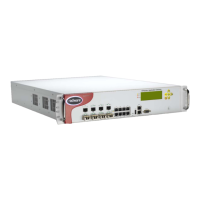
Details the various DefensePro platforms and models, including their port configurations and hardware specifications.
Provides an overview of the APSolute Vision interface structure, organized functionally for easy access to options.
Explains how to use the Configuration perspective to configure Radware devices, including device selection and settings.
Describes the Monitoring perspective for viewing physical devices, interfaces, and logical objects, with system and properties panes.
Details how to access real-time security monitoring tools to analyze current attacks and threat levels.
Explains the Asset Management perspective, available to Administrator roles for managing assets and user configurations.
Describes how to configure inspection ports on a DefensePro device to receive, inspect, and transmit traffic.
Explains the process of locking and unlocking a device to prevent simultaneous configuration changes by multiple users.
Covers essential setup parameters for a selected DefensePro device, including global parameters and time settings.
Details how to view and configure basic device parameters like location, contact information, and system up time.
Describes how to configure NTP for synchronizing the device's time and date for accurate timestamps.
Details how to configure access protocols like WBM, CLI, Telnet, and SSH for managing DefensePro devices.
Describes how to configure supported SNMP versions for connecting APSolute Vision to DefensePro devices.
Explains the procedure for upgrading DefensePro device capabilities using a new license key.
Covers configuring the device to send information messages and trap notifications via e-mail to users.
Details how to enhance security by authenticating users for device management using RADIUS servers.
Explains how to configure event traps to be mirrored to syslog servers for centralized logging.
Describes how to manage digital certificates and keys for secure access to Web Based Management (WBM).
Covers configuring two compatible DefensePro devices to operate in a two-node cluster for high availability.
Describes how DefensePro performs routing between IP interfaces, including Layer 2, Layer 4, and Layer 7 routing.
Explains how DefensePro devices forward IP packets using an IP routing table, including static and dynamic configuration.
Details how to change physical attributes of ports, such as speed and duplex mode, and configure port trunking.
Covers specifying IP version mode (IPv4/IPv6), jumbo frame handling, and IP fragmentation parameters.
Explains how to configure ports on a DefensePro device to receive, inspect, and transmit traffic in paired operations.
Describes DefensePro’s multi-layer security approach, covering network-wide, server, and access-control protections.
Explains how to select the specific DefensePro device for configuring security policies within the APSolute Vision.
Details how to enable and configure global parameters for various protection features before setting up policies.
Describes how to create and manage network-protection policies, defining rules and applying protection profiles.
Explains how to configure server protection policies to defend specific servers against targeted network and application attacks.
Details how to configure white lists to exempt specific traffic from security inspection.
Explains how to configure black lists to block traffic without inspection, used as policy exceptions.
Describes the Access Control List (ACL) module for configuring a flexible and focused stateful access-control policy.
Provides an overview of the Bandwidth Management module, enabling control over available bandwidth and application prioritization.
Details the general bandwidth management parameters, including classification modes and application classification types.
Describes how to define and manage bandwidth management policies, including policy mechanism, classification criteria, and rules.
Explains how to configure the maximum available bandwidth for ports to optimize the queuing algorithm.
Describes how to define network classes by network address, mask, or IP range for traffic classification.
Explains how to configure application classes based on Layer-4 ports for UDP and TCP traffic.
Details how to define network segments using physical port definitions for traffic classification.
Describes how to define network segments using VLAN tags for traffic classification.
Explains how to configure MAC address classes to identify traffic based on source or destination MAC addresses.
Describes how to view the active class configurations that are currently set on the device.
Describes how to configure basic filters with protocol, port, and content type parameters for traffic filtering.
Explains how to create AND Group filters by combining basic filters with a logical AND operator.
Describes how to create OR Group filters by combining basic or AND filters with a logical OR operator.
Explains how to view active services, including basic filters and AND/OR groups, through Web Based Management.
Covers how to activate a device reboot from APSolute Vision for configuration changes to take effect.
Explains how to activate a device shutdown from APSolute Vision, applicable to OnDemand Switch platforms.
Details how to enable or disable APSolute Vision monitoring for a DefensePro device, affecting status polling and alerts.
Explains the process of upgrading DefensePro software versions using APSolute Vision for new features and functions.
Covers downloading a DefensePro device’s log file to the APSolute Vision client system for debugging purposes.
Details how to upload updated Radware or RSA signature files to a DefensePro device from Radware.com or client system.
Explains how to generate and download a technical support file containing CLI output for Radware Technical Support.
Describes how to manage configurations of DefensePro devices within the APSolute Vision server, including commands requiring or not requiring reboot.
Explains how to apply configuration changes, such as network security policy or ACL policy, to a managed device in a single operation.
Describes how to check if a DefensePro device has sufficient memory before changing tuning parameters.
Covers resetting baseline-learned statistics for BDoS or DNS profiles to accommodate network changes.
Details how to enable and disable interfaces, device ports, and trunks from the Monitoring perspective.
Describes how to schedule operations for the APSolute Vision server and managed devices, referred to as tasks.
Covers monitoring various statistics and information for managed DefensePro devices, including general info and high availability.
Describes how to view status parameters related to the high availability of a selected DefensePro device in a cluster.
Explains how to view the Suspend table, which lists attackers whose traffic is suspended by protections like anti-scan.
Details how to view statistics for the device’s average resource utilization and the utilization for each accelerator.
Covers viewing statistics for Authentication Tables and clearing their contents.
Describes how to view statistics for the SNMP layer of the device, including received and sent messages.
Details viewing statistics related to user-defined policies and the utilization of the DoS Mitigation Engine (DME).
Explains how to view information relating to the syslog mechanism for centralized logging.
Describes how to view the Session table, which tracks sessions bridged and forwarded by the device.
Covers monitoring statistics for the IP layer of the device, including packet discards and errors.
Details monitoring Bandwidth Management (BWM) statistics for a DefensePro device, including last-second and last-period data.
Explains how to view the Routing table, which stores information about destinations and how they can be reached.
Describes how to view the device’s ARP table, which contains static and dynamic entries.
Details how to monitor MPLS RD information and configure MPLS RD for VPNs.
Explains how to view status and interface statistics for ports and trunks on DefensePro devices.
Provides a graphical representation of current and recent attacks, offering an overview of threats and their risk levels.
Details how to view summary and detailed information for current and recent attacks detected by the DefensePro device.
Describes how to view real-time traffic statistics over time for IP traffic, including overall traffic, protocol mix, and packet discards.
Explains how to view attack sources geographically, displaying originating countries based on source IP addresses.
Provides real-time traffic monitoring per network rule policy, helping to understand protection effectiveness and anomaly detection.
Details how to monitor rate-based and rate-invariant HTTP traffic parameters, learn baselines, and analyze anomalies.
Describes access to the Command Line Interface (CLI) via serial cable or terminal emulation for device management.
Explains how to define the period for maintaining CLI session inactivity before automatic termination.
Lists the capabilities of the DefensePro CLI, including command syntax, help, editing, and history features.
Describes managing DefensePro devices using a Web-based interface, including SSL confinement and help access.
Details the capabilities of secure Web Based Management (HTTPS), including self-signed Radware SSL certificates.
Explains the APSolute API as a SOAP/XML interface for third-party applications to access DefensePro devices.
Provides information on the APSolute API SDK, including components, documentation, and sample code for custom applications.
Describes Footprint Bypass types for TCP protocols, detailing parameters for attack characteristics.
Details Footprint Bypass types for ICMP protocol, listing parameters for packet header analysis.
Describes Footprint Bypass types for IGMP protocol, listing parameters for packet header analysis.
Details Footprint Bypass types for SYN protocol, listing parameters for packet header analysis and fragmentation.
Describes Footprint Bypass types for TCP Fragmentation, listing parameters for packet header analysis.
Details Footprint Bypass types for UDP protocol, listing parameters for packet header analysis and DNS query details.
Explains how to configure SSL inspection by setting up physical ports for traffic scanning and SSL acceleration.
Details how to configure SSL inspection Layer 4 ports, mapping original traffic ports to AppXcel's decrypted session ports.
Introduces DefensePro's diagnostic tools, including Traffic Capture and Trace-Log, for system diagnosis.
Describes the Traffic Capture tool for capturing packets for analysis using TCPDUMP format.
Explains how to configure the Trace-Log tool for debugging traffic flow within the device.
Explains how to configure diagnostic policies to classify and store only required traffic information for analysis.
Details how to generate and download a technical-support file containing CLI output for Radware Technical Support.
Lists predefined basic filters supported by DefensePro, including name, protocol, OMPC offset, and mask.
Provides a list of specialized terms and their definitions used in the Radware technical environment.

 To Next Page
 General