LED light
Channel,LED 1,channel 1,LED 2,channel 2….LED 6,Channel 6,
LED on means signal transmit
Choose the previous channel
Presss[Chennel selection-left], the current channel LED light will
be on,Press[Chennel selection left]within 3 seconds,press channel 6.
channel 5,channel 4 accordingly. Channel 3-channel 2,channel 1…
channel 6 in cyclic selection,the LED light will be off if no any
operation within 3 seconds.
Choose the next channel
Press[Chennel selection-right]the current channel LED light will
be on,Press[Chennel selection-right]within 3 seconds,press channel
1. channel 2,channel 3 accordingly.
Channel 3-channel 2,channel 1… channel 6 in circle selection, the
LED light will be off if no any operation within 3 seconds.
[Up/Open]
[Stop]
open the curtains. Stop the curtain.
[Down/Close]
[Up Tilting/75%]
Close the curtains.
Short time press,up tilting, press 1.5
second, move to IP1 75% limit position.
[Horizontal Position/50%]
[Down Tilting/25%]
Press tilt to horizontal position,press
1.5 second,move to IP3 50% limit
position.
Presstilt to Down tilting,press 1.5 second,
move to IP2 25% limit position.
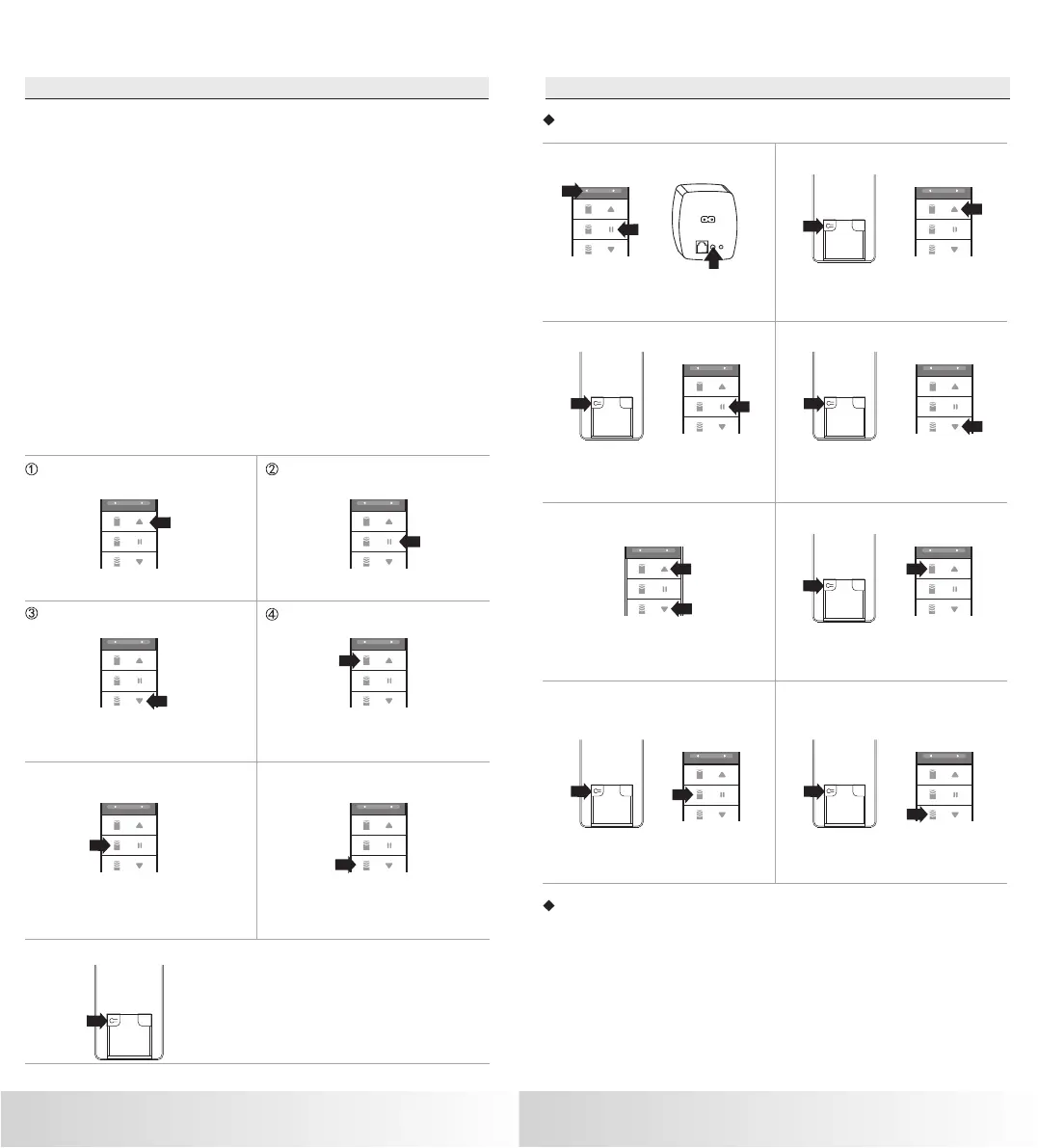
[Channel Choose Left]+[Stop]
[Channel Setting]+[Up/Open]
Direction change,After entering into
programming, press Programming
Button to confirm.
Press 5 seconds,enter into [Up/Open],
limit setting,move to position you like,
press Programming Button to confirm.
[Channel Setting]+[Stop]
[Channel Setting]+[Down/Close]
Press 5 seconds, delete limit. Press 5 seconds,enter into [Down/Close]
limit setting, move to the position you like,
press Programming Button to confirm.
Button function
⑤ ⑥
[Channel Setting]
Open the case, press the button for
programming.
⑦
Combination button
The specific operation of combination keys is as follows
+
5S
5S
+
5S
5S
+
5S
5S
[Up/Open]+[Down/Close]
[Channel Setting]+[Up Tilting/75%]
External control mode,Press up and
down button and then confirm by
programming button.
Press programming button and IP1 button.
[channel Setting]+[Horizontal
Tilting/50%]
[Channel Setting]+[Down Tilting
/25%]
Quick press to IP3,long press for 50%
limit position.
Quick press to IP2, long press for 25%
limit postion
+
+ +
Remark
1.All button’s function should be work with motor/controller
2.Choose current channel for all function setting
3.Hold programming button when press up/down button for limit setting
2 3
1.5S
1.5S
1.5S


 To Previous Page
 Loading...