PROGRAMMING YOUR WATER SOFTENER
The valve has 2 levels of programming – Level 1 and Level 2
You will need to only go through Level 1 programming to start up your unit. Level 2 programming is factory set and
can be changed only if desired.
In level 1 programming you can set current time, date, number of people in your home and the feed water hardness.
Level 1 programming is completed in 5 easy steps.
Level 1 PROGRAMMING
STEP 1 : Set Current Time
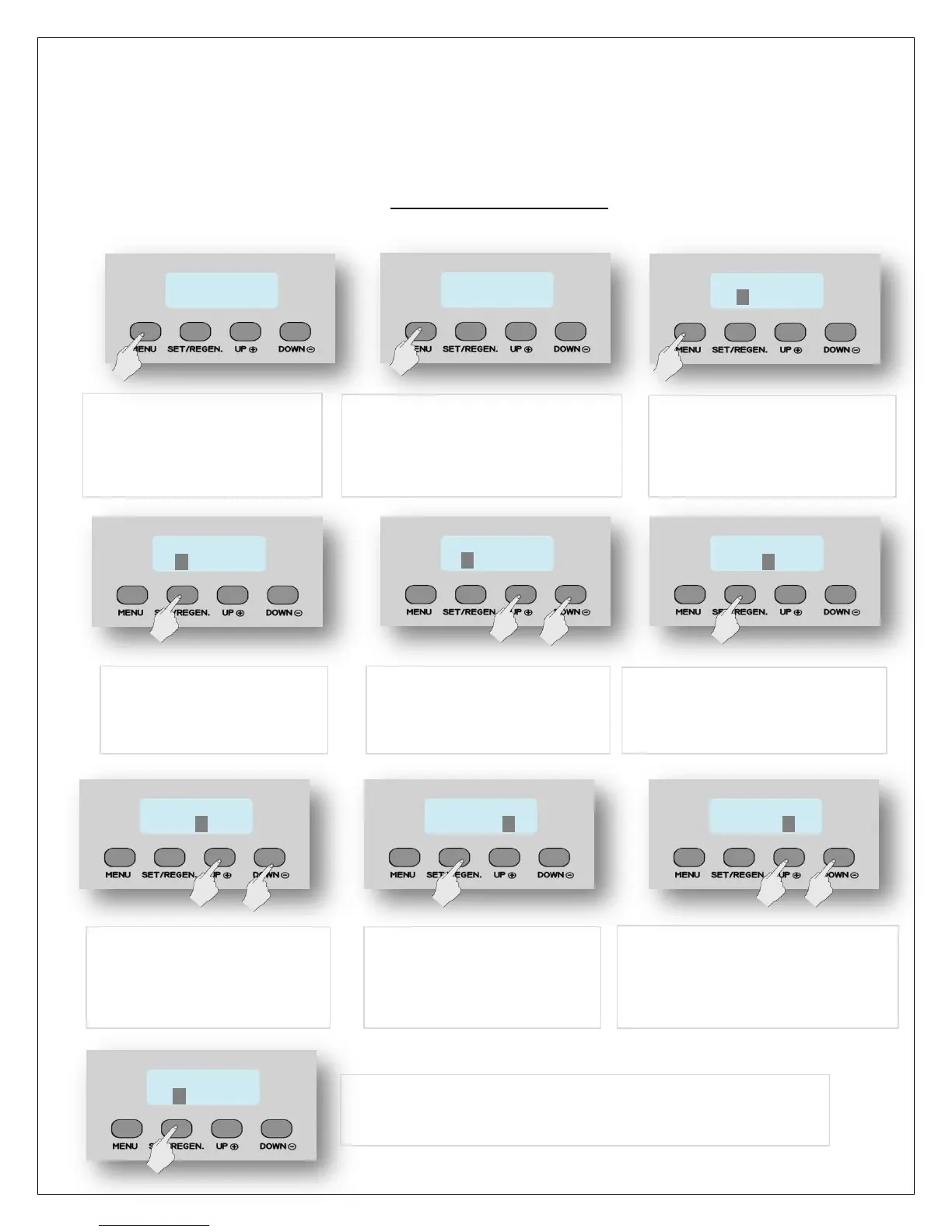
1. Press MENU for 3 seconds
5. Press SET/REGEN once
and the highlighted value
flashes
6. Now press UP or DOWN key
to change the hour values to
current time
7. Press SET/REGEN again. Hour
value will be accepted and
minute value will start flashing
2. The display will read “Press
MENU Key for 3 sec to unlock”.
3. After 3 seconds, the display will
beep confirming unlock
4. Press MENU again and the
hour value becomes
highlighted
PRESS MENU KEY
3 SEC TO UNLOCK
8. Now press UP or DOWN key
to change the minute value
to current time
9. Press SET/REGEN again.
Minute value will be
accepted and AM/PM
value will start flashing
10. Now press UP or DOWN key to
change the value to AM or PM
11. Press SET/REGEN again to accept. Flashing stops & hour value
is highlighted again. PROCEED TO STEP 2


 To Next Page