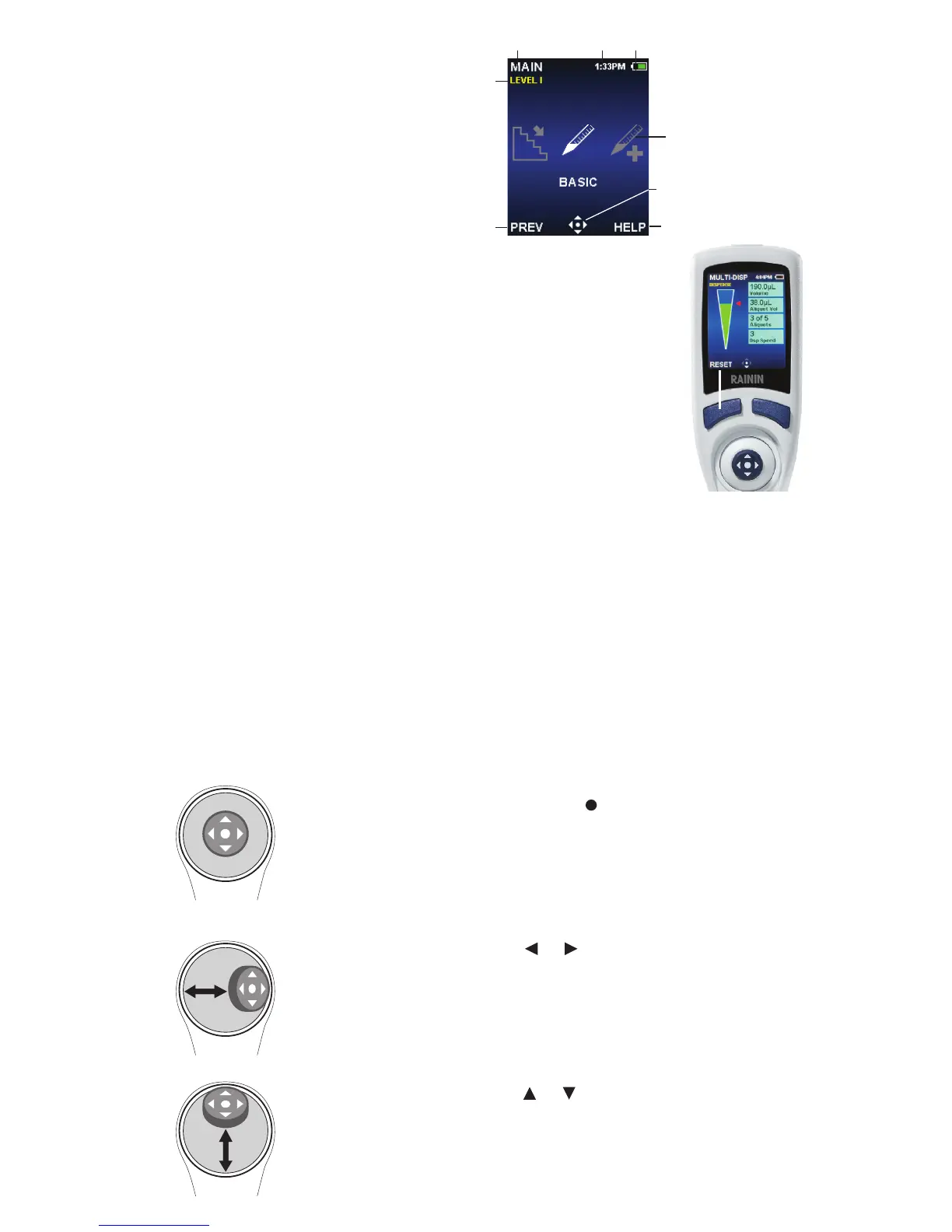
Basic navigation
Navigation on E4 XLS is done using the soft keys and the joystick
control. The functions of the soft keys and joystick control change
according to the menu or mode displayed. In the image, the left
soft key function has the function RESET.
Functions are shown in the display above each soft key, and the
available joystick controls are highlighted in the navigation icon.
Soft Key Functions
LEFT SOFT KEY
MAIN: Displays the Main Menu
CONT: Continues current pipetting operation
DONE: Exits Settings and Options screens
RESET: Empties tip, resets operation to aspirate
RETURN: Exits a Help screen
PREV: Returns to previous mode
RIGHT SOFT KEY
OPTIONS: Available mode options
CANCEL: Cancels, exits current action
HELP: Operational information
Mode- and setting-specific functions
Press and click the center button –
•Access menu items
•Edit settings and options
•Choose and save selections
Move joystick left or right – or
•Navigate between menu items and pages
•Access Settings screens
•Make coarse setting value adjustments
Move joystick up or down – or
•Aspirate and dispense
•Navigate between settings and options
•Make fine setting value adjustments
Joystick Controls
Display
1. Current menu or mode
2. Menu level, current operation or page
3. Time
4. Battery charge indicator
5. Carousel of modes
6. Joystick navigation icon
7. Soft key functions
7
6
1
3
4
2
5
7



 To Next Page