You have the ability to configure the functionality of the
auxiliary switches via the instrument cluster display. All
switches can now be configured for setting the switch type
operation to latching or momentary, power source of either
battery or ignition, and ability to hold last state across key
cycles.
NOTE: Holding last state conditions are met when switch
type is set to latching and power source is set to ignition.
For further information on using the auxiliary switches,
please refer to the Ram Body Builders Guide by accessing
www.rambodybuilder.com and choosing the appropriate
links.
PICKUP BOX
The pickup box has many features designed for utility and
convenience.
NOTE: If you are installing a Toolbox, Ladder Rack or
Headache Rack at the front of the Pickup Box, you must
use Mopar Box Reinforcement Brackets that are available
from your authorized dealer.
You can carry wide building materials (sheets of plywood,
etc.) by building a raised load floor. Place lumber across the
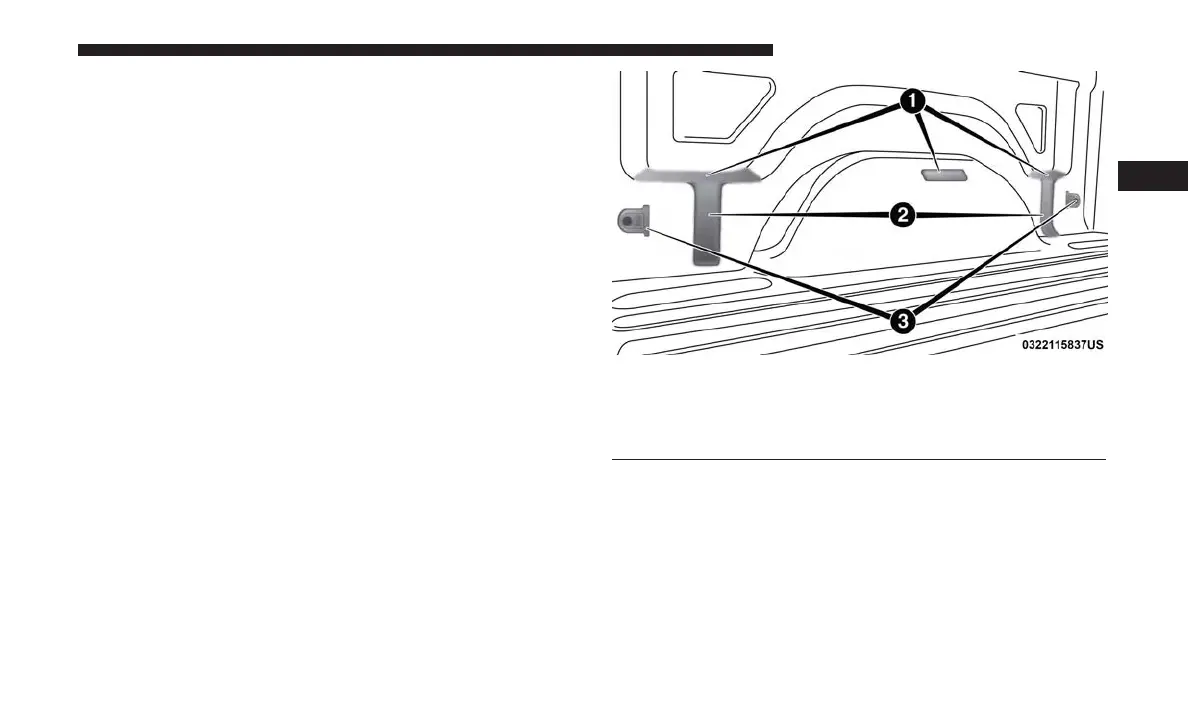
Pick Up Box Features
1 — Upper Load Floor Indents
2 — Bulk Head Dividers
3 — Cleats
3
GETTING TO KNOW YOUR VEHICLE 139















 To Next Page