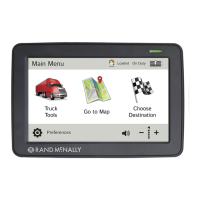
This document is a user manual for the Rand McNally IntelliRoute® TND™ 730 & 530 LM Truck GPS devices. It provides comprehensive instructions on how to use, configure, and maintain the navigation system, catering specifically to the needs of truck drivers.
Function Description:
The Rand McNally IntelliRoute® TND™ 730 & 530 LM are Global Positioning System (GPS) devices designed for truck navigation. They calculate geographical positions using satellite data, requiring at least three satellites for position and four for elevation. The devices offer truck-specific routing, taking into account truck information (weight, length, height, number of axles, hazmat type, and trailer type) to provide legal and appropriate routes. Key functions include destination selection (address, city center, intersection, latitude/longitude, history, address book, multi-stop trips, points of interest, and local search), map and routing options (route map window, exits quick view, directions slide-out list, virtual dashboard, junction view, turn view, and location/route options), and various tools and features (Wi-Fi, weather, fuel prices, truck tools, timers, mileage logs, trails, quick planner, road atlas information, unit converter, calculator, calendar, notepad, and optional traffic everywhere). The devices also connect to the Rand McNally Dock for software upgrades, map updates, construction updates, and additional features like uploading TripMaker® trips, exporting mileage and fuel logs, loading custom POIs, and sending feedback.
Important Technical Specifications:
- GPS Accuracy: Varies from 10 feet to several hundred feet, depending on vehicle placement and surrounding environment.
- Operating Temperature: Between 32 degrees F and 120 degrees F.
- Power Source: Recommended to be connected to a power source during use. Vehicle charger connects to a 12V outlet; wall charger connects to a 120V or 240V outlet.
- Connectivity: Mini-USB Port for charger/USB cord, SD Card Slot (for future use), Wi-Fi for data services.
- Display: Touch screen.
- Battery: Not user-replaceable. Contact customer support for battery-related questions.
- Memory: Stores preferences, address book, and other personal data even after a reset.
- Multi-Stop Trips: Can include up to 50 stops, with automatic optimization for up to ten stops.
- Custom POIs: Supports .csv file format for uploading custom locations, including destinations and alert locations (e.g., red light cameras, railroad crossings).
- Exported Data: Mileage and fuel logs can be exported in .xls or .csv format.
Usage Features:
- Driver Profiles: Supports two driver profiles for team driving, with separate driving timers.
- Load Option: Specifies whether the trailer is always loaded or prompts for load status before route calculation.
- Driver Status: Automatic mode starts/stops driving timers based on vehicle movement; manual mode allows temporary override.
- Main Menu: Provides quick access to Truck Tools, Go To Map, Choose Destination, and Preferences.
- Volume Control: Adjustable for spoken instructions.
- Mute/Unmute: Speaker icon on main menu and map screen for quick muting.
- Quick Power Press: Configurable for quick access to POI along route, screen snapshot, main menu, show map, mute on/off, save current location, or Tell Rand.
- Screen Snapshot Button: Captures screenshots.
- Shortcut Button: Configurable for Main Menu or Go to Map.
- Screen Click: Option to enable/disable screen click sounds.
- Tutorial: On-device tutorial for device use.
- Keyboard Layout: ABC or QWERTY options.
- Voice Name: Selectable voice for spoken instructions.
- Language: English, Español, Français for screen and spoken instructions.
- Units: U.S. Standard, Metric, Auto Select.
- Clock Setting: 12-hour or 24-hour clock.
- Skin Style: Day and Night modes with Ice, Carbon, and Classic styles.
- Brightness: Separately adjustable for day and night modes.
- Vehicle Type: Truck, Car, or Bus modes, affecting route calculations and available tools.
- Yard Time Zone: Configurable time zone.
- Update Driver Status: Automatic, Main Menu buttons, or Timers Inactive options.
- Reset Truck Timers: Automatic or Manual.
- Mileage Log: Truck only, Car only, Truck & Car, or Don't log mileage options.
- Map Styles: Light and Dark.
- Map Auto Zoom: Off, On (auto scale, street scale, city scale, state scale).
- POI Icons: Customizable display of various POI categories (restaurants, banks, travel centers, truck services, parking, weigh stations, CAT scales, dealers, hospitals, etc.) with selectable icons and colors.
- Route Color: Customizable.
- Route Preferences: Fine-tune settings for tunnels, avoid list management (roads, states/provinces, areas, routes), fast recalculation, turn announcements, turn view distance, junction view distance, cross-country borders, dirt roads, tollways, U-turns, ferries, and truck ETA adjustment.
- Warnings: Configurable alerts for hazmat type, height, number of axles, trailers, weight, auto dismiss, construction areas, state/province border, time zone change, curve warnings, driving day/session/week limits, engine brake warnings, hill warnings, narrow road warnings, speed, speed limit display, toll booth, warning/alert prompts, warning display size, and weigh stations.
- Virtual Dashboard: Displays current direction, yard/local/destination times, ETA, sunrise/sunset, current speed, posted speed limit, elevation, trip completion percentage, distance to next maneuver, trip miles/time, odometer, and fuel log access.
- Junction View: Displays upcoming maneuvers with signs, lane directions, distance, and lane assist arrows.
- Turn View: Displays upcoming turns.
- Wi-Fi Hotspots: Connects to available hotspots for live information, weather, and fuel prices.
- Traffic Everywhere: Optional service providing traffic events, flow, and incidents, with route recalculation based on traffic.
- Quick Planner: Estimates mileage and driving time between two cities, with cost per mile calculation.
- Road Atlas Information: Provides emergency contact information and truck regulations by state/province.
- Unit Converter: Converts distance, weight, and temperature.
- Calculator: Basic calculator function.
- Calendar: Displays current date and allows navigation through months/years.
- Notepad: Allows creation and editing of notes.
- Tell Rand: Enables users to send feedback and suggestions to Rand McNally.
Maintenance Features:
- Cleaning: Use a moist cloth to clean the navigation device.
- Reset Button: Restarts the device without losing personal data.
- Software Upgrades and Map Updates: Available through the Rand McNally Dock.
- Construction Updates: Provided via the Rand McNally Dock.
- Automatic Trip Reset: Configurable to automatically reset trip information after the vehicle remains stationary for a specified number of hours.
- Manual Trip Reset: Allows manual reset of trip information for selected tabs.
- Fuel Log Management: Records fuel purchases, calculates fuel economy, and allows viewing by state or month.
- Trails Management: Records "bread-crumb" paths of GPS coordinates, with options to view, edit, and color-code trails.
- Avoid List Management: Allows users to manage and remove avoided roads, states/provinces, areas, and routes.

 Need help?
 General

 To Next Page