5
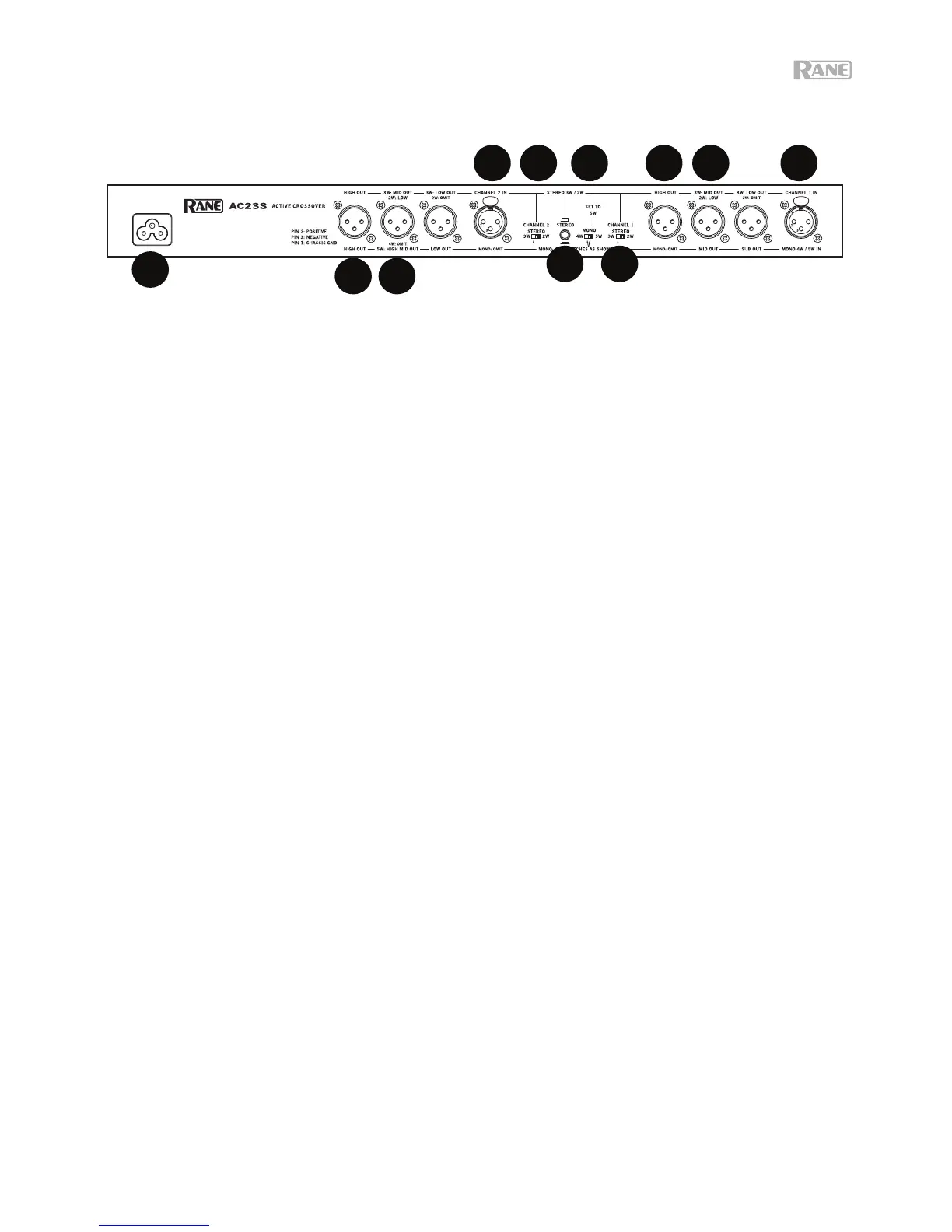
REAR PANEL: STEREO 2-WAY CONNECTIONS
Observe the labels above the Inputs and Outputs for Stereo operation.
1. Channel 1 Input: Plug the left output of the mixer, equalizer, or other signal source to this input. Pin 2 is “hot”
per AES standards.
2. Channel 2 Input: Plug the right output of the mixer, equalizer, or other signal source to this input.
3. High Frequency Outputs: Connect the Channel 1 High Out to the left channel input of the high frequency
amp, and the channel 2 high out to the right channel input of the high frequency amp.
4. Low Frequency Outputs: Connect the Channel 1 “2W-Low” output to the left channel input of the low
frequency amplifier, and the Channel 2 “2W-Low” output to the right channel input of the low amplifier.
5. Stereo / Mono Switch: Set this switch to the Stereo (out) position.
6. Stereo 2-Way / 3-Way Switches: Slide the switches to the 2W position. This switch removes the low
frequency crossover from the signal path. Low frequencies are now routed to the Mid frequency output.
Note: The Low frequency outputs are still active and may be used as additional Low outputs.
7. Mono 4-Way / 5-Way Switch: Set this switch to the 5W position for stereo operation.
8. Power Input: Connect the included power cable here. Do not lift the ground connection!
8


 To Next Page