How to use the screen?
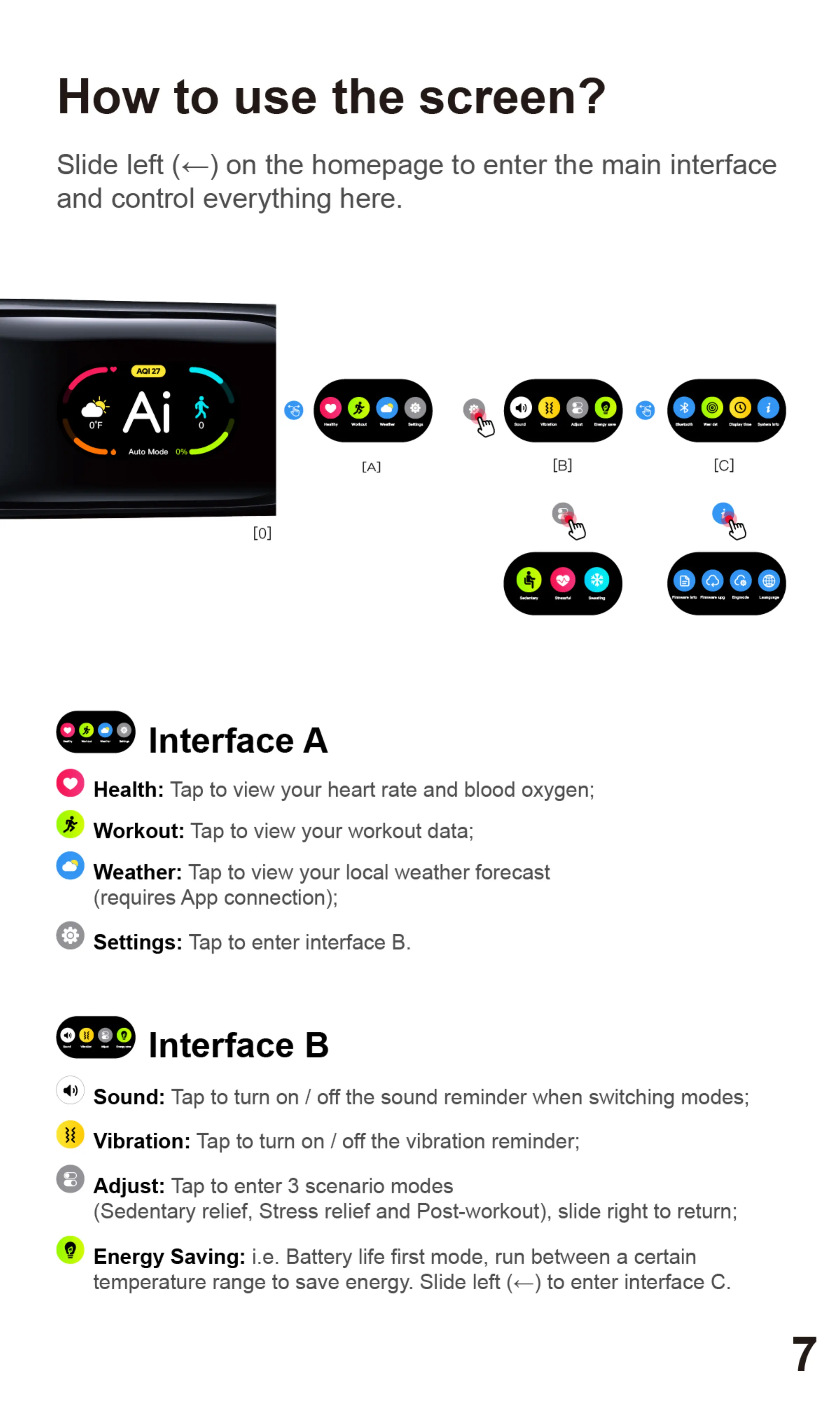
Slide left (e) on the homepage to enter the main interface
and control everything here.
27
OOF
O Auto Mode 0%
@ InterfaceA
4)
[B]
O ealth: Taptoviewyourheartrateandbloodoxygen;
* Workout:
Tap to view your workout data;
O
Weather: Tap to view your local weather forecast
(requires App connection);
O
Settings: Tap to enter interface B.
Interface B
4) SOUnd:
Tap to turn on / off the sound reminder when switching modes;
Vibration:
Tap to turn on / off the vibration reminder;
Adjust: Tap to enter 3 scenario modes
(Sedentary relief, Stress relief and Post-workout), slide right to return;
Energy Saving: i.e. Battery life first mode, run between a certain
temperature range to save energy. Slide left (e) to enter interface C.
7


 To Next Page
 Loading...