Need help?
Do you have a question about the Rascal R200 Series and is the answer not in the manual?
Learn to operate the scooter safely in an open area with guidance.
Practice moving forward, turning, and reversing to gain confidence.
Avoid carrying passengers, driving on slopes, drinking, towing, or using mobile devices.
Be aware of radio/TV transmitters and proximity; understand EMI immunity levels.
Do not turn on hand-held communication devices while scooter is on.
Turn off scooter for unintentional motions, uncontrollable direction, or brake release.
Modifications can increase susceptibility to radio wave interference.
Report incidents of unintended movement or brake release to customer service.
Avoid traffic, water, adverse weather, rough surfaces, and darkness.
Ensure clear reverse path, avoid sharp turns, maintain proper body posture.
Do not climb curbs over 2" or cross gaps over 3".
Avoid climbing hills >10°, slopes >3°, or soft/uneven surfaces.
Do not reverse on hills; use low speed downhill and avoid on-hill transfers.
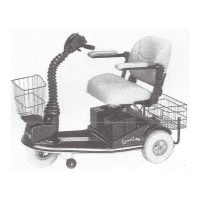
Identifies main controls like key switch, panel, speed dial, and charger indicator.
Covers seat height, swivel, and adjustable armrest features.
Details tiller, levers, wheels, bumper, basket, and charger socket.
Identifies Model 500 controls: key switch, panel, speed dial, charger indicator.
Covers Model 500 seat features: pivot, deluxe seat, adjustable armrests.
Details Model 500 parts: tiller, levers, wheels, bumper, basket, light, charger.
Scooter uses sealed lead acid batteries; instructions for cable connection.
Charge fully for best performance; follow steps: turn off, plug in, connect.
Red light means ready, white means charging, green means fully charged.
Steps include seat removal, cover removal, battery disconnection, and motor section separation.
Controls power (ON/OFF) and speed regulation via dial.
Uses levers on right (forward) and left (reverse) sides.
Displays battery charge and provides horn warning signal.
Engages electromagnetic brake and throttle for movement and stopping.
Adjust seat height by lifting off post; swivel in 45° increments.
Adjusts backrest angle to 90°, 100°, 105°, or 120°.
Adjust armrest height, angle, and width using clamping nuts.
Adjusts handlebar angle for control access and comfort.
Use lever to disengage brake for manual pushing; ensure scooter is off.
Ensure scooter is off and on a level surface for transfers.
Never operate scooter without feet on the platform; risk of injury.
Covers defects for one year; service via authorized reps or Customer Service.
Wear items excluded; batteries covered free for 60 days, then pro-rated.
Excludes damage from misuse, accidents, modifications, or external factors.
Labor/shipping not covered unless authorized within first 30 days.
Disclaims liability for incidental/consequential damages, personal injury, property damage.
Implied warranties limited to one year; state laws may affect coverage.
Provides contact numbers for USA, Canada, UK, and other countries.
Contact customer service for advice, inspection, or repair arrangements.
Procedures for returning parts/products, including Return Authorization Number.
Contact details for US and Canada service centers.
Fields for model, serial number, date purchased, name, and address.
Section for providing a return address.


 To Next Page
 General