‐8‐
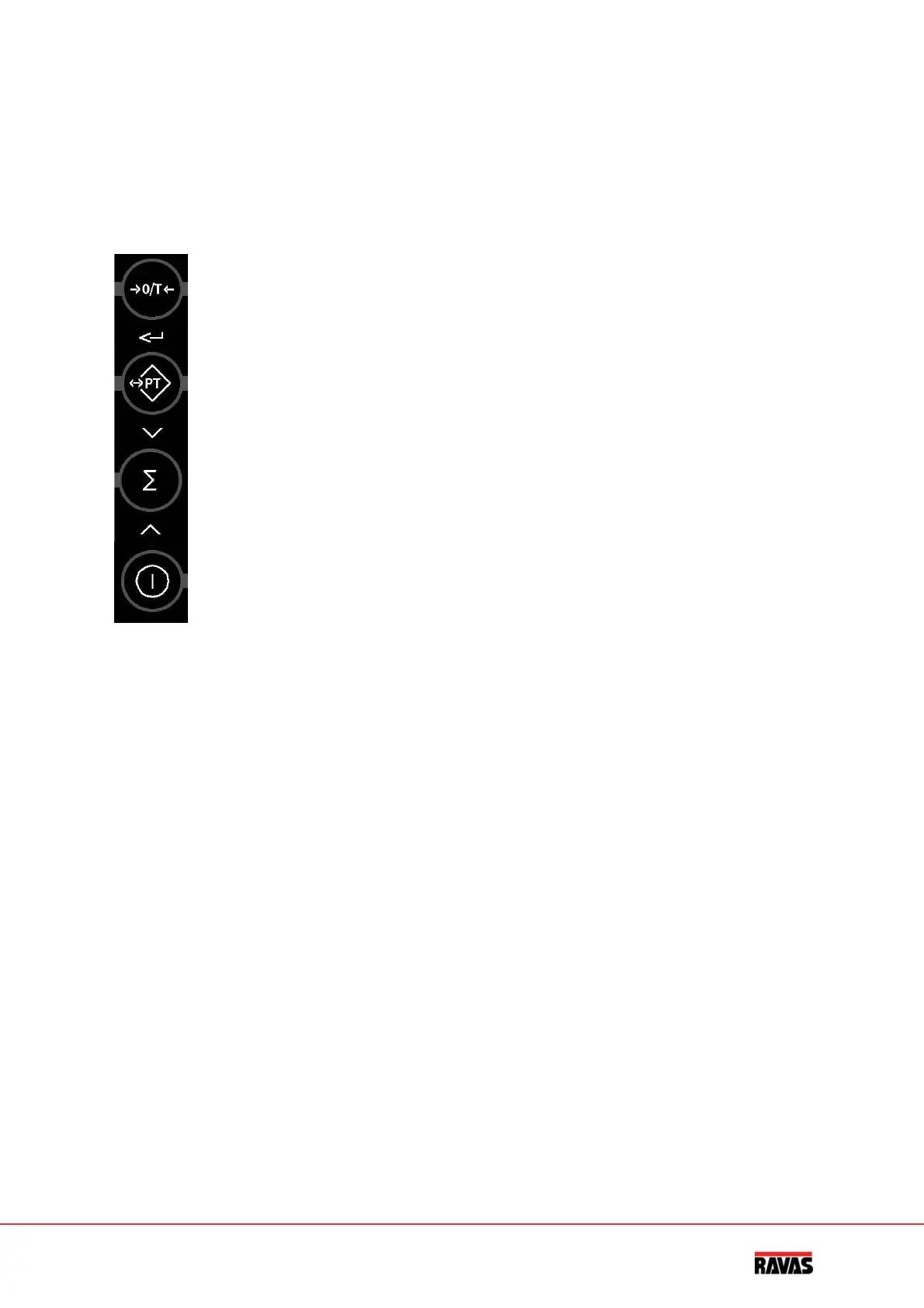
Thetouchpanel
Eachkeyhasanoperationalandanentryfunction.
Operational
function
Entryfunction
zerosettingand
automatictare
confirmand
digittotheleft
tareentry
decreasingflashingdigit
totalising
increasingflashingdigit
on/off
clear
Important
Operationofakeyisnotacceptedunlesstheweighingsystemisstable(andthesign“loadstable”
lightsup).Thismeansthattheindicatoronlyexecutescommandswithastableload.
Warning
Whentheweighedloadsurpassesthepre‐setmaximum,thedisplayshows:“HELP1”.Inorderto
preventdamagetotheindicatororloadcells,theweighingsystemmustbeunloaded
immediately.
Tiltedposition
Withtheapprovedversionoftheweighingsystem,thehelpdisplayshowssmallbarswhenthis
systemisinatiltedpositionlargerthan2°.Inthiscase,theweighingsystemmustbeplacedina
horizontalposition.Afterthis,thesystemcontinuesexecutinganycommands.



 To Next Page