‐7‐
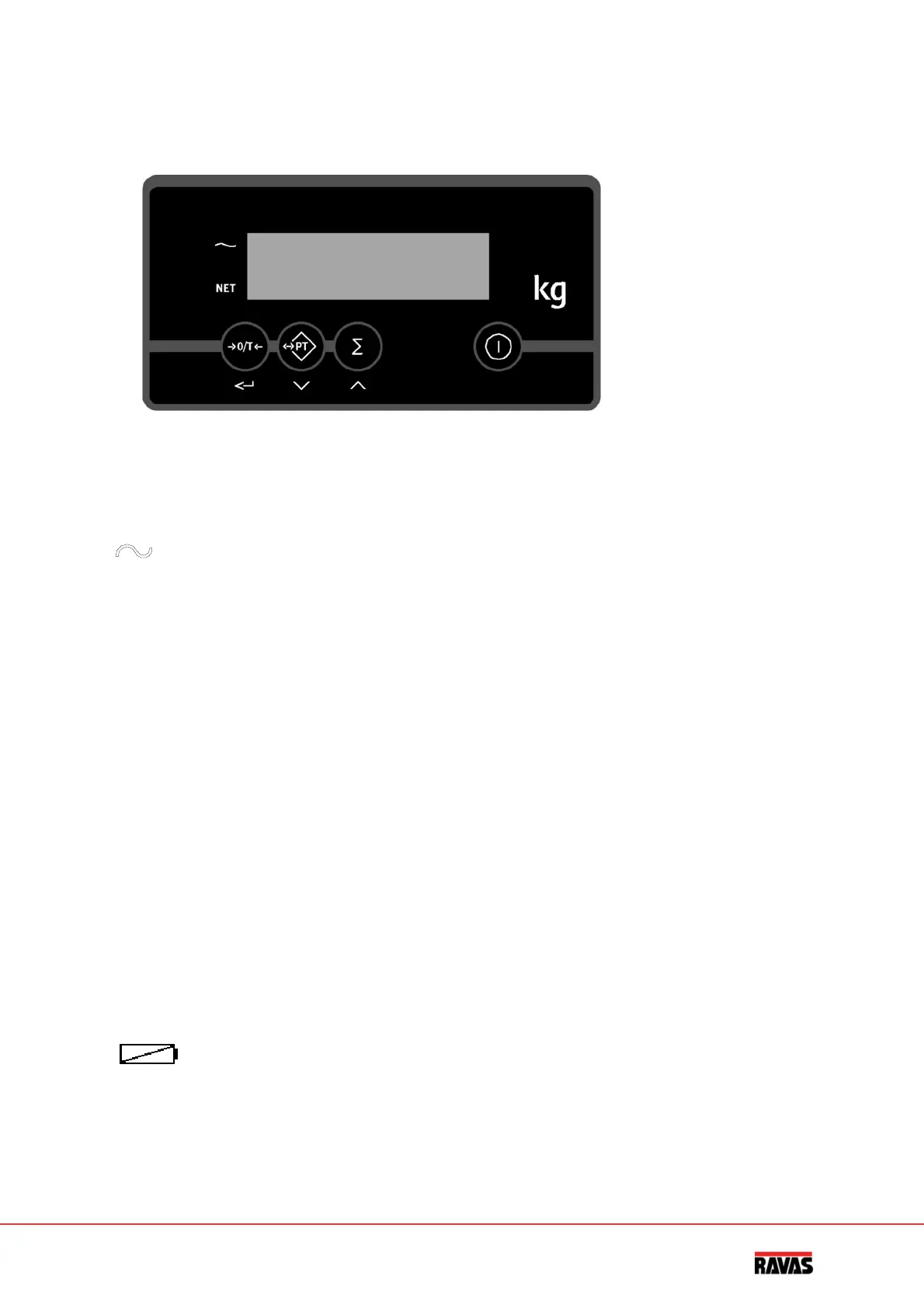
2.Touchpanelindicator
Frontindicator
Thedisplay
Bymeansofthreepointerbarsthedisplayshows:
◄
theweighingsystem(includingload)isstable
▬
theweightshownisnegative
NET
◄
thedisplayshowsthenetweight
Thedisplayindications
Theminussignlightsinthedisplay.Thefollowingindicationscanbeshowninthedisplay:
HELP1Theweighingsystemhasbeenoverloaded.
HELP2Taringofnegativeweight.
HELP3NegativesignalfromtheloadcellonADconverter/tiltedposition.
HELP4Thetarevalueentered(manually)istoohigh.PresskeyPTagaintodelete
thishelpmessageandkeyinalowertarevalue.
HELP5Totallingmemoryfull.
HELP6NoBluetoothconnection(onlyRF‐systems).
HELP7SignalfromtheloadcellonADconverteristoohigh.
HELP8Tiltedposition(onlyRF‐systems).
HELP9Lowbatontransmitter(onlyRF‐systems).
LO‐BA or
Thebatteryvoltagelevel(indicator)isrunninglow.Thebatteryhastobe
charged.


 To Next Page