HYBRID
EXTREMELY DURABLE
SEMI-MECHANICAL KEYBOARD
12
EN
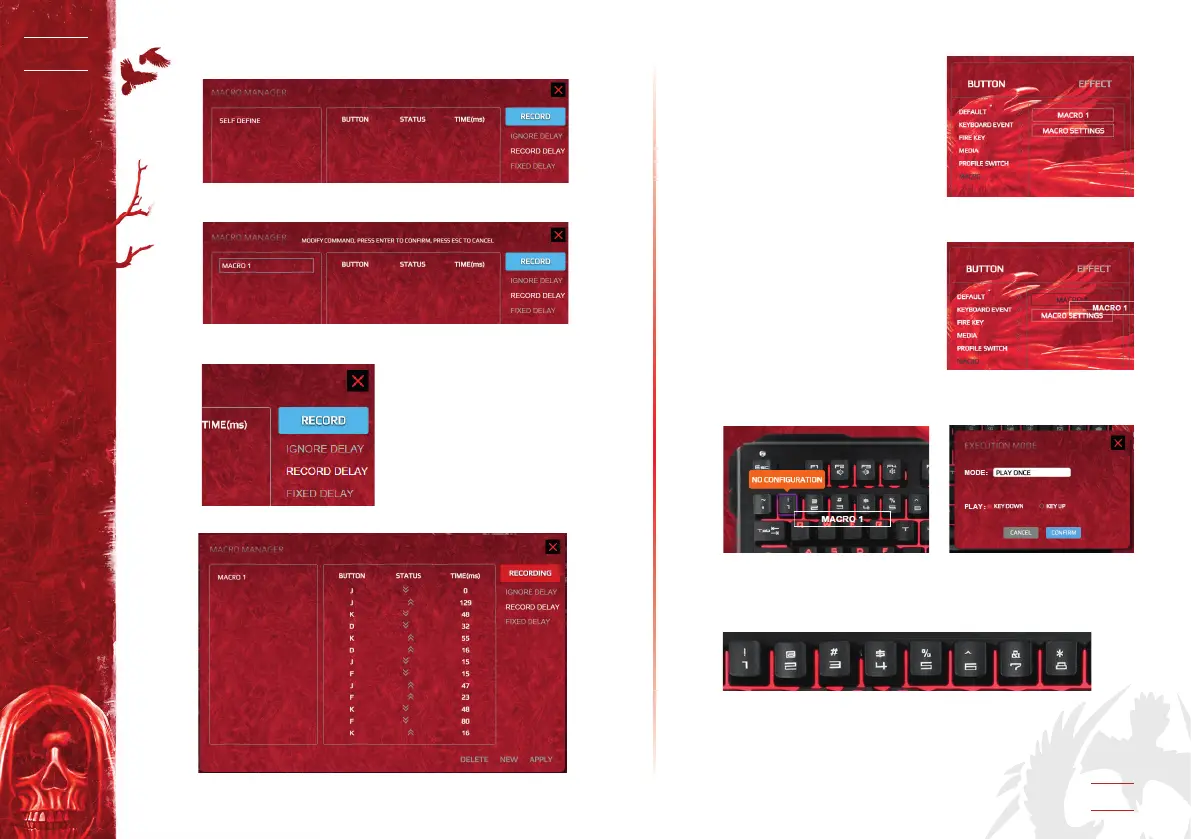
B. Then double click SELF DEFINE.SELF DEFINE.
Writing your given name, for example MACRO1, like the
below one:
Then click RECORD:
C. After RECORD is done, click APPLY:
D. After RECORD is done, the
below window appears:
E1.
After one Macro (for instance
Macro1) is dened, you can de-
ne any key as this Macro key.
For example, if you would like
to dene key 1 as the macro key
for macro1, you just need to click
macro1 and drag it on key 1, then
click CONFIRM to complete the
setting.
E2. From key 1 to key 8 , each mode has eight Marcos to be
dened, so total there are 24 macros setting.


 To Next Page