
 Need help?
Do you have a question about the RaycoWylie i4507 and is the answer not in the manual?
Provides an overview of the manual's content and purpose.
Lists the required qualifications for operating the system.
Describes the system's primary purpose and function.
Explains the system's core functionality and monitoring capabilities.
Details audible warnings provided by the system's buzzer.
Describes visual warning lights on the display.
Details the main hardware components of the i4507 system.
Lists the system's technical specifications and interface details.
Explains the layout and elements of the primary display screen.
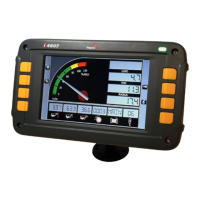
Provides an overview of the display unit's physical features and controls.
Describes the function of each button used to operate the system.
Outlines the different operating modes available on the system.
Illustrates the physical locations of warning lights and indicators on the display.
Explains the meaning and triggers for various warning lights and indicators.
Provides crucial safety rules for system operation.
Discusses inherent risks that remain even with safety measures.
Describes the system's startup process and initial self-test.
Covers the procedures for configuring the system parameters.
Explains how to select the appropriate duty configuration for the crane.
Details how to view the current system configuration and crane settings.
Outlines how to enter the mode for setting up system configurations.
Describes how to choose measurement units for display.
Explains how to set the system's display language.
Details how to adjust the system date and time for data recording.
Covers screen brightness presets for different lighting conditions.
Explains how to adjust the screen's backlight brightness.
Describes how to zero the load display by removing hook/rigging weight.
Explains how to bypass system lockouts or enter rigging mode.
Details the use of rigging mode for maintenance and erection tasks.
Provides instructions on how to enter the rigging mode.
Explains how to bypass the system's lockout functions.
Guides the user on setting operational limits to prevent hazardous movements.
Details the steps to enter the mode for setting operational limits.
Explains how to modify the values of the set operational limits.
Describes how to activate or deactivate specific operational limits.
Introduces the range limiting feature and its safety considerations.
Details how to navigate to the range limiting settings menu.
Explains the procedure for programming the height limit.
Describes the steps to define a free zone with side walls.
Explains how to set height limits that vary based on the boom's rotational position.
Describes how to set radius limits that vary based on the boom's rotational position.
Guides on accessing the diagnostic menu to check system and sensor status.
Details checking the angle sensor's software version and calibration status.
Details checking the load sensor's software version and calibration status.
Provides information on relay cards, digital outputs, and inputs.
Discusses diagnostics for slew sensors and their relation to range limiting.
Explains how to view detected sensor addresses on the CAN network.
Lists common error messages and their causes for internal system issues.
Details errors related to the system's internal components like memory and clock.
Lists errors concerning external interfaces such as angle, load, and relay connections.
Outlines daily checks to ensure system readiness before operation.
Details semi-annual inspection tasks for system integrity.
Provides a step-by-step guide for performing the rated load test.
Covers preventive maintenance procedures and important care instructions.
Lists critical safety precautions to take before performing repairs or adjustments.
Addresses how to handle adjustments, repairs, and contact for service.
 General
| Brand | RaycoWylie |
|---|---|
| Model | i4507 |
| Category | Construction Equipment |
| Language | English |

 To Next Page
