LifeTag System Operating Guide 3
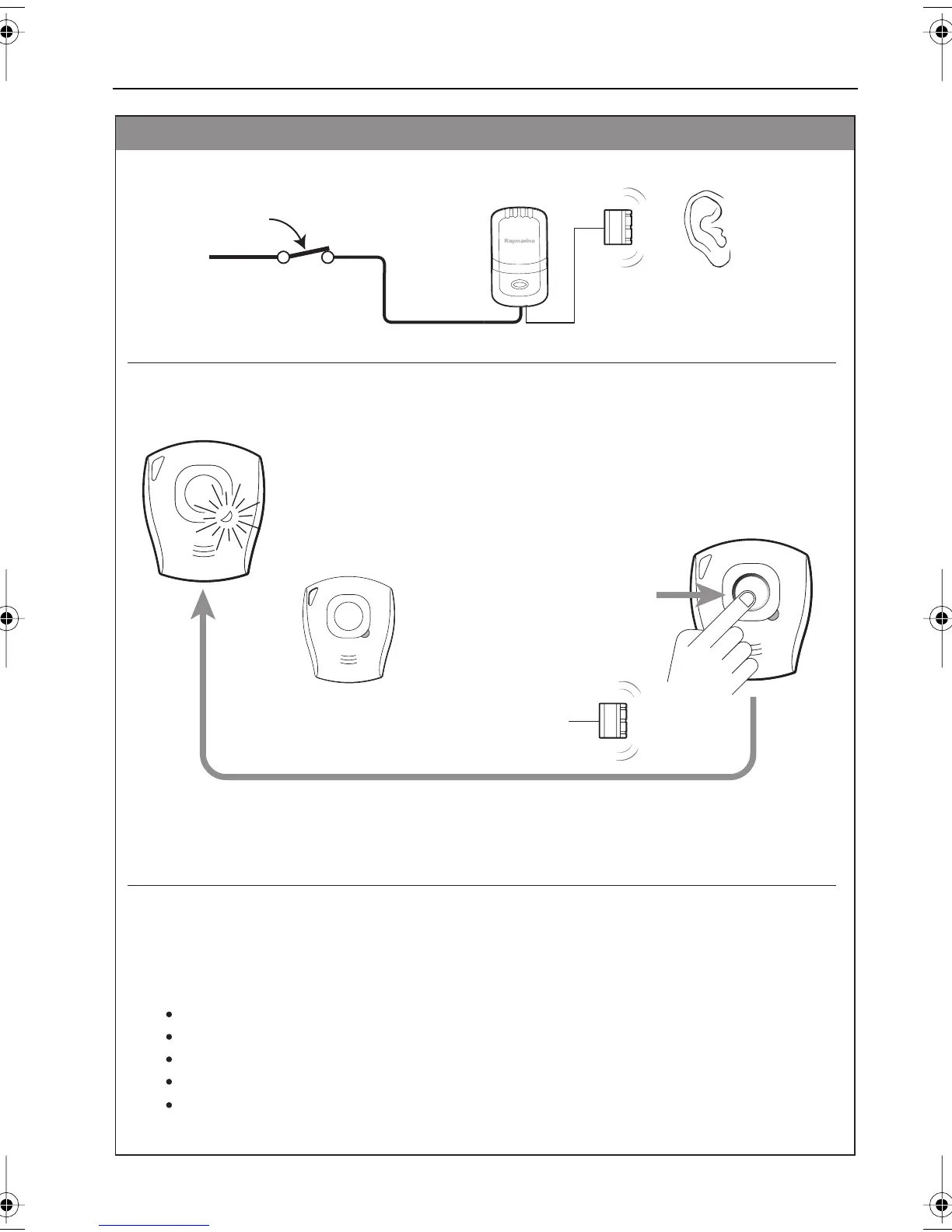
If a Tag is not active (indicator
unlit), press and release the
pushbutton to activate the Tag.
2. Ensure Tags are Active
1. Apply power to Base Station
Base Station
Getting started
Before issuing Tags to crew members, check each Tag to ensure the
LED indicator briefly flashes GREEN once every 10 seconds.
This indicates that the Tag is ACTIVE.
12 V dc
Check that the Alarm 'chirps'
briefly, as power is applied
D8884-2
3. Issue Tags to crew
What to do if an alarm occurs
How to carry Tags
What will initiate an alarm
How to know if a Tag is active
How to know when a Tag battery needs changing
Issue Tags to your crew members, then instruct them how to use the LifeTag system.
With reference to this Operating Guide, explain:
As each Tag is activated, the
Alarm 'chirps' 3 times.
If a Tag indicator does not flash green once every 10 seconds, then the Tag is
not active. Check the table on page 4 to determine what to do.
81275_3.book Page 3 Friday, July 28, 2006 8:48 AM


 To Next Page