
 Need help?
Do you have a question about the Razer GOLIATHUS CHROMA and is the answer not in the manual?
Details the items included in the Razer Goliathus Chroma package, such as the mouse mat and documentation.
Lists the hardware and software requirements for using the Razer Goliathus Chroma and Razer Synapse 3.
Instructions on how to register your Razer product online for warranty status and benefits.
Information on warranty coverage and how to access free online technical support.
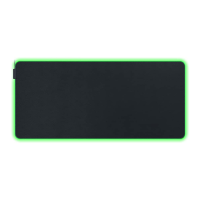
Key technical features of the Razer Goliathus Chroma, including lighting and surface type.
Provides precise measurements and weight specifications for the Razer Goliathus Chroma mouse mat.
Diagram and labels identifying the key physical components of the Razer Goliathus Chroma mouse mat.
Step-by-step guide on how to download, install, and set up Razer Synapse 3 for your device.
Configure device settings, profiles, and lighting effects on the Mouse Mat tab in Razer Synapse 3.
Organize game profiles and link them to specific applications or games for automatic profile switching.
Create advanced lighting effects or enable third-party app integrations for a personalized Chroma experience.
Record, edit, and assign complex command sequences to mouse buttons using the Macros tab.
Adjust software language, startup behavior, and perform device resets via the Razer Synapse 3 Settings window.
Essential safety precautions and best practices for operating the Razer Goliathus Chroma to prevent damage.
Recommended procedures for cleaning and maintaining the Razer Goliathus Chroma for optimal performance.
Details Razer's intellectual property rights, trademarks, and copyright notices for the product and guide.
Information on the terms and conditions of the limited product warranty, with a link to razer.com/warranty.
Defines limitations of liability and costs of procurement for Razer concerning the product.
 General
| Package width | 33 mm |
|---|---|
| Package weight | 230 g |
| Quantity per pack | 1 pc(s) |
| Material | Microfiber |
| Wrist rest | No |
| Product color | Black |
| Backlight color | Multi |
| Gaming mouse pad | Yes |
| Surface coloration | Monochromatic |
| Harmonized System (HS) code | 4016100090 |
| Country of origin | China |
 Weight and Dimensions
| Depth | 355 mm |
|---|---|
| Width | 255 mm |
| Weight | 196 g |
| Thickness | 3 mm |
| Cable length | 2.1 m |












 To Next Page