BROADCASTER TAB
The Broadcaster tab is the main tab for your Razer Kiyo Pro. From here, you'll be able to view and
customize your camera feed's preview. Changes made under this tab are automatically saved to
your system and cloud storage.
Settings
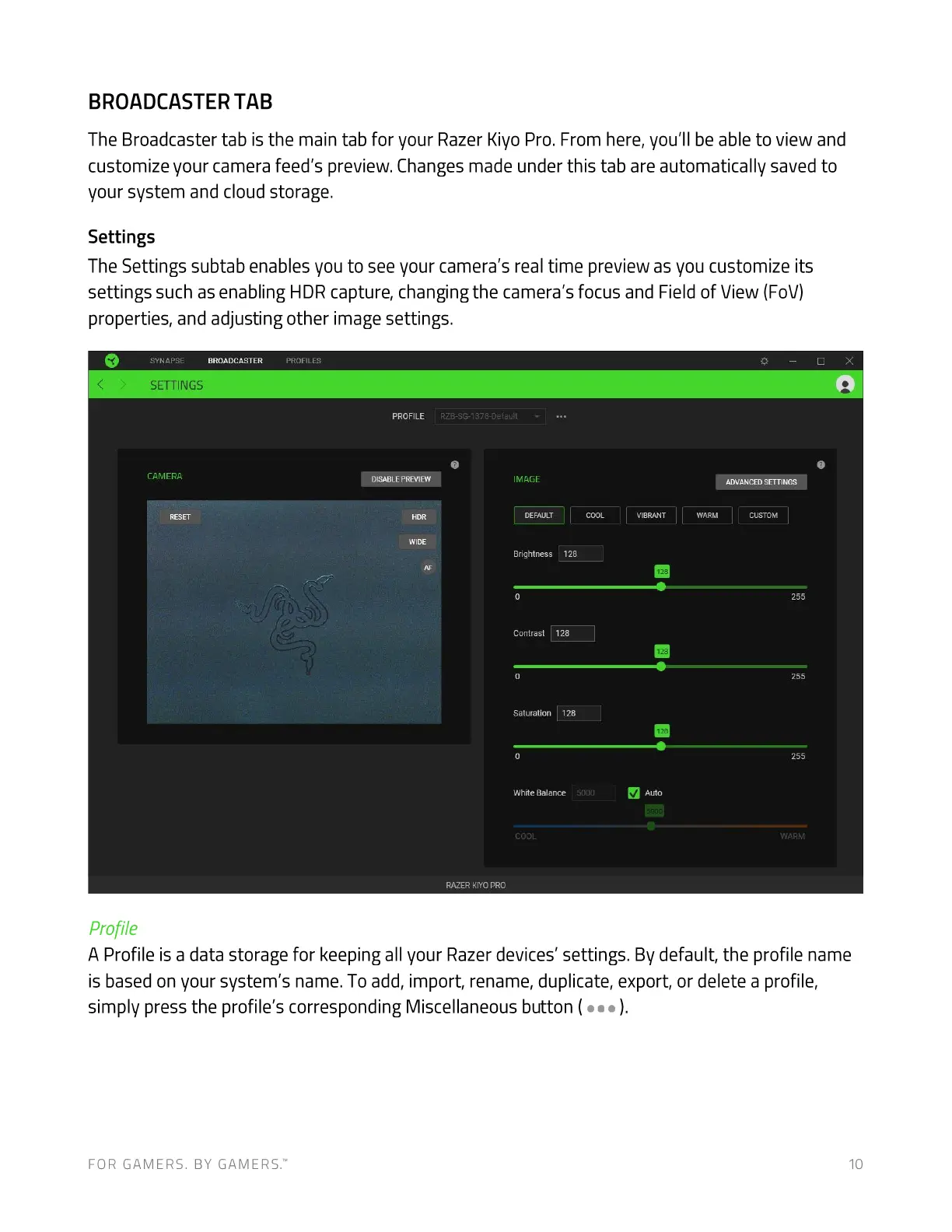
The Settings subtab enables you to see your camera's real time preview as you customize its
settings such as enabling HDR capture, changing the camera's focus and Field of View (FOV)
properties, and adjusting other image settings.
BROADCASTER
SYNAPSE
SETTINGS
CAMERA
RESET
Profile
PROFILES
PROFILE
DISABLEPREVIEW
HOR
WIDE
RZB-SG-1378-oefauit
IMAGE
DEFAULT
Brightness 128
contrast 128
Saturation 128
White Balance
5000
COOL
RAZER KIYO PRO
Auto
ADVANCED SETTINGS
CUSTOM
WARM
A Profile is a data storage for keeping all your Razer devices' settings. By default, the profile name
is based on your system's name. To add, import, rename, duplicate, export, or delete a profile,
simply press the profile's corresponding Miscellaneous button (
FOR GAMERS. BY GAMERS.W


 To Next Page