BROADCASTER TAB
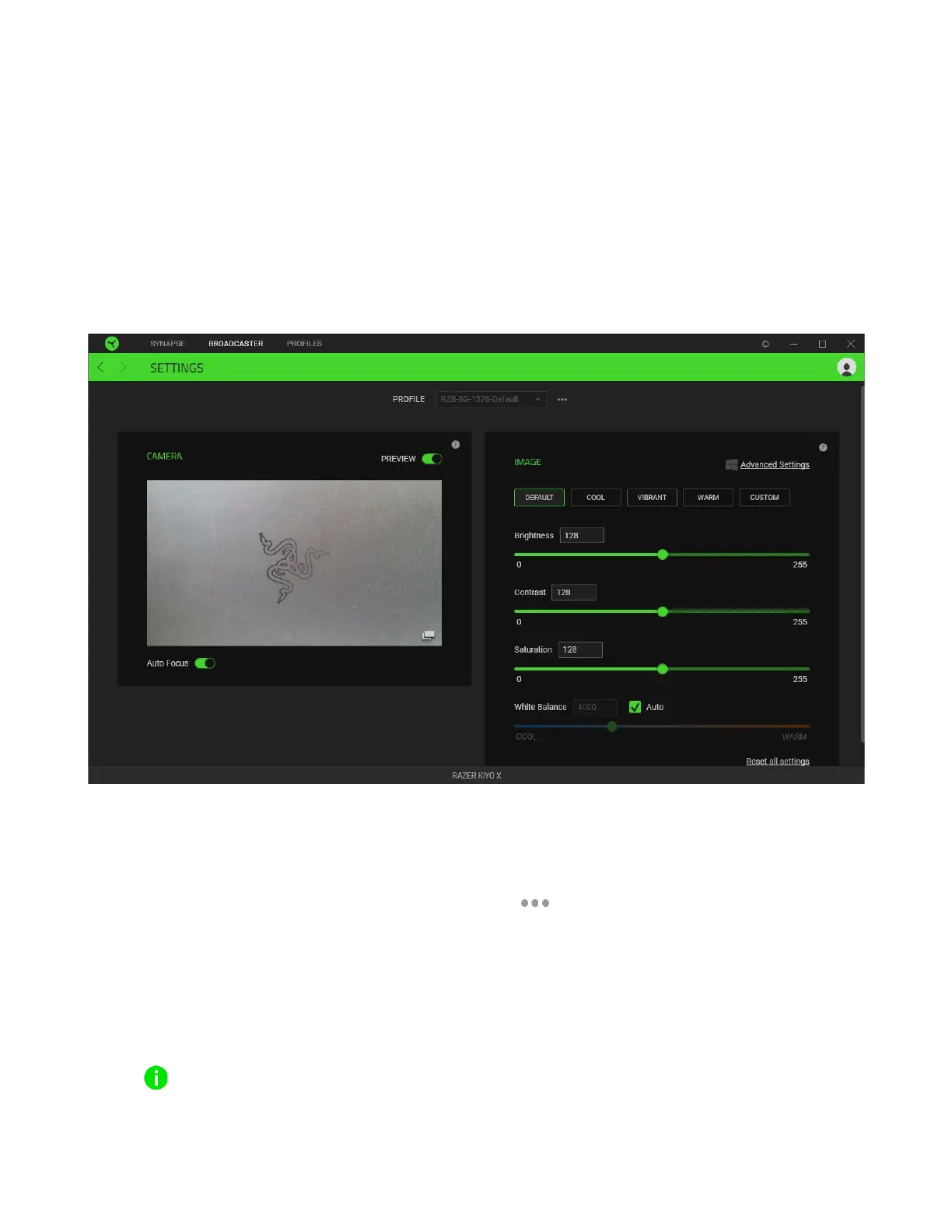
The Broadcaster tab is the main tab for your Razer Kiyo X. From here, you’ll be able to view and
customize your camera feed’s preview. Changes made under this tab are automatically saved to your
system and cloud storage.
Settings
The Settings subtab lets you see your camera’s real-time preview as you customize its settings, such
as changing its focus and adjusting other image settings.
Profile
A Profile is a data storage for keeping all your Razer devices’ settings. By default, the profile name is
based on your system’s name. To add, import, rename, duplicate, export, or delete a profile, simply
press the profile’s corresponding Miscellaneous button ( ).
Camera
Displays the camera’s real time preview. Here you’ll also be able to modify the following:
▪ Preview. Disable the camera preview. This is useful if you want other applications to begin
using your Razer Kiyo X.
When the camera preview is disabled, all camera settings will become unchangeable.


 To Next Page