BUTTON ASSIGNMENT MENU
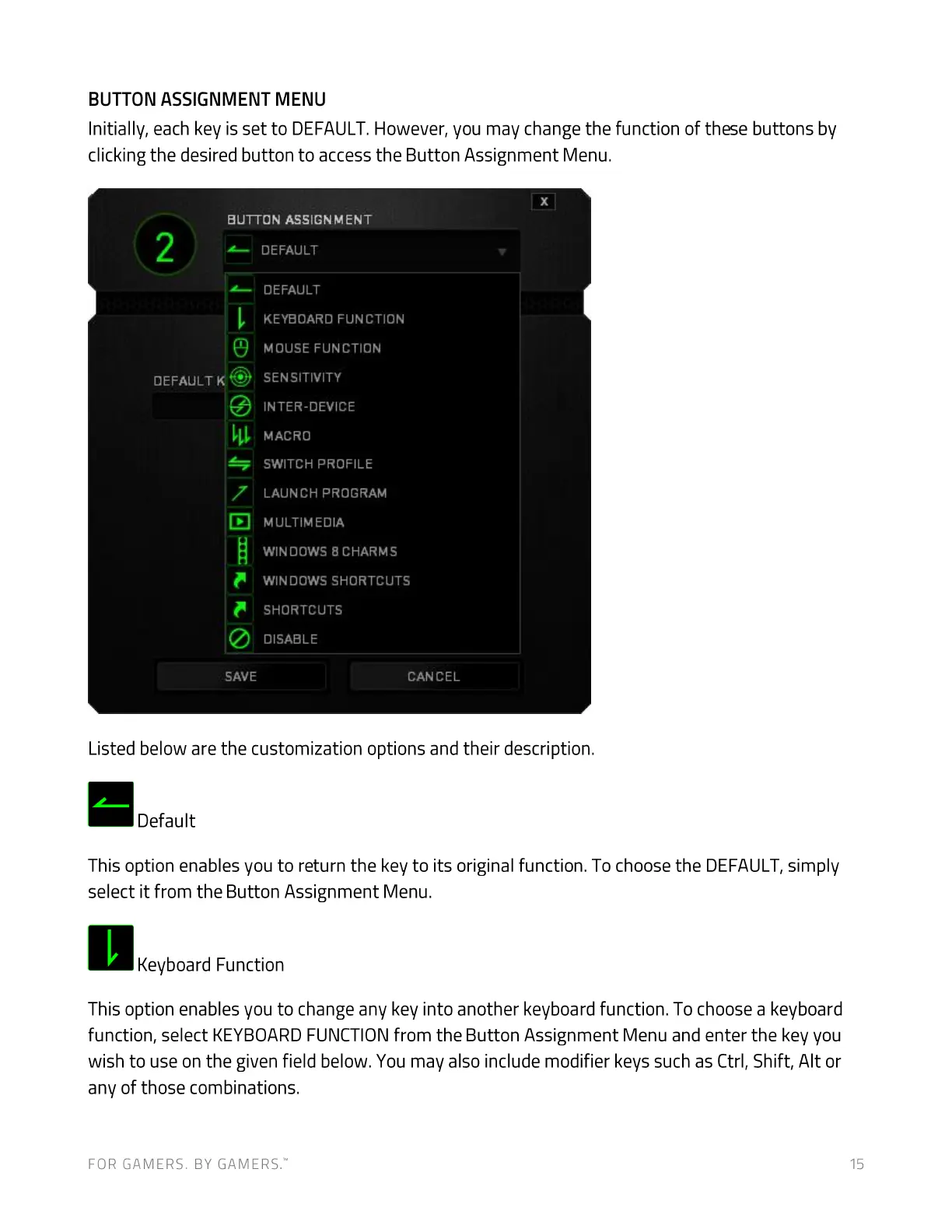
Initially, each key is set to DEFAULT.However, you may change the function of these buttons by
clicking the desired button to access the Button Assignment Menu.
BUTTON ASSIGNMENT
OZ-FAULT
7
SAVE
DEFAULT
DEFAULT
KEYBOARD FUNCTION
MOUSE FUNCTION
SENSITIVITY
INTER-OEVICE
MACRO
SWITCH PROFILE
LAUNCH PROGRAM
MULTIMEDIA
WINDOWS 8 CHARMS
WIN DOWS SHORTCUTS
SHORTCUTS
DISABLE
CANCEL
Listed below are the customization options and their description.
Default
This option enables you to return the key to its original function. To choose the DEFAULT,simply
select it from the Button Assignment Menu.
Keyboard Function
This option enables you to change any key into another keyboard function. To choose a keyboard
function, select KEYBOARDFUNCTIONfrom the Button Assignment Menu and enter the key you
wish to use on the given field below. You may also include modifier keys such as Ctrl, Shift, Alt or
any of those combinations.
FOR GAMERS. BY GAMERS:
15


 To Next Page