EasyManua.ls Logo

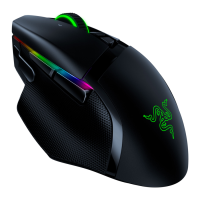
Razer BASILISK - User Manual

Razer BASILISK
34 pages
Print Icon
To Next Page IconTo Next Page
Loading...
RAZER BASILISK
MASTER GUIDE
Question and Answer IconNeed help?

Do you have a question about the Razer BASILISK and is the answer not in the manual?

Summary

PACKAGE CONTENTS; SYSTEM REQUIREMENTS

PACKAGE CONTENTS

Lists the items included in the Razer Basilisk gaming mouse package.

SYSTEM REQUIREMENTS

Details the necessary hardware and software for the Razer Basilisk and Synapse.

REGISTRATION AND TECHNICAL SUPPORT

PRODUCT REGISTRATION

Guide to registering your Razer product online for warranty status and benefits.

TECHNICAL SUPPORT OPTIONS

Information on accessing Razer's warranty and free online technical assistance.

TECHNICAL SPECIFICATIONS

MOUSE SPECIFICATIONS

Key technical features of the Razer Basilisk, including sensor, switches, and DPI.

SIZE AND WEIGHT DETAILS

Physical dimensions and weight of the Razer Basilisk gaming mouse.

DEVICE LAYOUT OVERVIEW

RAZER BASILISK BUTTONS AND FEATURES

Identifies all buttons, scroll wheel, sensor, and other physical components of the mouse.

SETTING UP YOUR RAZER BASILISK

ADJUSTING SCROLL WHEEL RESISTANCE

Customize the scroll wheel's tactile feedback using the resistance adjustment dial.

CUSTOMIZING THE DPI CLUTCH

Learn to attach/detach DPI clutches or use a rubber cap for personalized sensitivity control.

INSTALLING RAZER SYNAPSE SOFTWARE

SYNAPSE INSTALLATION STEPS

Connect your Razer Basilisk and follow instructions to download and install Razer Synapse.

CONFIGURING YOUR RAZER BASILISK WITH SYNAPSE

CUSTOMIZE TAB FUNCTIONS

Configure button assignments, profiles, and device functionalities for optimal gaming.

PERFORMANCE TAB SETTINGS

Optimize mouse sensitivity, acceleration, and polling rate for peak gaming performance.

LIGHTING TAB EFFECTS

Personalize Razer Chroma lighting effects, colors, and brightness for your Basilisk.

CALIBRATION TAB OPTIONS

Calibrate the mouse sensor to your mousing surface for precise tracking and lift-off range.

MACROS TAB MANAGEMENT

Create, record, and manage complex macros for in-game commands and actions.

SAFETY, COMFORT, AND MAINTENANCE

SAFETY GUIDELINES AND PRECAUTIONS

Essential safety precautions for using the Razer Basilisk and general device care.

ERGONOMIC COMFORT TIPS

Guidance on posture, desk setup, and hand positioning for comfortable gaming.

MAINTENANCE AND USE RECOMMENDATIONS

Proper cleaning, environmental conditions, and optimal usage for the Razer Basilisk.

LEGAL AND WARRANTY INFORMATION

COPYRIGHT AND INTELLECTUAL PROPERTY

Information on Razer's intellectual property, trademarks, and copyrights.

LIMITED PRODUCT WARRANTY TERMS

Details on how to access the latest terms for the Razer Basilisk product warranty.

LIMITATION OF LIABILITY DISCLAIMER

Disclaimer concerning Razer's liability for any damages or losses related to product use.

GENERAL TERMS AND CONDITIONS

Outlines governing laws, severability of terms, and Razer's right to amend.

Summary

PACKAGE CONTENTS; SYSTEM REQUIREMENTS

PACKAGE CONTENTS

Lists the items included in the Razer Basilisk gaming mouse package.

SYSTEM REQUIREMENTS

Details the necessary hardware and software for the Razer Basilisk and Synapse.

REGISTRATION AND TECHNICAL SUPPORT

PRODUCT REGISTRATION

Guide to registering your Razer product online for warranty status and benefits.

TECHNICAL SUPPORT OPTIONS

Information on accessing Razer's warranty and free online technical assistance.

TECHNICAL SPECIFICATIONS

MOUSE SPECIFICATIONS

Key technical features of the Razer Basilisk, including sensor, switches, and DPI.

SIZE AND WEIGHT DETAILS

Physical dimensions and weight of the Razer Basilisk gaming mouse.

DEVICE LAYOUT OVERVIEW

RAZER BASILISK BUTTONS AND FEATURES

Identifies all buttons, scroll wheel, sensor, and other physical components of the mouse.

SETTING UP YOUR RAZER BASILISK

ADJUSTING SCROLL WHEEL RESISTANCE

Customize the scroll wheel's tactile feedback using the resistance adjustment dial.

CUSTOMIZING THE DPI CLUTCH

Learn to attach/detach DPI clutches or use a rubber cap for personalized sensitivity control.

INSTALLING RAZER SYNAPSE SOFTWARE

SYNAPSE INSTALLATION STEPS

Connect your Razer Basilisk and follow instructions to download and install Razer Synapse.

CONFIGURING YOUR RAZER BASILISK WITH SYNAPSE

CUSTOMIZE TAB FUNCTIONS

Configure button assignments, profiles, and device functionalities for optimal gaming.

PERFORMANCE TAB SETTINGS

Optimize mouse sensitivity, acceleration, and polling rate for peak gaming performance.

LIGHTING TAB EFFECTS

Personalize Razer Chroma lighting effects, colors, and brightness for your Basilisk.

CALIBRATION TAB OPTIONS

Calibrate the mouse sensor to your mousing surface for precise tracking and lift-off range.

MACROS TAB MANAGEMENT

Create, record, and manage complex macros for in-game commands and actions.

SAFETY, COMFORT, AND MAINTENANCE

SAFETY GUIDELINES AND PRECAUTIONS

Essential safety precautions for using the Razer Basilisk and general device care.

ERGONOMIC COMFORT TIPS

Guidance on posture, desk setup, and hand positioning for comfortable gaming.

MAINTENANCE AND USE RECOMMENDATIONS

Proper cleaning, environmental conditions, and optimal usage for the Razer Basilisk.

LEGAL AND WARRANTY INFORMATION

COPYRIGHT AND INTELLECTUAL PROPERTY

Information on Razer's intellectual property, trademarks, and copyrights.

LIMITED PRODUCT WARRANTY TERMS

Details on how to access the latest terms for the Razer Basilisk product warranty.

LIMITATION OF LIABILITY DISCLAIMER

Disclaimer concerning Razer's liability for any damages or losses related to product use.

GENERAL TERMS AND CONDITIONS

Outlines governing laws, severability of terms, and Razer's right to amend.

Razer BASILISK Specifications

General IconGeneral
PurposeGaming
Scroll typeWheel
Buttons typePressed buttons
Polling rate1000 Hz
Buttons quantity8
Device interfaceUSB Type-A
Recommended usageUniversal
Acceleration (max)50 G
Programmable mouse buttonsYes
Movement detection technologyOptical
Form factorRight-hand
Product colorBlack
Illumination colorMulti
Surface colorationImage
Power sourceCable
Weight and Dimensions IconWeight and Dimensions
Depth124 mm
Width75 mm
Height43 mm
Weight107 g

Videos

How To Fix Razer Basilisk X Hyperspeed Not Working

How To Connect Razer Basilisk X Hyperspeed Bluetooth

How To Reset Razer Basilisk X Hyperspeed

How To Fix Razer Basilisk V3 Scroll Wheel

How To Connect Razer Basilisk X Hyperspeed to XBOX

How To Connect Razer Basilisk X Hyperspeed to PS5

Related product manuals