
 Need help?
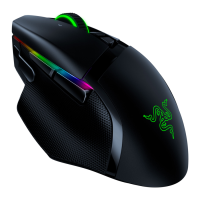
Do you have a question about the Razer Basilisk V2 and is the answer not in the manual?
Install Synapse 3 for advanced features like macros, profile settings, and Chroma lighting.
Offers comfortable hold for actions like push-to-talk or DPI adjustment, defaults to 800 DPI.
Allows customization of scroll wheel resistance for FPS gamers, enabling actions like bunny hops.
Works on Xbox One with supported games, but not for UI navigation. Basic functions only.
Adjust DPI on-the-fly by assigning a button and moving the scroll wheel up or down.
Features Audio Meter, Spectrum Cycling, Breathing, Static, and Reactive effects.
Calibrates lift-off distance automatically across surfaces via Synapse 3 Smart Tracking.
Clean with monitor wipes; avoid scrubbing. Sensor can be cleaned with alcohol-tipped Q-tip.
Modifying or disassembling voids the manufacturer's warranty.
Contact Customer Support for spare parts and accessories not found online.
Troubleshoot by rebooting, checking Synapse updates, trying another USB port, or reinstalling Synapse.
Likely a dirty sensor or surface. Clean components or reset surface calibration.
Plug directly into the computer. KVM switches can cause connection interruptions.
Uses the Razer Focus+ 20K DPI Optical Sensor for precise tracking of fine movements.
Utilizes Razer Optical Mouse Switches for its primary button actuation.
No, it is a wired mouse and does not include the Chroma Mouse Charging Dock.
Yes, it supports 16.8 million colors via Razer Chroma RGB and Synapse 3.
Yes, it has on-board memory and can store up to 5 custom profiles.
 General
| Purpose | Gaming |
|---|---|
| Scroll type | Wheel |
| Buttons type | Pressed buttons |
| Button functions | DPI switch |
| Buttons quantity | 11 |
| Device interface | USB Type-A |
| Acceleration (max) | 50 G |
| Mouse tracking speed | 650 ips |
| Scrolling directions | Vertical |
| Number of scroll wheels | 1 |
| Programmable mouse buttons | Yes |
| Movement detection technology | Optical |
| Buttons durability (million clicks) | 70 |
| Number of movement resolution modes | 5 |
| Form factor | Right-hand |
| Product color | Black |
| Surface coloration | Monochromatic |
| Power source | Cable |
| Cable length | 2.1 m |
| Harmonized System (HS) code | 84716070 |
 Weight and Dimensions
| Depth | 130 mm |
|---|---|
| Width | 60 mm |
| Height | 42 mm |
| Weight | 92 g |











 To Next Page