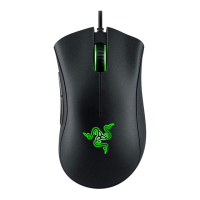
The Razer DeathAdder V2 X HyperSpeed is a high-performance wireless gaming mouse designed for gamers seeking precision, control, and ergonomic comfort. Building on the legacy of the DeathAdder series, which has sold over 13 million units, this mouse combines iconic ergonomics with advanced wireless technology and customizable features to deliver a superior gaming experience.
Function Description
The Razer DeathAdder V2 X HyperSpeed serves as a primary input device for computers, specifically optimized for gaming. Its core function is to translate physical movements and button presses into digital commands, allowing users to interact with their operating system and games with high accuracy and responsiveness. The mouse supports dual wireless connectivity, offering both ultra-fast Razer™ HyperSpeed Wireless (2.4 GHz) and Bluetooth 5.1, providing flexibility for various setups and devices.
The mouse features seven independently programmable buttons, including two new quick-access edge buttons, which can be customized to perform a wide range of functions, from simple clicks to complex macros. It incorporates a Razer™ 5G Advanced 14K DPI Optical Sensor, ensuring precise tracking and sensitivity adjustments on-the-fly. The Razer™ Mechanical Gen-2 Mouse Switches are rated for 60 million clicks, providing durability and a tactile response.
Usage Features
The Razer DeathAdder V2 X HyperSpeed offers a rich set of features designed to enhance usability and gaming performance:
- Ergonomic Design: The mouse maintains the classic DeathAdder ergonomic right-handed design, providing comfort for extended gaming sessions and reducing strain.
- Dual Wireless Connectivity: Users can choose between two wireless modes:
- Razer™ HyperSpeed Wireless (2.4 GHz): This mode provides ultra-fast, low-latency connectivity, ideal for competitive gaming. It utilizes a dedicated USB dongle for a stable and responsive connection.
- Bluetooth 5.1: This mode offers broader compatibility with various devices, making it suitable for productivity or casual use when the USB dongle is not available or desired.
- Programmable Buttons: All seven buttons, including the DPI stage up/down buttons, left/right mouse buttons, scroll wheel, and two side buttons (Mouse Button 4 and 5), are independently programmable. This allows users to assign keyboard functions, mouse functions, sensitivity adjustments, multimedia controls, Windows shortcuts, or even text functions to suit their playstyle or workflow.
- DPI Adjustment: The mouse supports On-The-Fly Sensitivity Adjustment, allowing users to cycle through predefined DPI stages (400, 800, 1600 (default), 3200, and 6400) with dedicated buttons. These stages can be customized using Razer Synapse.
- Razer Synapse 3 Support: The mouse is fully compatible with Razer Synapse 3 software, which unlocks a suite of advanced customization options:
- Customize Tab: Users can modify button assignments, enabling them to remap buttons to keyboard functions (with optional Turbo mode for repeated presses), other mouse functions (e.g., scroll click, double click, forward/backward), sensitivity controls (clutch, stage up/down, on-the-fly, cycle stages), inter-device functions, profile switching, program launching, multimedia controls, Windows shortcuts, and text functions. Buttons can also be disabled.
- Performance Tab: This tab allows users to fine-tune sensitivity (DPI), polling rate (125Hz, 500Hz, 1000Hz), and access Windows Mouse Properties for further system-level adjustments.
- Calibration Tab: The Calibration feature optimizes the Razer Precision Sensor for specific surfaces, improving tracking accuracy. Users can select from a list of pre-configured Razer mouse mats or add their own.
- Power Tab: This feature enables users to set the mouse to enter sleep mode after a specified period of inactivity, conserving battery life.
- HyperSpeed Multi-Device Pairing: A unique feature that allows an additional HyperSpeed-compatible device (such as a keyboard) to be paired with the same wireless USB dongle used by the mouse. This reduces the number of USB ports required and simplifies the setup.
- Hypershift Mode: This mode provides a secondary set of button assignments, activated by holding down a designated Hypershift key (which can be assigned to any mouse button or a Razer Synapse-supported keyboard key). This effectively doubles the number of programmable functions available.
- On-board DPI and Keymap Storage: The mouse can store DPI settings and keymap configurations directly on its internal memory, allowing users to retain their preferred settings even when using the mouse on a different computer without Razer Synapse installed.
- Battery Flexibility: The mouse is designed with a hybrid battery slot, compatible with either a single AA battery (included) or a single AAA battery (not included), offering users choice based on weight preference or availability.
- Low Power Indicator: A status indicator blinks red twice at repeated intervals when the battery level drops below 5%, signaling that it's time to replace the battery.
- Ultraslick Mouse Feet: The mouse features undyed 100% PTFE mouse feet, which provide smooth gliding across various surfaces, contributing to precise and effortless movements.
- Gaming-grade Tactile Scroll Wheel: The scroll wheel is designed for tactile feedback, ensuring accurate scrolling and button presses during gameplay.
Maintenance Features
To ensure the longevity and optimal performance of the Razer DeathAdder V2 X HyperSpeed, certain maintenance practices are recommended:
- Regular Cleaning: It is advised to unplug the mouse from the computer once a month and clean it using a soft cloth or cotton swab. This helps prevent dirt buildup, which can affect sensor performance and overall hygiene. Harsh cleaning agents or soap should be avoided.
- Battery Management:
- Only one battery (AA or AAA) should be inserted at a time. Attempting to forcefully insert two batteries simultaneously is explicitly cautioned against.
- The included AA battery is non-rechargeable.
- Batteries should be disposed of in accordance with local environmental laws.
- For safety, only lithium or alkaline batteries should be used.
- The low power indicator serves as a reminder to replace the battery before it is fully drained, preventing unexpected interruptions during use.
- Mouse Mat Usage: For the best tracking performance and to minimize wear on the mouse feet, using a premium mouse mat, especially one from Razer, is highly recommended. The sensor is specifically tuned and optimized for Razer mouse mats, ensuring superior tracking accuracy. Using the mouse on abrasive or unsuitable surfaces can lead to undue wear on the mouse feet, requiring more frequent replacement.
- Software Updates: Keeping Razer Synapse 3 updated is crucial for accessing the latest features, performance improvements, and bug fixes. The software provides notifications for available updates.
- Factory Reset: Razer Synapse offers a "Reset" tab, allowing users to perform a factory reset on the mouse. This erases all profiles stored on the device's on-board memory and resets Razer Synapse tutorials, which can be useful for troubleshooting or starting fresh with configurations.
- Ergonomic Practices: While not a direct maintenance feature for the device itself, the manual emphasizes ergonomic guidelines to prevent physical discomfort and injury during long periods of use. This includes proper positioning of the keyboard, monitor, and mouse, adjusting chair and table height, maintaining good posture, relaxing wrists, and taking breaks to stretch. Adhering to these guidelines contributes to a more comfortable and sustainable gaming experience.

 Need help?
 General
 Weight and Dimensions











 To Next Page