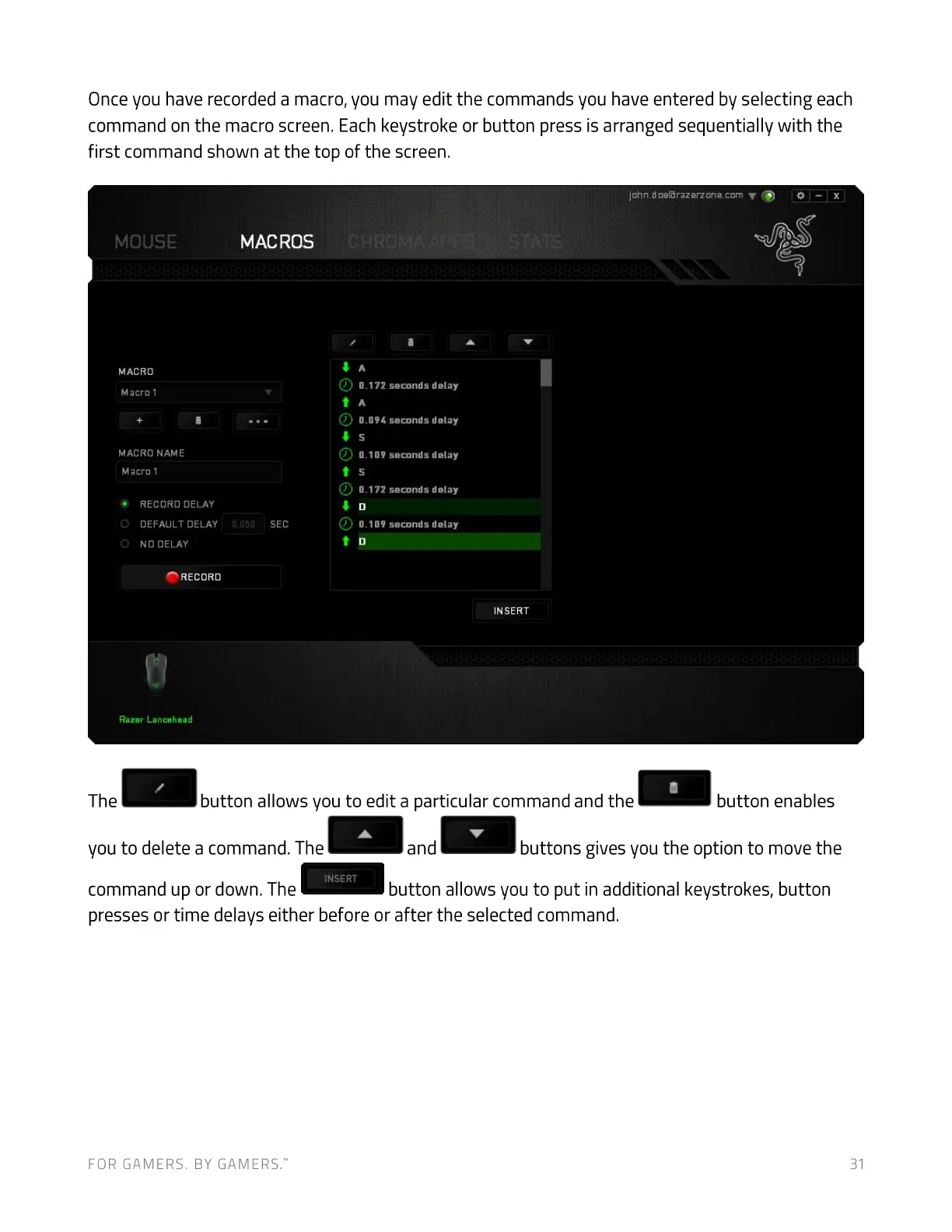
Once you have recorded a macro, you may edit the commands you have entered by selecting each
command on the macro screen. Each keystroke or button press is arranged sequentially with the
first command shown at the top of the screen.
john.doeßrazerzone.com V (9
MOUSE
MACRO
M acro 1
MACRO NAME
M acro 1
@ RECORD DELAY
O DEFAULT DELAY
O NO DELAY
RECORD
Razer Lancehead
MACROS
OTlfifi
SEC
Q) 0.172secondsdelay
Q) 0.094secondsdelay
Q) 0.109secondsdelay
Q) 0.172secondsdelay
Q) 0-109secondsdelay
INSERT
The
button allows you to edit a particular command and the
button enables
you to delete a command. The
INSERT
command up or down. The
and
buttons gives you the option to move the
button allows you to put in additional keystrokes, button
presses or time delays either before or after the selected command.
FOR GAMERS. BY GAMERS:
31


 To Next Page