SAFETY AND MAINTENANCE
In order to achieve maximum safety while using
your Razer Pro Click, we suggest that you adopt
the following guidelines:
Should you have trouble operating the device
properly and troubleshooting does not work,
unplug the device and contact the Razer hotline
or go to support.razer.com for assistance.
Do not take apart the device (doing so will void
your warranty) and do not attempt to operate it
under abnormal current loads.
Keep the device away from liquid, humidity or
moisture. Operate the device only within the
specific temperature range of 0°C (32°F) to
40°C (104°F). Should the temperature exceed
this range, unplug and/or switch off the device
in order to let the temperature stabilize to an
optimal level.
COMFORT
Research has shown that long periods of
repetitive motion, improper positioning of your
computer peripherals, incorrect body position,
and poor habits may be associated with physical
discomfort and injury to nerves, tendons, and
muscles. Below are some guidelines to avoid
injury and ensure optimum comfort while using
your Razer Pro Click.
• Position your keyboard and monitor directly
in front of you with your mouse next to it.
Place your elbows next to your side, not
too far away and your keyboard within easy
reach.
• Adjust the height of your chair and table so
that the keyboard and mouse are at or below
elbow-height.
• Keep your feet well supported, posture
straight and your shoulders relaxed.
• During gameplay, relax your wrist and keep it
straight. If you do the same tasks with your
hands repeatedly, try not to bend, extend or
twist your hands for long periods.
• Do not rest your wrists on hard surfaces for
long periods. Use a wrist rest to support your
wrist while gaming.
• Customize the keys on your keyboar
d to suit
your style of gaming in order to minimize
repetitive or awkward motions while gaming.
• Do not sit in the same position all day. Get up,
step away from your desk and do exercises to
stretch your arms, shoulders, neck and legs.
Model No./ : [Wireless Mouse / ]: RZ01-0299
[USB Dongle / USB
]: DGRFG6
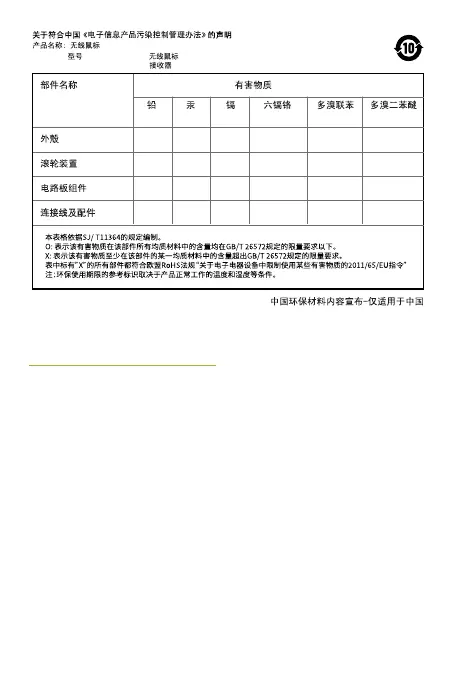
(Pb) (Hg) (Cd) (Cr(VI)) (PBB) (PBDE)
O O O O O O
O O O O O O
X O O O O O
X O O O O O
ProClick_IPIG_200520.indd 24 26/5/20 10:30 AM



 To Next Page