WHAT’S INSIDE
• Razer Pro Click
A B
C
D E
F
G
H
I
N
TOP
Q
R
J
K
L
M
O
P
K
2.4
OFF
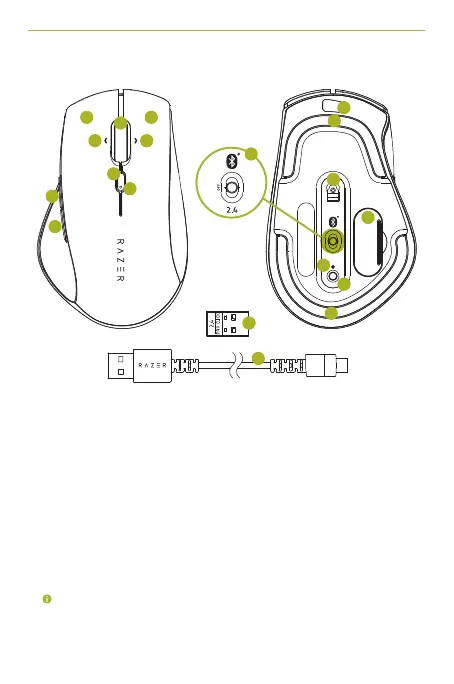
A Left mouse button L 5G optical sensor
B Right mouse button M USB dongle compartment
C Scroll wheel N Slider switch
D Left tilt-click • Bluetooth mode
E Right tilt-click • Power off mode
F Cycle DPI stage up button • 2.4GHz mode
G Status indicator O Pairing indicator
H Mouse button 5 P Pair/switch button
I Mouse button 4 Q 2.4GHz Wireless USB dongle
J Micro-USB port R USB Cable
K Ultraslick mouse feet
DPI stages are as follows: 800, 1800 (default), 3200, 5000, and 10000. The DPI
stages can be customized using Razer Synapse 3.
GET HELP WITH
RAZER SUPPORT
We’re here to assist you with your Razer device.
ProClick_IPIG_200520.indd 3 26/5/20 10:30 AM



 To Next Page