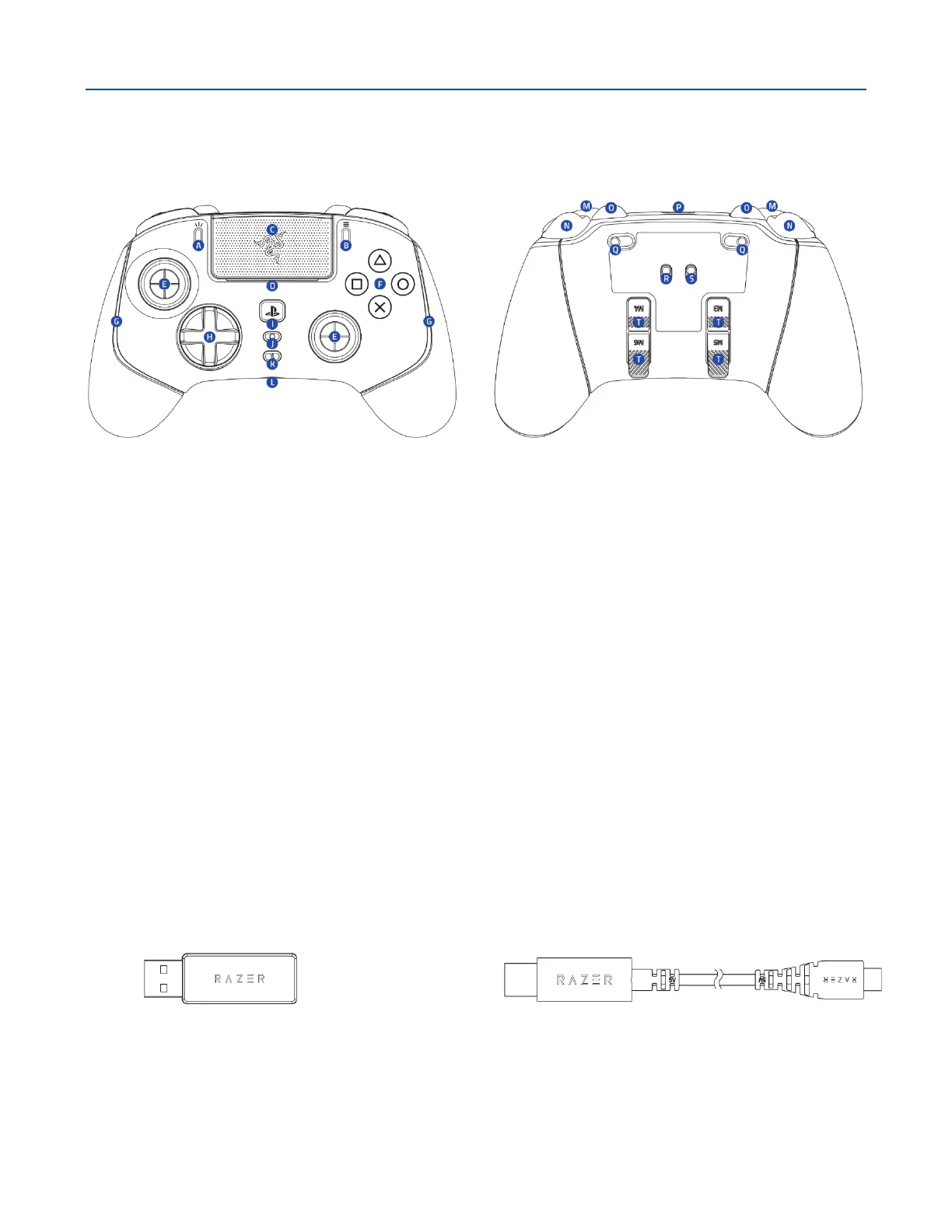
1. WHAT'S INSIDE
▪ Razer Wolverine V2 Pro
A. Create button
B. Options button
C. Touch pad / Touch pad button
D. LED status indicator*
E. Standard thumbstick modules (L3
/ R3)
F. Razer™ Mecha-tactile action
buttons
G. Controller lighting Powered by
Razer Chroma
TM
RGB
H. 8-Way Microswitch D-Pad
I. PS button
J. Multi-function button
K. 3.5 mm mic mute button (for 3.5 mm
port)
L. 3.5 mm analog audio port**
M. Bumpers (L1 / R1)
N. Razer HyperTriggers (L2 / R2)
O. Multi-function bumpers (M1 – M2)
P. USB Type C port
Q. Trigger stop switches
R. Connection mode switch
(Wireless / Wired)
S. Controller mode switch (PS5 / PC)
T. Multi-function triggers (M3 - M6)
▪ Razer™ HyperSpeed Wireless 2.4 GHz
USB Type A dongle
▪ USB Type A to USB Type C cable
*When using the controller with the PS5™ console, the controller will show your current player
number in the LED status indicator.
**Audio function only available in PS5™ controller mode.










 To Next Page