LIF200 User Manual
5
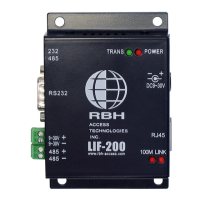
2.2. LED status
Ethernet Link established
TCP/IP session link established
Booting/System Self-Test
Data Sending/Receiving between Serial and Ethernet
2.3. Initial Setup
Set up your computer by assigning it a static IP address in the 192.168.168.1 to
192.168.168.254 range with a subnet mask of 255.255.255.0. This is necessary to ensure that
your computer can communicate with your LIF-200.
Your computer must have an Ethernet card and TCP/IP installed. TCP/IP should already be
installed on computer using Windows 98/2000/XP and later operating systems.
Note: To connect a computer directly to the LIF-200 Ethernet port use a crossover Ethernet cable, if both the
computer and the LIF-200 are connected to a hub/switch use a straight-through Ethernet cable.
2.3.1. Fixed IP Addresses Configuration
For details please refer to Section 3 Basic Configuration Setup.
2.3.2. Configure your LIF-200
For details please refer to Section 4 Advanced Configuration Setup.


 To Next Page