Using the TV's Features
hi Conan
Promotional information
How to Get More Information About an
Advertisement or a Program
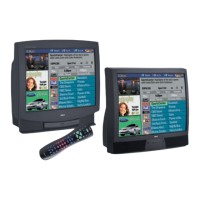
To find OLIt tnon_' inl()nllatR)[1 about a progranl, advel-tisenle[+lt or special, LtSe
the le/t arrow button to high g _ the channel listing or prnnlotional
information hox.
Requesting more infornlation about a partk'ulal- show displays tile PlusCode
prognumlling number and the Shows (m _;Z<\'tfk)r that channel.
Press tile INFO butto11 to exit the expanded in{_)rmation screen
GUIDE Plus+ Menu Items
The G&TDEPlus+ M_,uu gives you access to features in the GUIDE Plus+ system.
To access the GUIDE Plus+ Menu:
1. Press MENU on the remote.
2 Highlight GUIDE Plus+ Menu and press OK.
Each menu and the sub-menus are listed below:
GUIDEPIus+ Setup Displays the GUIDE PMs+ system setup screen.
Change system settings Confirms the settings you completed in the
GUIDE Plus+ system setup are correct.
Review options Displays GUIDE Plus+ system auto display options.
View demo Runs the GUIDE Plus+ system demonstration.
GUIDEPIus+ Label Displays the GUIDE Plus+ label menu.
On Displays the station name when you change channels.
Of,[ The station name isn't displayed when you change channels.
Continuous Demo Runs the GUIDE Plus+ system demonstration until it is
turned off. To turn off the demonstration, you must turn off the TV.
Note: If you have not completed your GUIDE Plus+ ._l_stemsetup, these
options will not be available. A screen will prompt you to complete
your setup.
Chapter 3 35



 To Next Page
 Loading...