Section 07: Photos and Video 33
Photos and Video
_07
This section explains how to use your device’s built-in
camera and camcorder, the Video Player app to
view and manage videos, and the Gallery app to
view, capture, and manage photos and videos. It also
PROVIDESANOVERVIEWOFTHE034OUCHAPP-EDIA(UB
and Video Maker apps.
Camera
5SEYOURDEVICESBUILTINCAMERAANDCAMCORDERTO
take photos and record videos.
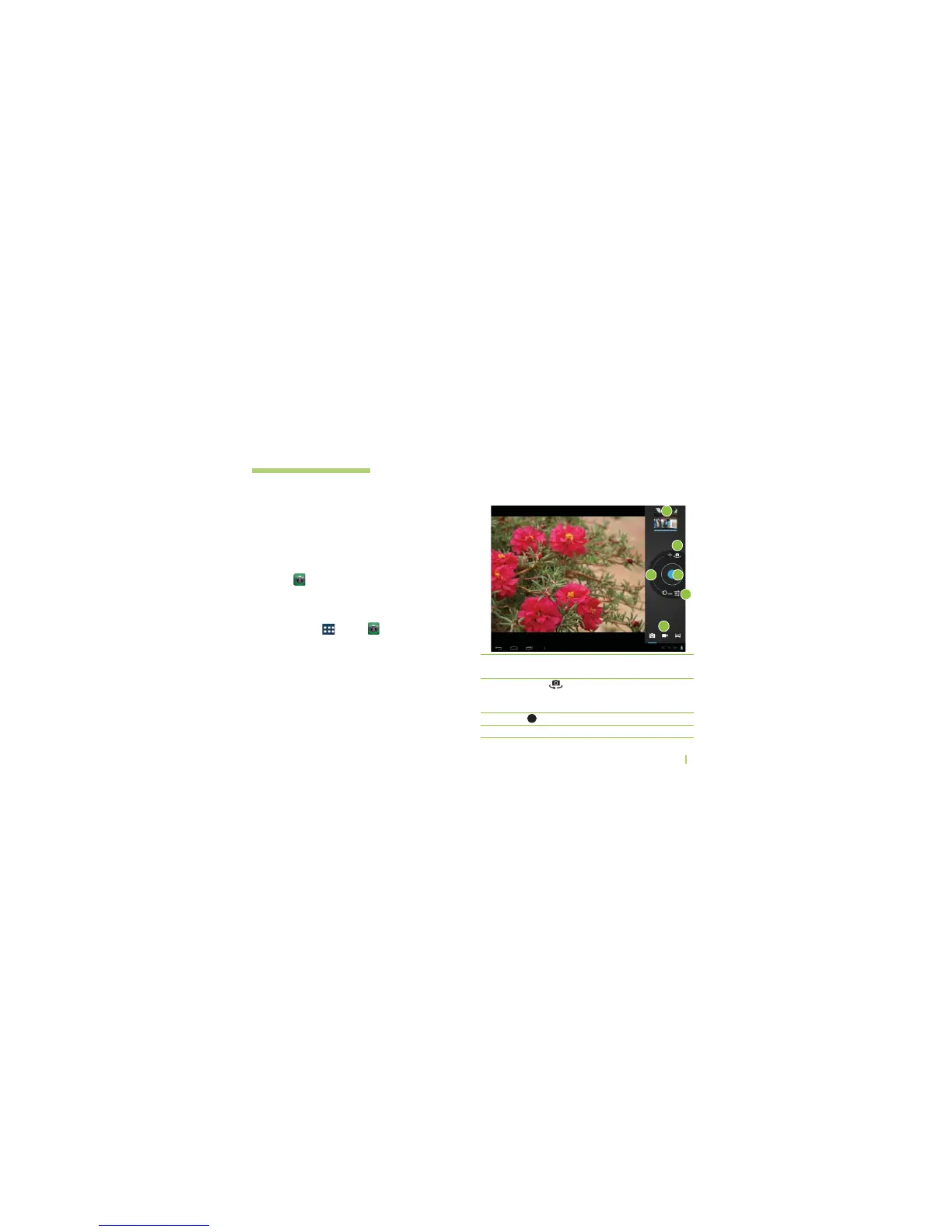
Taking a photo
1. Touch Home or
Apps > Camera Æ (OLDING
the device, point the lens towards the subject you
want to photograph.
2. Lighty touch and hold Capture, and then a focus box
will appear in the center of the viewfinder screen. (A
focus box only appears on the rear-facing camera
mode.) Æ Position the device so you can see the
subject in the focus box Æ 7HENTHEFOCUSBOXTURNS
green, the camera is focused on your subject.
3. Release your finger from Capture.
ߑ
Gallery
ߒ
Switch lenses
ߓ
Capture
ߔ
Zoom +/-
Access your saved photos from
within the camera mode.
Switch between the rear-facing
camera lens and the front-facing
camera lens.
Takes a photo.
Zoom in or zoom out.
1
2
3
5
6
4



 To Next Page