EN
%.
Navigating the Home Screen
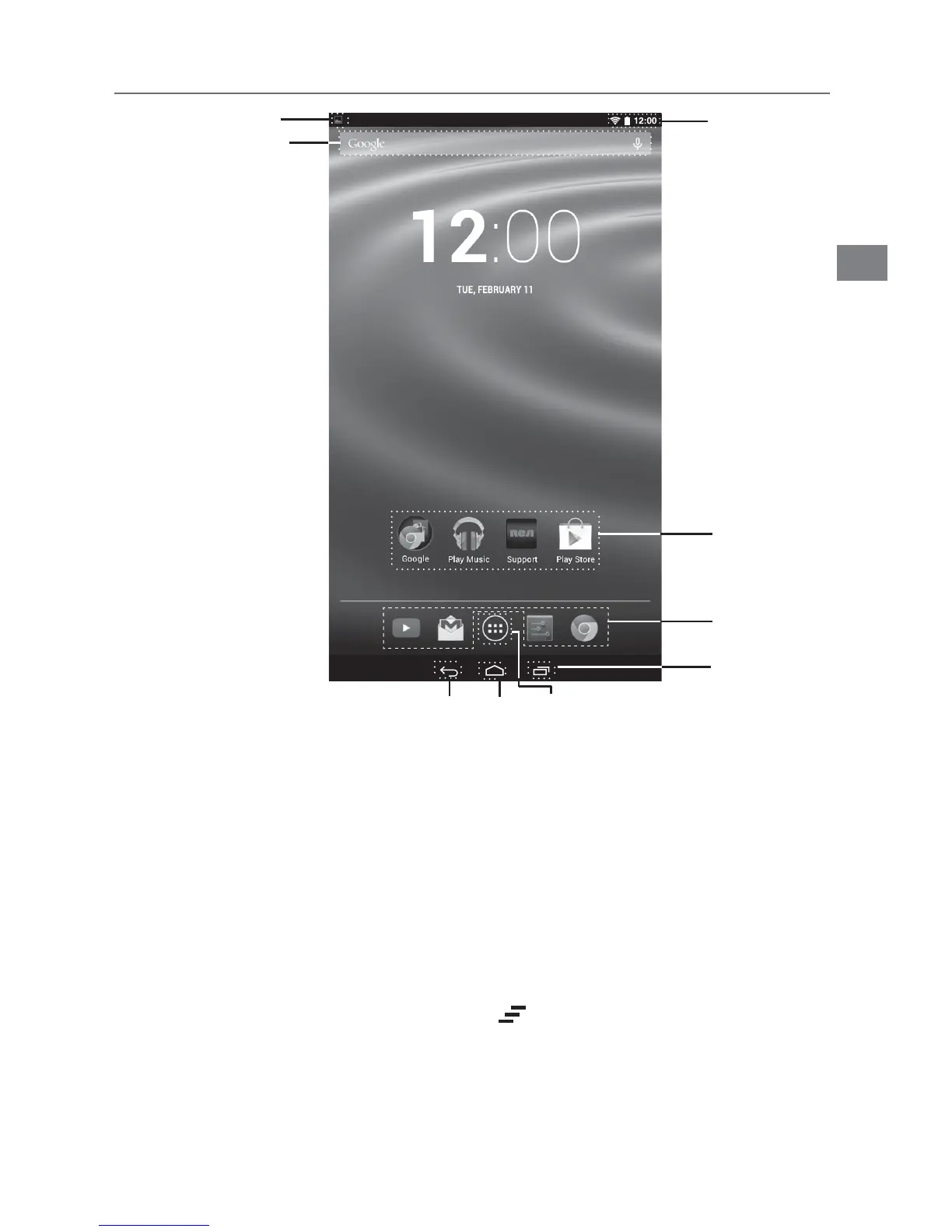
Notification & Status Bar
Some indicators that inform you about the status of your tablet are shown at the top of
the screen.
Notification Shade
Notifications may come from the system, a game, an application such as E-mail, or
the music player.
When Notifications are available, related icons will appear in the top left corner of
the screen. To open the Notification Shade, touch the Notification icon and swipe your
finger down. Some notifications allow you to take specific actions by tapping icons
within the notification.
After you are finished with a notification, just slide it away to the left or right. If you want
TODISMISSALLNOTIlCATIONSTAPTHE$ISMISSICON
at the top of the notification.
Status Bar & Quick Settings
The Status Bar in the top right corner shows various indicators, including Wi-
&ICONNECTIONANDBATTERYSTATUS4OACCESS1UICK3ETTINGSTOUCHTHESTATUSBAR
ANDSWIPEDOWN9OUCANTHENADJUSTVARIOUSSETTINGSONTHETABLETBYTOUCHINGTHE
corresponding square.
App Icons
Status Bar
Google Search
TM
App Icons
Notification Bar
Recent Apps
Home
Back All App



 To Next Page
 Loading...