EN
EN - 8
Battery Management and Charging
The tablet has a built-in rechargeable battery.
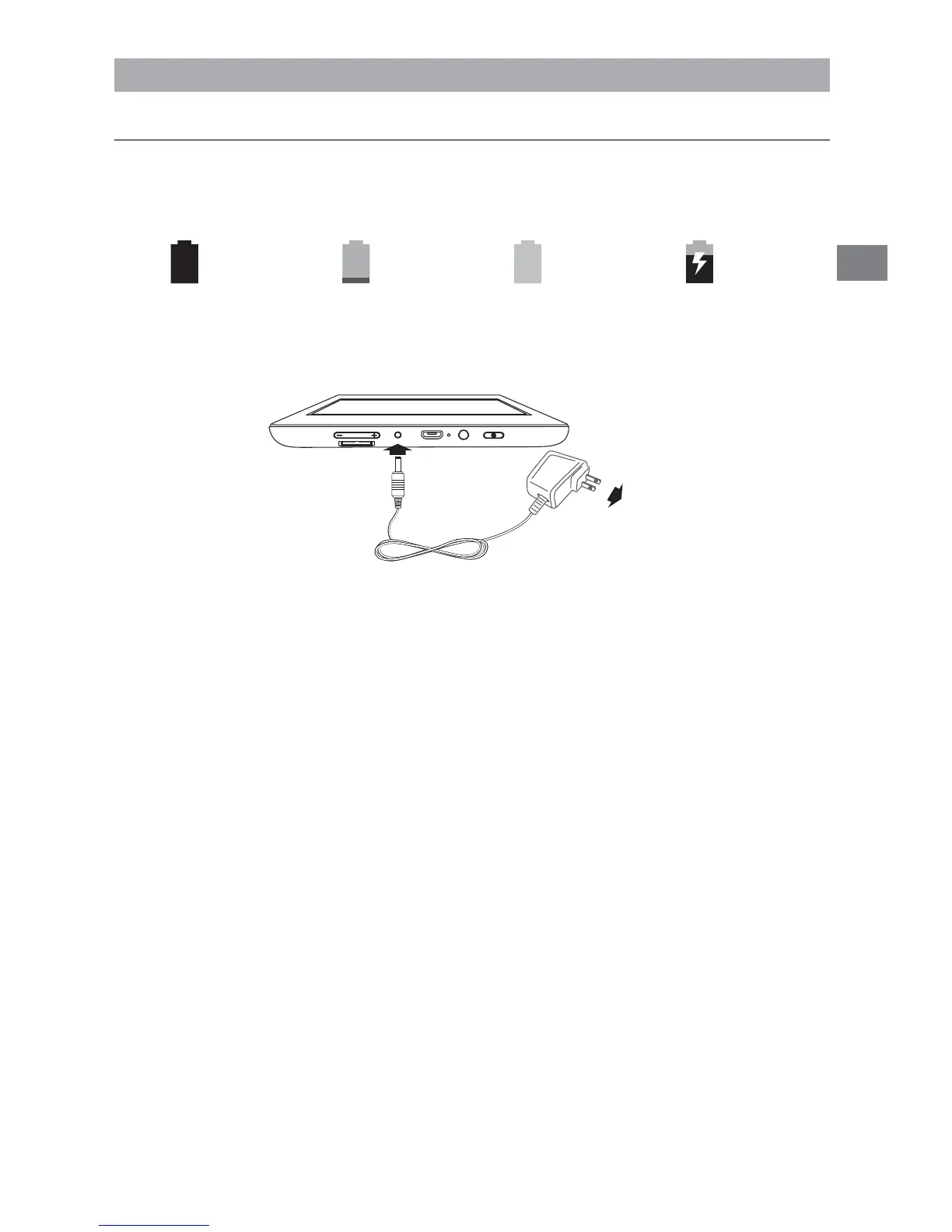
Battery Icon
The battery icon in the upper-right corner shows the battery level or charging status.
Charging the Battery
Note: In order to keep the battery working in best condition, please pay attention to
the following:
ͻ
4HE INCLUDED !# ADAPTER IS FOR USE WITH THIS UNIT ONLY $O NOT USE IT WITH OTHER
equipment.
ͻ
Please do not charge the battery in high temperatures.
s $ONOT WAITFOR THEBATTERY TOBE FULLY DEPLETED BEFORECHARGING AGAIN+EEP THE
battery charged as needed.
s )FTABLETHASNOTBEENUSEDFORALONGPERIODOFTIMETHEBATTERYMIGHTBEINOVER
discharge protection mode and may take longer to charge.
Prolong the Battery Life
Here are some tips for how to prolong the life of the battery:
ͻ
If you aren’t using Wi-Fi, go to Settings > WIRELESS & NETWORKS >Wi-Fi, turn
it off.
ͻ
$ONTLEAVETHE-APSOR.AVIGATIONAPPSOPENONTHESCREENWHENYOURENOT
using them.
ͻ
Turn down screen brightness and set a shorter screen timeout: Settings >
DEVICE >Display.
ͻ
If you don’t need it, turn off automatic syncing for all apps: Settings >
ACCOUNTS >[Google account-name]. This means you need to sync manually
to collect messages, email, and other recent information, and won’t receive
notifications when updates occur.
Full battery
Low battery Need to be
charged
Charging
AC Adapter
To Wall Outlet
4O$# *ACK
Connections



 To Next Page
 Loading...