Note: The b
ǃcǃ
dǃ
eǃfǃg function it is only available in USER mode.
2. Press “c/d” button to select “MTS” and press the “e/f” button to adjust.
Note: It is only available inATV.
3. Press “c/d” button to select “Audio Language” and press the “e/f” button to adjust.
Note: It is only available in DTV.
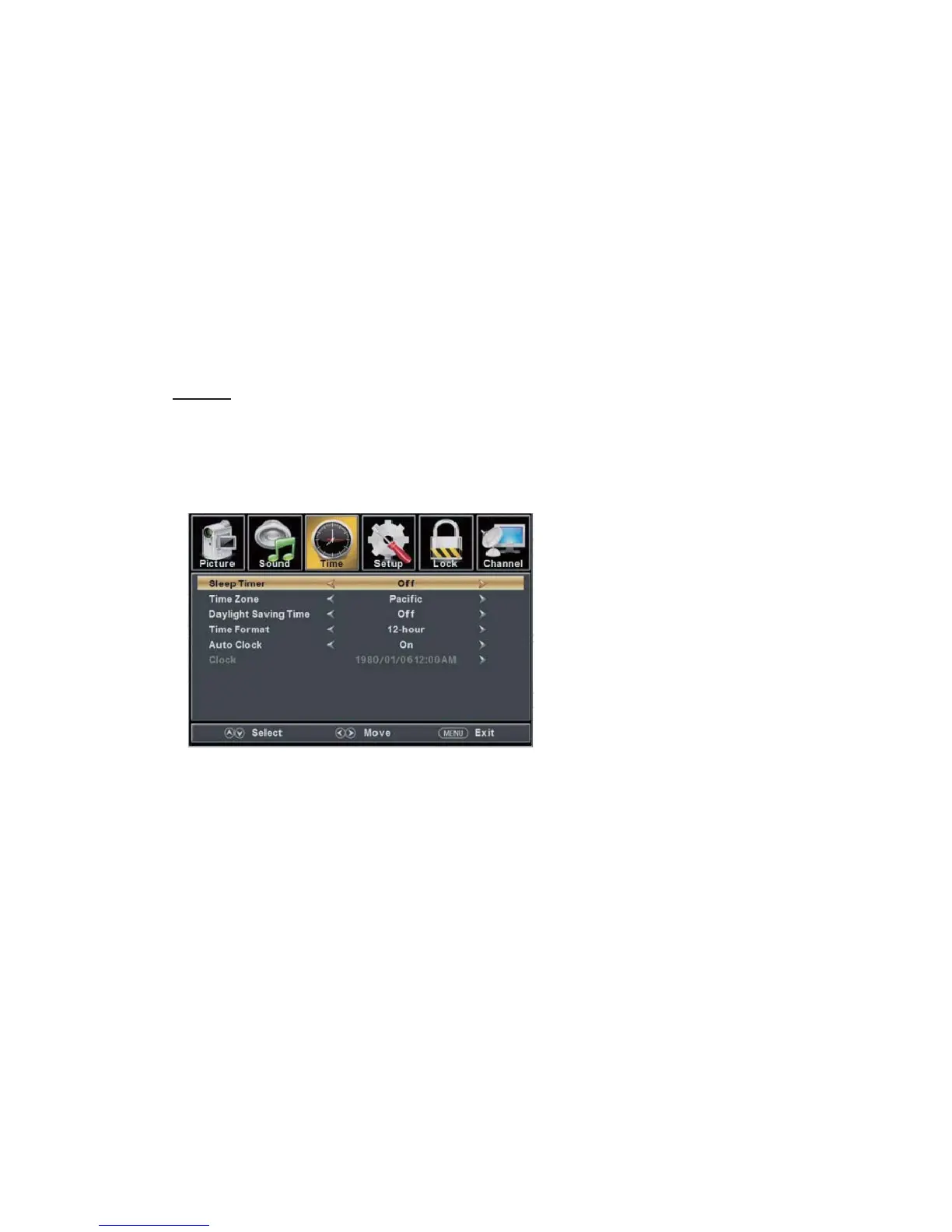
TIME
Press the “MENU” button to
enter the OSD menu .Then press “
” button to
select the “TIME” menu.
1. Press “d” button to sel
ect “Sleep Timer” and press the “e/f” button to enter sleep timer
adjustment menu to adjust sleep timer.
2. Press “c/d” button to select “
Time Zone” and press the “e/f” button to enter time zone
adjustment menu to select the local time zone.
3. Press “c/d” button to select “Daylight Saving Time” and press the “e/f” button to select
“On” or “Off”.
4. Press “c/d” button to select “Time Format” and press the “e/f” button to select “12-hour”
or “24-hour”.
5. Press “c/d” button to select “Auto Clock” and press the “e/f” button to select “On” or
“Off”.
6. Press “c/d” button to select “Clock” and press the “ENTER/f” button to adjust.
4. Press “c/d” button to select “Digital Audio Output” and press the “e/f” button to adjust.
5. Press “c/d” button to select “AVL” and press the “e/f” button to select “On” or “Off”.



 To Next Page