16
TV
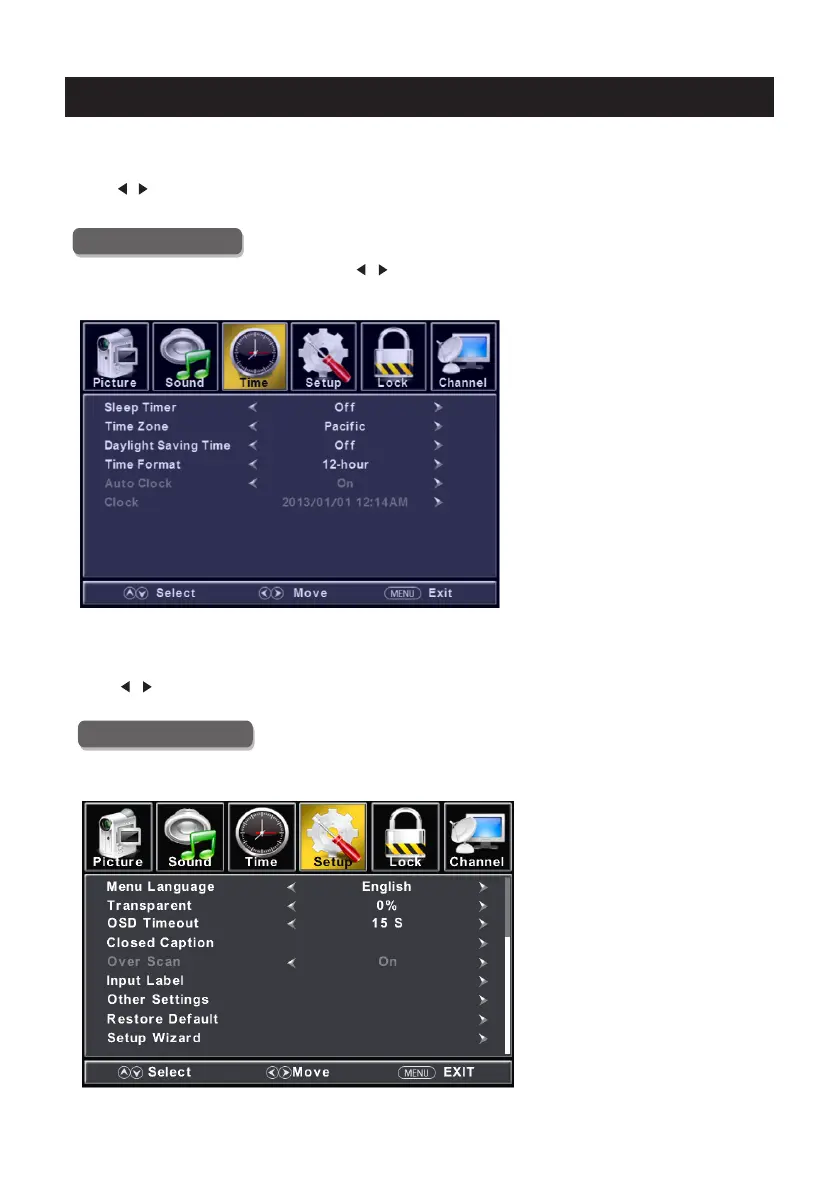
Time Menu
ENU to enter the main menu, Press button to select.Press M /
Press to enter.ENTER / ▼
ENU again to exit or back to parent menu.Press M
button to select among Sleep Timer / Time Zone / Daylight Saving Time / Time Format / Auto Press ▼ / ▲
Clock / Clock.
Press to enter. ENTER / ▼
Press button to adjust./
ENU again or back to parent menu. Press M
button to select among /Sound Mode / Bass / Treble / Balance /MTS/ Audio LanguagePress ▼ / ▲
/Digital Audio Output/Surro und Sound/ AVL .
Press to enter. ENTER / ▼
Press button to adjust./
ENU again or back to parent menu. Press M
Setup Menu
ENU to enter the main menu, Press button to select.Press M ◄ / ►
Press to enter.ENTER / ▼
ENU again to exit or back to parent menu.Press M


 To Next Page