EasyManua.ls Logo

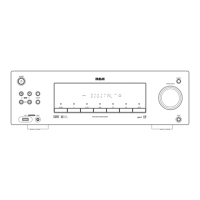
RCA Stereo Receiver with Remote Control - User Manual

RCA Stereo Receiver with Remote Control
16 pages
Print Icon
To Next Page IconTo Next Page
Loading...
owner’s manual
200 Watt Stereo Receiver
with Remote Control

Questions and Answers

  • D
    douglaswillisJul 30, 2025
    What to do if the RCA with Remote Control remote control does not work?
    • J
      Jacqueline CrawfordJul 30, 2025
      If the remote control for your RCA Stereo Receiver isn't working, start by installing fresh batteries. Ensure you're using the remote within its effective range and at a good angle to the remote sensor window. Check for any obstacles blocking the path between you and the remote sensor window and remove them. Finally, fluorescent light shining on the remote sensor window can interfere with the signal; try turning off the light.
  • D
    Donna WarnerAug 5, 2025
    Why is there no sound coming from my RCA with Remote Control Stereo Receiver?
    • E
      Edwin PetersonAug 5, 2025
      There are several reasons why your RCA Stereo Receiver might not be producing any sound. First, check and correct all connections. Make sure the mute function isn't activated by pressing the MUTING button. Ensure the volume isn't turned down; if it is, turn it up. Verify that the speaker wires are securely connected. Also, confirm that you've selected the correct set of speakers (SPEAKER A or B). If only one set of speakers is connected, ensure that only one of SPEAKER A or B is selected. Lastly, check if TAPE MONITOR is selected; if so, press TAPE MONITOR to turn it off.
  • J
    Joseph DunlapAug 11, 2025
    Why is there a high noise level coming from my RCA with Remote Control Stereo Receiver?
    • T
      Travis SteeleAug 11, 2025
      A high noise level in your RCA Stereo Receiver could be due to several factors. Try adjusting the tuning to correctly tune to the station. Ensure the antenna is properly connected. If using an FM antenna, stretch both ends taut and reposition it. For AM, adjust the AM loop antenna. If the noise is coming from another electrical appliance, try using an AC line noise filter.
  • G
    Gregory WallerAug 17, 2025
    What to do if sound comes from only one speaker on RCA Stereo Receiver?
    • D
      Dr. Janet ColeAug 17, 2025
      If you're only getting sound from one speaker on your RCA Stereo Receiver, first check all connections to ensure none of the speaker wires or input cords are disconnected. Also, verify that the BALANCE setting is set to the center position.
  • J
    James JamesAug 23, 2025
    Why automatic tuning does not stop when searching for stations on RCA with Remote Control?
    • S
      Steven PearsonAug 23, 2025
      If the automatic tuning on your RCA Stereo Receiver doesn't stop when searching for stations, it could be because the stations are too weak. Consider using a better antenna to improve signal reception.

Summary

Introduction and Safety

Key Features and FCC Compliance

Summarizes receiver benefits, FCC regulations, and potential interference issues.

Essential Safety Instructions

Crucial safety warnings and instructions for product use and handling.

Safety and Handling Precautions

Environmental and Electrical Safety

Guidelines for safe placement, ventilation, power, wiring, and servicing.

Preparation and Speaker Setup

Speaker Placement and Connection

Advice on optimal speaker placement and connecting speaker wires.

Connecting Sources and Antennas

Connecting Audio Devices

How to connect turntables, CD players, cassette decks, and other audio sources.

Connecting Radio Antennas

Instructions for connecting AM and FM antennas for optimal reception.

Installation and Power

Battery Installation and AC Power

Guide for installing remote batteries and connecting the receiver to AC power.

Receiver Operation

Basic Controls and Sleep Timer

Using power, sources, volume, tone, and setting the sleep timer.

Radio Tuning Features

Manual, Automatic, and Direct Tuning

Methods for finding and tuning radio stations.

Memory Tuning and Station Storage

How to save and recall favorite radio stations.

Advanced Operation and Features

Audio Adjustments and Features

Tuning memory, balance, muting, headphones, tape monitor, and recording.

System Reset Procedure

How to reset the receiver in case of erratic operation.

Troubleshooting Guide

Care and Maintenance

Technical Specifications

Warranty Information

RCA Stereo Receiver with Remote Control Specifications

General IconGeneral
TypeStereo Receiver
Remote ControlYes
Frequency Response20Hz - 20kHz
Signal-to-Noise Ratio80dB
Input Sensitivity200mV
Input Impedance47k Ohms
Output Impedance8 Ohms

Related product manuals