EN - 4
Startup
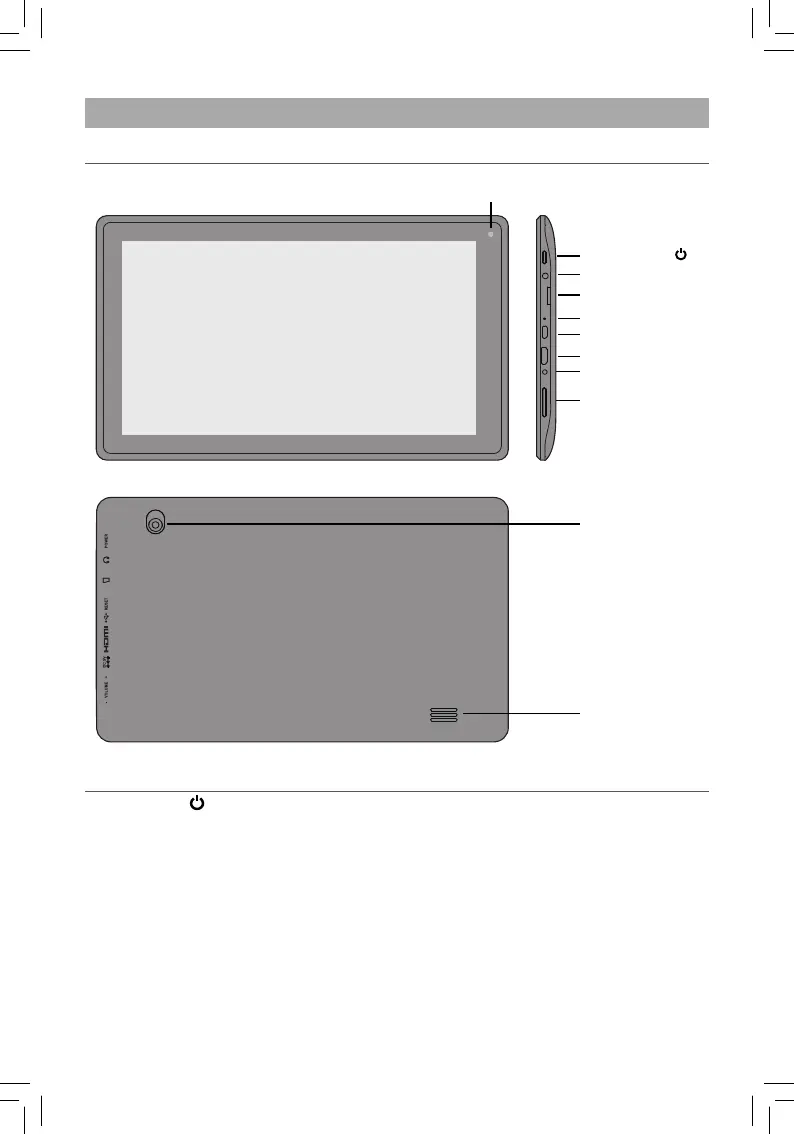
Item Description
Power Button Press to enter standby/wake up mode; Press and hold to switch On/
Off the unit.
Headphone Port Headphone connection for personal listening.
Micro SD Card Slot Accepts micro SD card (up to 32G).
Reset/Microphone Reset the tablet; For voice input.
Micro-USB Port Connect to a PC or USB storage device; Or use to charge the battery.
HDMI Jack Connect to a TV or a display device.
DC Jack Connect with 5V DC charger.
Vol+/- Button Press to increase/decrease the volume.
Front Camera
Rear Camera
Power Button
Headphone Port
Micro-USB Port
DC Jack
HDMI Jack
Vol+/- Button
Reset/Microphone
Micro SD Card Slot
Overview of Controls
Speaker













 To Next Page